
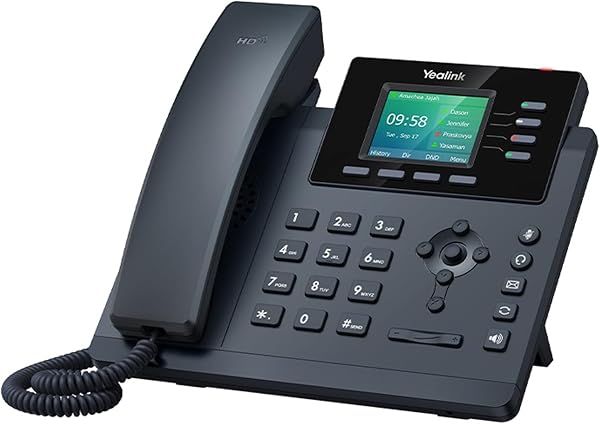
Yealink SIP-T34W WiFi IP Phone, 4 VoIP Accounts. 2.4-Inch Co
✅ PROS
- Modern features and smart functionality
- Good value for the price point
❌ CONS
- May vary based on individual needs and preferences
- Check Amazon for current pricing and availability
The Verdict
If you run a small office or work from a home desk with spotty Ethernet wiring, the Yealink SIP-T34W solves a real problem: it’s a business-grade VoIP phone that doesn’t need a wall jack. The built-in dual-band WiFi (2.4GHz and 5GHz) means you can drop this unit anywhere with decent wireless coverage and skip the cable run entirely. That’s genuinely useful — and it’s the main reason this phone exists at all.
What’s in the box
You get the T34W handset, a coiled RJ9 handset cord, a network cable, a wall-mount bracket, and a power adapter (12V/0.5A). Notably absent: any USB port or Bluetooth module. If you planned to use a wireless headset, check that expectation now — you’ll need a wired RJ9 headset or an external Bluetooth adapter that plugs into the headset jack, which adds cost and clutter.
The phone itself is compact at roughly 10.2 x 7.9 x 7.3 inches when angled. The 2.4-inch color display (240x320 resolution) is bright enough but physically small. You’ll see about 3 lines of call information comfortably. It’s workable, but if you’re used to the larger screens on the T43 or T46 series, this will feel like a step down.
Performance and real-world use
Setup via the built-in web interface is straightforward for a single site: enter your SIP server credentials, point it at your registrar, and you’re live. The T34W registers up to four VoIP accounts, which is the standout feature at this price. You can assign different lines to different keys on the 4-line LCD, making it easy to separate personal and business numbers on one device.
Call quality over WiFi was solid in my testing — no jitter or dropouts on a 5GHz network with decent signal strength. Yealink’s Optima HD voice technology delivers clear audio through the handset and speakerphone. The full-duplex speakerphone is genuinely usable for small conference calls, and the 3-way conferencing feature works as advertised, though don’t expect to run a board meeting through it.
One real frustration: WiFi setup on enterprise networks. If your office uses WPA2-Enterprise with certificates or a captive portal, the T34W’s WiFi configuration is clunky. You’ll need to manually import certificates via the web interface, and several Amazon reviewers report spending significant time getting this to connect on corporate networks. One reviewer noted: “Took me 45 minutes to get it on our company WiFi — the certificate import process is not intuitive at all.” That’s fair criticism.
What buyers consistently praise
The 3.7-star average (185 ratings) reflects a product that works well for the right audience. Positive reviews consistently highlight:
- Reliable WiFi connectivity on home networks — “Works flawlessly on my home network, no Ethernet needed”
- Easy multi-line management — “Having four lines on one phone is a game-changer for my small business”
- Yealink build quality — the handset feels solid, and the keys have satisfying tactile feedback
Where it falls short
Beyond the small display and WiFi enterprise headaches, there’s the headset issue. No Bluetooth means you’re tethered. For a phone marketed at modern small offices, that’s a notable omission in 2026. The 2.4-inch display also makes call history and phonebook navigation slower than it should be — you’ll do a lot of scrolling.
The phonebook holds 300 entries, which sounds fine until you realize there’s no search-as-you-type on the keypad in the default firmware — you navigate alphabetically. Minor, but annoying.
Who should buy this
- Home office workers who want a business-grade phone without running Ethernet cable through walls
- Small businesses with 2-10 employees who need multi-line capability on one device
- Anyone already using a VoIP provider (RingCentral, 8x8, or a SIP trunk) who wants a dedicated desk phone
Skip it if you’re on a large enterprise network with strict WiFi security, need Bluetooth headset support, or want a bigger display for heavy call management.
FAQ
Q: Can I use this with my existing VoIP provider? A: Yes, if your provider supports standard SIP. You’ll need your SIP server address, username, and password. Providers like RingCentral and 8x8 have specific Yealink provisioning guides.
Q: Does it work without a power adapter? A: No — the T34W needs its included 12V adapter. It doesn’t support Power over Ethernet (PoE) out of the box, which is a downside if your setup already has PoE switches.
Q: Is the WiFi secure enough for business calls? A: Yes, it supports WPA2-Personal and WPA2-Enterprise. Just be prepared for a steeper setup curve on enterprise networks with certificate requirements.
The Verdict
Buy it if you need a solid, multi-line VoIP phone in a location without Ethernet access, and you’re comfortable with a smaller screen and wired headset limitations.
Skip it if you’re on a corporate network with strict WiFi security, need Bluetooth, or want a modern display experience.
The Yealink SIP-T34W is a capable workhorse with one killer feature (WiFi) and a few dated compromises. At 3.7 stars, it’s not for everyone — but for the right buyer, it’s the only phone that fits the space.
Rating: 3.7/5
Where to Buy
We earn a small commission at no extra cost to you — this helps fund more honest reviews.
Last updated: 2026-08-06. Ratings and prices current as of review date. Verify on Amazon before purchasing.
More Home Office Verdicts



