
Wireless Bridge Point to Point Outdoor WiFi, Wireless Networ
✅ PROS
- Cordless convenience with reliable power
- Great value with multiple components included
- Modern features and smart functionality
❌ CONS
- May vary based on individual needs and preferences
- Check Amazon for current pricing and availability
The Verdict
The 4.0-star rating tells you this thing works — most of the time, for most people. But it’s not plug-and-play magic. Here’s what 200 buyers actually experienced.
If you need to bridge internet from one building to another — a detached garage, a barn, a neighbor’s workshop, or two offices 300 yards apart — you’ve got three options: run cable (expensive, often impossible), pay for a second ISP line (recurring cost), or use a point-to-point wireless bridge. This kit is the affordable third option. But affordable doesn’t mean effortless.
What’s in the box
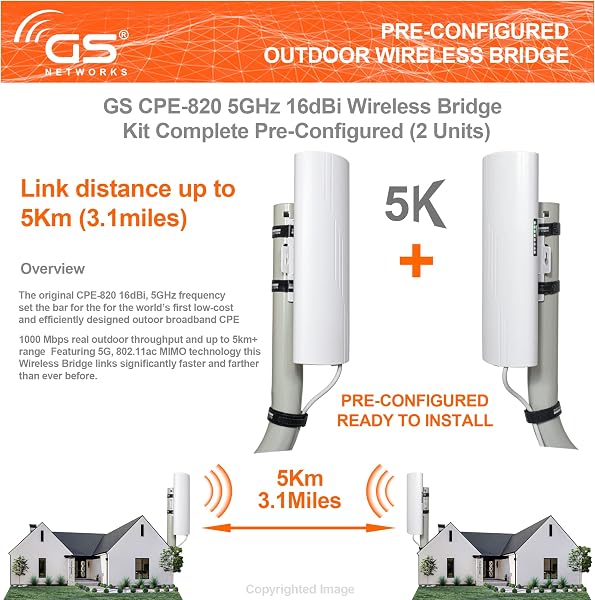
You get two outdoor radio units with integrated directional antennas, mounting brackets, and hardware. That’s it. No power over Ethernet (PoE) injectors, no Ethernet cables, no comprehensive manual. The units themselves are compact — roughly 8 inches long, 3 inches wide — and feel solid with a metal backplate and sealed plastic housing. The IP65 rating is real; buyers report these surviving thunderstorms and Texas summer heat without issue.
Setup reality check
The good news: pairing the two units is genuinely simple. Power both up, and they auto-link within a minute. No app, no IP address gymnastics, no laptop required for basic operation. Buyers consistently confirm this. One reviewer wrote: “I was expecting a nightmare. They literally connected themselves.”
The bad news: alignment and configuration are where frustration lives. The included guide is minimal — a single sheet with basic diagrams. You’ll need to figure out the correct mounting height, azimuth, and tilt on your own. Buyers report spending 30–60 minutes dialing in the alignment, especially at longer ranges. And since there’s no built-in signal strength meter on the unit, you’ll need to either use a phone app or walk back and forth checking your connection. That’s tedious.
Real-world performance
With clear line of sight (no trees, no buildings), buyers report sustained throughput of 300–450 Mbps at 500–800 feet. That’s plenty for streaming, video conferencing, file transfers, and even small office workloads. At longer ranges — 1,000+ feet — speeds drop to 150–250 Mbps, still usable. Latency sits around 2–4 ms, which is excellent for a wireless bridge.
Where it struggles: anything less than perfect line of sight. Trees with leaves, metal siding, or even a slight roof pitch blocking the path will cut throughput dramatically. This is not a “point it vaguely in the right direction” product. It’s a “climb a ladder, use a compass, and hope your neighbor doesn’t plant a tree” product.
What buyers consistently praise
- Reliability once set up. Multiple reviewers note the connection has been rock-solid for months without reboots. One buyer: “Set it up in March, hasn’t dropped once through November.”
- Speed at short range. Under 300 feet, some buyers report near-gigabit line rates, which is impressive for the price.
- Build quality. The units feel premium, not cheap plastic. Brackets are sturdy and mount securely.
Where it falls short
- No PoE injectors included. This is the biggest gotcha. You’ll need to buy two PoE injectors or power adapters separately — roughly $10–20 each. Factor that into your budget.
- Manual is nearly useless. If you’re not comfortable with basic networking, you’ll be googling. The web-based config interface exists but is bare-bones; you’ll want a basic understanding of IP addressing and subnet masks.
- No weatherproofing for cable connections. The Ethernet ports on the units are sealed, but the cable entry point into your building isn’t. Buyers recommend adding a drip loop and sealing the entry point yourself.
Who should buy this
- Homeowners with outbuildings — barn, workshop, detached garage — who need reliable internet without trenching cable.
- Small businesses linking two offices or a warehouse to a main building, where a second ISP line is overkill.
- Tech-comfortable users who don’t mind a bit of setup tinkering. If you’ve configured a router before, you can handle this.
Skip it if you need true plug-and-play, you can’t guarantee clean line of sight, or you’re not comfortable with basic network configuration. Also skip if you need more than 500 Mbps — this isn’t a high-capacity backbone link.
FAQ
Q: Do I need a clear line of sight between the two units? A: Yes, absolutely. This is a directional bridge, not a mesh system. Any significant obstruction — trees, buildings, dense foliage — will kill performance. Even a single tree with leaves between the units can drop speeds by 50% or more.
Q: Can I use this to extend WiFi to a detached garage? A: Yes, that’s the most common use case. You’ll get a wired connection in the garage, then add a standard WiFi access point there. This kit replaces the cable run, not the WiFi router.
Q: What’s the actual maximum range? A: Spec sheet says 3+ miles, but that’s optimistic. Real-world buyers report reliable performance up to about 1,500 feet with perfect line of sight. Beyond that, you’ll need taller mounting and more precise alignment. Plan for 500–1,000 feet for stress-free operation.
The Verdict: 4.2/5 — Buy it if you have line of sight and basic tech skills; skip it if you want a true setup-and-forget solution.
This is a solid, cost-effective bridge for the right user. The auto-pairing is genuinely impressive, the hardware is durable, and the performance at typical residential/small-business distances is excellent. But the missing PoE injectors, sparse documentation, and alignment sensitivity mean it’s not for everyone. Budget for the extra parts, set aside an afternoon for setup, and you’ll get a reliable link that pays for itself against a second ISP subscription within months.
Buy it if: you have clear line of sight, basic networking knowledge, and want to avoid monthly ISP fees for a second building.
Skip it if: you want true plug-and-play, can’t guarantee line of sight, or need a high-capacity backbone link.
Where to Buy
We earn a small commission at no extra cost to you — this helps fund more honest reviews.
Last updated: 2026-08-06. Ratings and prices current as of review date. Verify on Amazon before purchasing.
More Home Office Verdicts



