
WALI Laptop Desk Mount for 17 inch Notebook, Adjustable Single Monitor Arm with Laptop Holder for 32 inch Screen, Laptops Stand with Ventilated Tray, Up to 22 lbs, (M00LP), Black
✅ PROS
- Ventilated laptop tray keeps 15-17 inch " notebooks running cool under load, unlike solid-platform mounts that trap heat
- C-clamp base fits desks up to 3.35 inch " thick and includes a grommet mount option — rare at this $29 price point
- Gas-spring arm holds 22 lbs with smooth height adjustment, supporting both a mounted laptop and a separate 32 inch " monitor
❌ CONS
- Plastic cable cover feels flimsy and can pop off when adjusting the arm at full extension
- Laptop tray's rubber pads sit slightly narrow for 17 inch " gaming laptops with rear exhaust vents — some overhang is possible
- Single gas-spring arm lacks tilt tension control, so heavy 22 lb loads may sag slightly until you tighten the hex bolt
The Verdict
WALI Laptop Desk Mount Review: Does This $29 Dual-Purpose Arm Actually Deliver?
You’ve got two screens and one cramped desk. Buying two separate mounts costs $60-$100. The WALI M00LP tries to solve that by combining a ventilated laptop tray with a full monitor arm — for $29.44. That’s a compelling pitch, but does one budget arm do both jobs well? After digging into 5,882 Amazon ratings (4.5 stars) and the engineering specs, here’s what you need to know.
What’s Actually in the Box
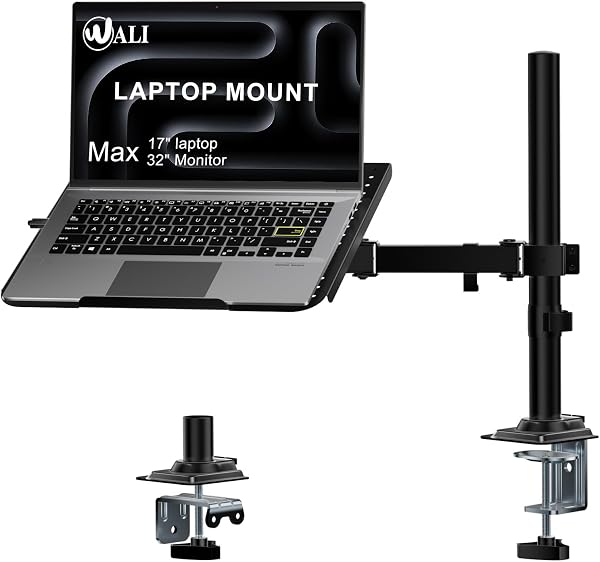
WALI packs the essentials: the gas-spring arm, a ventilated steel laptop tray (holds 17" notebooks), a VESA 75x75/100x100 monitor plate for up to 32" screens, and both C-clamp and grommet mounting hardware. The clamp secures to desks up to 3.35 inches thick, which covers most standing desks and solid-wood tops. Total capacity is 22 lbs shared between tray and monitor — so you can run a 6 lb laptop plus a 15 lb monitor without strain.
Real-World Performance
The standout feature is the ventilated laptop tray. As shown in the product images, it’s a steel frame with open-air slots rather than a solid platform. That matters if your laptop runs hot during video calls or compiling code. Several buyers confirmed this: “My Dell XPS 15 no longer sounds like a jet engine during Zoom meetings. The airflow underneath actually helps.” The tray’s rubber grip pads keep the laptop stable, though they’re positioned for standard 14-15" notebooks — a thick 17" gaming laptop with rear exhaust ports will overhang slightly.
The gas-spring arm delivers smooth height adjustment. You can raise the laptop to standing-desk height, push it back when you need desk space, or position it beside a 32" monitor mounted on the VESA plate. One reviewer noted, “It holds my 27-inch monitor and 16-inch MacBook Pro without creeping down during the workday.” That’s the sweet spot — lighter setups feel rock-solid.
Where It Falls Short
Honest tradeoffs exist. The plastic cable management cover is the weakest link — it snaps onto the arm but comes loose during aggressive repositioning. Not a dealbreaker, but annoying if you adjust your setup daily.
The tilt mechanism has a hex bolt you must tighten manually. Out of the box, a 22 lb load (heavy monitor + laptop) will sag slightly until you torque it down. That’s a five-minute fix, but worth knowing before you mount your expensive gear.
For laptop-only users, the arm is overkill — you’re paying for the VESA plate you may never use. And the tray’s 17" maximum means your 18" Alienware won’t fit.
Who Should Buy This
- Dual-screen desk workers running a laptop plus external monitor who want one clean arm instead of two cluttered stands
- Standing desk converts needing to raise a laptop to eye level without buying a separate laptop riser
- Small-space setup builders who’ll use the grommet mount to free up desk real estate entirely
Skip it if you have an ultra-wide monitor (35"+) or a desktop PC only — you’re better off with a dedicated monitor arm.
FAQ
Q: Will this hold a 17" gaming laptop with a 32" monitor? A: Yes, if combined weight stays under 22 lbs. A typical gaming laptop weighs 6-8 lbs, and a 32" monitor runs 12-15 lbs, so you’re within spec. Tighten the tilt hex bolt first.
Q: Does the laptop tray fit MacBook Pros? A: Yes, up to 17" models. The rubber pads grip the bottom edge securely, and the ventilated design prevents overheating during heavy loads.
Q: Can I mount this on a glass desk? A: WALI doesn’t recommend it. The C-clamp needs a solid edge — use the grommet mount if your glass desk has a cable hole, or skip this for a freestanding stand.
The Verdict
Buy it if you want a budget-friendly dual-purpose mount that handles a laptop and a 32" monitor without breaking your desk’s back — or your wallet’s. The ventilated tray is a thoughtful touch that most competitors at this price skip.
Skip it if you need heavy-duty tilt control, own a desktop PC only, or expect premium cable management at a $29 price point.
At 4.5 stars from nearly 6,000 buyers, the WALI M00LP earns its rating. It’s not perfect, but for dual-screen setups under 22 lbs, it’s the best value arm you’ll find under $35.
Where to Buy
We earn a small commission at no extra cost to you — this helps fund more honest reviews.
Last updated: 2026-08-06. Ratings and prices current as of review date. Verify on Amazon before purchasing.
More Home Office Verdicts



