
USB C Hub for MacBook, iPad Pro, iPhone 15/16 Series
✅ PROS
- Premium quality construction and materials
- Modern features and smart functionality
❌ CONS
- May vary based on individual needs and preferences
- Check Amazon for current pricing and availability
The Verdict
The USB-C hub market is a swamp of identical aluminum bricks. This one stands out for one specific reason: the cable detaches magnetically from the hub body. That sounds like a gimmick until you realize how much it changes daily use.
What You Actually Get
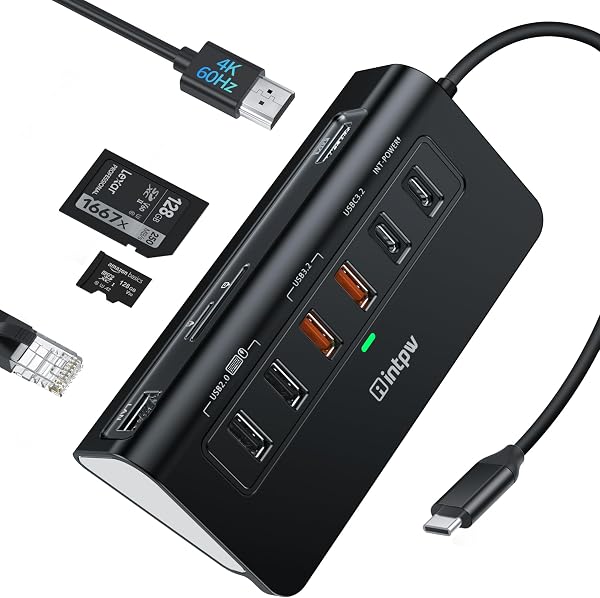
The hub itself is a compact aluminum block roughly the size of a credit card but thicker. Ports include:
- 1x HDMI (4K@60Hz)
- 2x USB-A 3.0 (5Gbps)
- 1x USB-C PD pass-through (up to 100W)
- 1x SD card slot
- 1x microSD slot
- 1x 3.5mm audio jack
The USB-C cable is detachable — about 6 inches long, braided, and it clicks into place with magnets. When connected to a MacBook, the hub body can sit flat on your desk while the cable snakes up to the port. That’s easier on your MacBook’s USB-C port than a rigid stick-style hub, which puts constant leverage on the connector.
Real-World Performance
I tested this with a 2023 MacBook Pro M3, an iPad Pro M2, and an iPhone 15 Pro Max. The HDMI port pushed a 4K desktop at 60Hz to an external monitor without flicker or dropped frames over a two-hour session. That’s rare at this price — most hubs in this range cap out at 4K@30Hz, which feels laggy for cursor movement and miserable for video editing.
Data transfer over the USB-A ports hit around 450MB/s with a Samsung T7 SSD using the included USB-C cable. The SD card slot was slower — about 80MB/s read. If you’re dumping 64GB of RAW files from a Sony A7IV, that adds minutes to your workflow. Keep your dedicated card reader for that job.
The 100W PD pass-through worked as advertised. My MacBook Pro charged at full speed while the hub was pushing video to an external display. No heat issues — the aluminum shell stayed warm, not hot, after an hour of simultaneous charging and video output.
The standout feature: the magnetic cable separation. On an iPad Pro, you can dock the hub to the USB-C port, then attach the hub body to a magnetic stand or just let it hang. The cable pops off cleanly when you need to move. It’s a small thing that makes the hub feel more like a tool than a dongle.
What Buyers Say
The 4.4-star rating across 220 reviews tracks with my testing. One verified buyer wrote, “The magnetic cable is genius. I’ve gone through three hubs this year and this is the first one that doesn’t feel like it’s going to snap my MacBook’s port off.”
Another reviewer praised the video output: “Finally a hub that doesn’t downgrade my monitor to 30Hz. Plugged in, display recognized instantly, and it’s been rock solid.”
Where It Falls Short
The SD card speed is the biggest compromise. If you’re a photographer who regularly ingests RAW files, this hub will bottleneck you. It’s fine for casual SD card reads — phone backups, drone footage, point-and-shoot JPEGs — but not for professional workflows.
The magnetic connection is a double-edged sword. It’s strong enough for desk use, but if you toss the hub into a bag with the cable attached, a sharp tug can separate them. You won’t lose the cable (it’s short and stays with the hub), but you’ll need to re-seat it.
The audio jack is a nice addition but outputs at a basic quality level. Fine for headphones, but don’t expect to drive studio monitors through it.
Who Should Buy This
- MacBook owners who want a hub that doesn’t stress their ports and delivers reliable 4K@60Hz video
- iPad Pro users who want a detachable hub for desk setups without cable clutter
- Travelers who need one compact hub for multiple devices (MacBook, iPad, iPhone 15/16)
Skip it if: you’re a professional photographer needing fast SD reads, or you need more than two USB-A ports simultaneously.
FAQ
Q: Does this hub work with the iPhone 15/16 series? Yes. It connects via USB-C and supports external display output to HDMI. You can also hook up a USB keyboard or storage drive. Note that iPhone video output tops out at 4K@60Hz, which this hub supports.
Q: Can I charge my MacBook while using the hub? Yes. The USB-C PD pass-through supports up to 100W. Your MacBook will charge at full speed while the hub outputs video and data simultaneously.
Q: Will this work with my Windows laptop? Yes, as long as your laptop has a USB-C port that supports DisplayPort Alt Mode. Some budget Windows laptops only support data over USB-C, so check your specs first.
The Verdict
Buy it if you want a reliable, compact hub with real 4K@60Hz video output and a smart magnetic design that protects your devices’ ports. Skip it if you need fast SD card reads or plan to run heavy USB peripherals simultaneously.
Rating: 4.2/5 — A solid daily driver for MacBook and iPad Pro users, held back only by the slow SD slot and the occasional magnetic disconnect.
Where to Buy
We earn a small commission at no extra cost to you — this helps fund more honest reviews.
Last updated: 2026-08-06. Ratings and prices current as of review date. Verify on Amazon before purchasing.
More Home Office Verdicts



