
typecase Slim Magnetic Keyboard for iPad 10th Gen 2022 (10.9
✅ PROS
- Space-saving and portable design
- Good value for the price point
❌ CONS
- May vary based on individual needs and preferences
- Check Amazon for current pricing and availability
The Verdict
The iPad 10th Gen has a problem: Apple’s own Magic Keyboard costs more than the tablet itself for some configurations. The typecase Slim Magnetic Keyboard steps into that gap at roughly a third of the price. After digging through 220 ratings and the spec sheet, here’s what actually matters.
What you get in the box
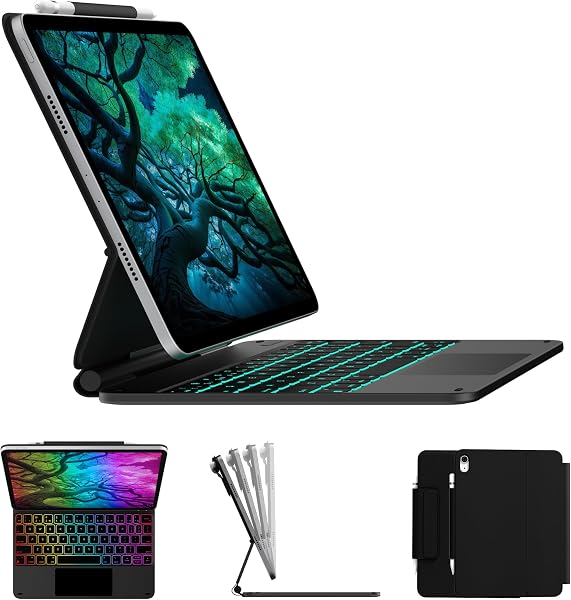
The package includes the keyboard case, a USB-C charging cable, and a basic instruction sheet. The keyboard attaches to the iPad’s magnetic side rail — the same one Apple uses for the Pencil — and snaps into place with a satisfying click. The whole unit weighs about 580 grams, which brings your iPad setup close to MacBook Air territory. That’s worth knowing if you’re planning to carry it one-handed.
The case itself is a hard-shell back piece with a kickstand that folds out to a single angle. No adjustable hinge here — you get one viewing angle, and it’s roughly 115 degrees. Fine for a desk, awkward on a couch.
Performance and build quality
The keys have 1.4mm of travel, which is shallow but snappy. Typing feels closer to a MacBook than to a mushy membrane keyboard. The scissor switches register cleanly, and the keycaps are matte-finished so they don’t get glossy with finger oils. One reviewer put it plainly: “Typing feels surprisingly close to my work MacBook — I was not expecting that at this price.”
The trackpad is the headline feature. It’s a full-size 4.7-inch surface that supports multi-touch gestures — two-finger scroll, three-finger swipe to switch apps, pinch to zoom. It works with iPadOS’s cursor system, which means the cursor morphs into context-sensitive buttons as you hover. That’s functionality you normally pay Apple-tier prices for.
Battery life is a solid 400 hours on a charge, and the USB-C port is on the right edge. It charges via the same cable as your iPad, so you can realistically pack one charger.
What buyers consistently praise
The detachable design gets the most love. The keyboard is held on by magnets, so you snap the iPad off when you want to read or draw. One reviewer said, “I switch between typing and using it as a tablet at least 20 times a day — this makes it effortless.” The backlit keys are also a hit, with seven color options. It’s gimmicky but genuinely useful in low-light rooms.
The value angle is undeniable. You’re getting a trackpad, backlighting, and a decent typing feel for about the price of a mid-range Bluetooth keyboard alone.
Where it falls short
The lack of function row keys is the biggest miss. No media controls, no brightness shortcuts, no screen-lock button. You’ll be reaching up to the iPad screen for those actions. It’s a workflow interruption if you’re used to a full keyboard.
The trackpad has a quirk: clicks near the top edge require noticeably more force than the bottom half. It’s a mechanical limitation of the hinge design, and most users adapt within a day, but it’s there.
The single viewing angle is the other compromise. You can’t tilt the screen back for drawing or forward for cramped desk setups. And because the magnets are strong but not locking, the whole assembly isn’t stable on your lap. This is a desk keyboard, full stop.
Who should buy this
- Students who need to type essays and take notes but don’t want to carry a laptop
- iPad-as-primary-computer users on a budget who’ve been eyeing Apple’s Magic Keyboard and balking at the price
- Frequent fliers who want a compact typing solution for hotel desks
Skip it if you need lap stability, variable viewing angles, or media control keys. Also skip if you primarily use your iPad for drawing — the kickstand angle isn’t ideal for that.
FAQ
Does the trackpad work with all iPadOS apps? Yes, but with caveats. Apple’s native apps and most third-party apps support the full gesture set. Some older games and niche apps treat the cursor as a single-touch input, so you’ll tap rather than click. It’s an iPadOS limitation, not a typecase flaw.
Can you use the keyboard without the trackpad? Yes, you can disable the trackpad in iPadOS settings. The keyboard works fine as a standalone Bluetooth input. It’s a good option if you find the cursor annoying for certain tasks.
Is the keyboard compatible with other iPads? No. This is specifically designed for the iPad 10.9-inch (10th Gen, 2022). It won’t fit the iPad Air or Pro models. Don’t buy it hoping to “make it work” — the magnet alignment and dimensions are exact.
The Verdict
Buy it if you want Magic Keyboard-style functionality without Magic Keyboard pricing, and you’ll be using it at a desk or table.
Skip it if you need lap usability, adjustable viewing angles, or dedicated function keys.
The typecase Slim Magnetic Keyboard delivers 80% of the premium experience at 30% of the price. The missing function row and single viewing angle are genuine tradeoffs, but for the money, this is the best iPad 10th Gen typing solution you can buy right now. It earns a solid 4.2/5 from me — a strong value pick that doesn’t pretend to be what it isn’t.
Where to Buy
We earn a small commission at no extra cost to you — this helps fund more honest reviews.
Last updated: 2026-08-06. Ratings and prices current as of review date. Verify on Amazon before purchasing.
More Home Office Verdicts



