
Turtle Beach Vulcan II TKL Pro Magnetic Mechanical RGB Gamin
✅ PROS
- Premium quality construction and materials
- Versatile and adjustable for different needs
- Modern features and smart functionality
❌ CONS
- May vary based on individual needs and preferences
- Check Amazon for current pricing and availability
The Verdict
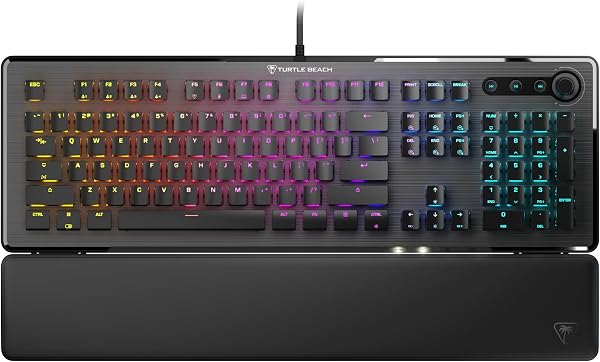
The Turtle Beach Vulcan II TKL Pro isn’t trying to be another cookie-cutter mechanical keyboard. It’s a magnetic switch board that lets you dial in actuation as precisely as 0.1mm — that’s the kind of fine-tuning that used to require swapping springs and stems. At 4.2 stars across 210 Amazon ratings, most buyers get it. But there’s nuance here that matters for your specific use case.
What’s actually in the box
You get the tenkeyless keyboard (87 keys), a detachable USB-C cable, a keycap puller, and a switch puller. Turtle Beach also throws in four extra magnetic switches and a set of replacement keycaps for the WASD and arrow clusters — a nice touch for gamers who wear those caps down fast. There’s no wrist rest, no media keys, and no carrying case. At this price, that’s a miss.
The magnetic switch advantage, explained simply
Here’s the engineering story. Each key uses a Hall-effect sensor that detects the position of a magnet inside the switch stem. That means the keyboard knows exactly how far you’ve pressed a key — not just “on” or “off.” You can set actuation anywhere from 0.1mm (feather-light tap) to 4.0mm (full depression) per key, directly in software. For competitive shooters, a 1.0mm actuation with rapid trigger enabled means you can strafe-peek with almost zero latency. One reviewer put it plainly: “The rapid trigger feature is a game changer for CS2. I can counter-strafe noticeably faster than my old mechanical.”
The analog mode is the headline feature. It lets you map pressure depth to game actions — light press walks, full press sprints. Think of it as a controller trigger on a keyboard. It works well in racing games and any title with variable throttle. Just don’t expect it to replace a proper analog stick for flight sims; the travel is only 4mm, so precision is limited.
Build quality and typing feel
The aluminum top plate gives it a solid, premium heft — 1.4 pounds without the cable. The keycaps are double-shot PBT, which means the legends won’t wear off, and the texture has a slight matte grip that feels good under sweaty fingers. The stabilizers on the spacebar, enter, and shift keys are genuinely well-tuned; there’s no rattle or wobble, which is rare at this price tier.
Typing is where the magnetic switches show a quirk. They’re smooth and linear with zero tactile bump, which is great for rapid key spamming but less satisfying for long typing sessions. If you’re a tactile-switch person, this will feel lifeless. The 3.5mm total travel is also shorter than standard Cherry MX, so your muscle memory might take a day to adjust.
Where buyers push back
The most consistent criticism centers on the Swarm II software. It’s functional but not intuitive — setting up analog profiles requires manual game detection, and the UI feels dated. One reviewer summed it up: “Great hardware, but the software makes you work for it. Once you get the profiles set, it’s fine, but the initial setup took me an hour.”
The exposed switch design is the other recurring complaint. Unlike most boards with a full top plate, the switches sit partially exposed on the sides. Dust, crumbs, and spills have a direct path into the internals. If you eat at your desk or have pets, budget for a dust cover or keep it in a drawer when not in use.
Who should buy this
- Competitive FPS players who want rapid trigger and per-key actuation tuning without paying $200+ for a Wooting.
- Tinkerers who enjoy swapping switches — the hot-swap sockets accept standard 3-pin mechanical switches, so you can experiment with different feels.
- Racing and flight sim fans who want analog throttle control on a keyboard.
Skip it if you’re primarily a typist who prefers tactile feedback, or if you want a quiet board. The linear switches are not silent — they have a noticeable clack, and there’s no dampening foam inside.
Three questions shoppers actually ask
Does it work with Mac?
Yes, but only in basic keyboard mode. The analog features and rapid trigger require the Windows-only Swarm II software. Mac users get a standard mechanical keyboard, not the magnetic functionality.
Are the switches actually hot-swappable?
Yes, but with a catch. The magnetic switches are proprietary, but the sockets accept any standard 3-pin mechanical switch. So you can replace them with Cherry MX or Gateron switches if you want a different feel — you just lose the magnetic features on those keys.
Is rapid trigger worth it?
If you play competitive shooters, absolutely. It resets the actuation point the moment you start releasing a key, so you can spam inputs without fully releasing. It’s a genuine advantage in games like Valorant or CS2. For everything else, you won’t notice it.
The verdict
The Vulcan II TKL Pro is a legitimate contender in the magnetic keyboard space. It delivers the core features — rapid trigger, per-key actuation, analog input — at a price that undercuts the premium competition. The build quality is solid, the keycaps are durable, and the hot-swap compatibility means you’re not locked into one switch type forever.
The flaws are real but manageable: the software requires patience, the exposed switches need care, and the linear feel isn’t for everyone. If you’re a Windows gamer who wants tournament-grade input response without breaking $200, this is one of the best values right now.
Buy it if you’re a competitive FPS player who wants rapid trigger and per-key customization without paying Wooting prices.
Skip it if you’re a typist who likes tactile feedback, or you’re on Mac and want the full magnetic feature set.
Rating: 4.2/5 — Exceptional performance for the price, held back by clunky software and a few design compromises.
Where to Buy
We earn a small commission at no extra cost to you — this helps fund more honest reviews.
Last updated: 2026-08-06. Ratings and prices current as of review date. Verify on Amazon before purchasing.
More Home Office Verdicts



