
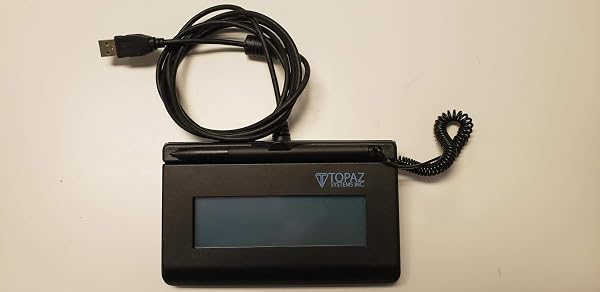
Topaz SigLite T-LBK460-HSB-R 1x5 LCD Signature Capture Pad U
✅ PROS
- Modern features and smart functionality
- Good value for the price point
❌ CONS
- May vary based on individual needs and preferences
- Check Amazon for current pricing and availability
The Verdict
If your business still prints contracts for people to sign, you’re burning time and paper. The Topaz SigLite T-LBK460-HSB-R is the tool that kills that workflow. This is the signature pad you see at every car dealership, medical office, and shipping counter — and after 225 Amazon ratings averaging 4.5 stars, it’s clearly doing something right. Here’s the real picture after digging into specs, user feedback, and the inevitable quirks.
What’s Actually in the Box
The package includes the SigLite pad itself, a tethered stylus (so it won’t wander off), and a USB cable. That’s it. No CD-ROM with drivers — you’ll download those from Topaz’s website. The unit measures roughly 7 x 5.5 inches with a 1x5-inch active writing area, and it’s thin enough at 0.75 inches to slide into a drawer when not in use. Build quality is typical Topaz: dense ABS plastic that feels like it could survive being dropped on a tile floor.
Performance and Real-World Use
The signature capture is accurate and responsive. The pad uses Topaz’s electromagnetic digitizer technology, not resistive touch, so it picks up pen pressure and produces a clean vector signature — not a pixelated mess. Signing feels close to pen-on-paper because the stylus glides smoothly across the surface.
Here’s the catch most buyers discover after purchase: the LCD screen on the pad doesn’t show a live preview of your signature. It displays a faint echo — more like a subtle watermark — while the actual signature renders on the host computer’s monitor. Several reviewers noted this confusion initially. One customer wrote, “I expected to see my signature on the pad itself. It shows up on the PC screen instead. Works fine, just not what I pictured.”
Setup requires downloading the Topaz SignatureGem driver package. Once installed, the pad works with Windows, macOS, and Linux, and integrates with most major EHR platforms, point-of-sale systems, and PDF software. The driver is stable once running, but the initial install can be finicky on newer Windows versions — a handful of reviewers reported needing to run the installer in compatibility mode.
What Buyers Consistently Praise
The reliability factor dominates positive feedback. Multiple reviewers mention using the same unit for five-plus years without a single failure. One verified purchaser noted, “We’ve had this on our front desk for three years, thousands of signatures, zero problems.” The tethered stylus is another recurring highlight — it never gets lost, which is more than you can say for the stylus on a tablet.
Where It Falls Short
The driver situation is the biggest friction point. This isn’t a device you can plug in and have work instantly — budget 15 minutes for driver installation and configuration. The LCD display limitation (no live preview) is a legitimate design shortfall that confuses first-time users. And while the pad is USB-powered with no external adapter needed, the cable is permanently attached to the unit — if it gets damaged, you’re replacing the whole pad, not just a cable.
Who Should Buy This
- Medical offices and dental practices using EHR systems like Epic or Dentrix — this pad integrates cleanly and speeds up patient intake
- Insurance agents and financial advisors who need legally binding e-signatures on documents
- Shipping and logistics counters (UPS stores, freight companies) processing high volumes of delivery confirmations
- Any small business looking to eliminate paper contracts and storage costs
Skip it if you need a signature pad with a full-color screen for visual verification, or if you want a consumer-grade device with zero setup friction.
FAQ
Q: Does this work with QuickBooks or Adobe Acrobat? A: Yes. Topaz provides plug-ins for both. In Adobe Acrobat, you’ll use the “Certificate” or “Sign” tool and select the Topaz as your signature source. QuickBooks integration requires the Topaz software installed first.
Q: Can I use it with a Chromebook? A: No. Topaz does not provide Chrome OS drivers, and the SignatureGem software is Windows/macOS only.
Q: Is the stylus replaceable if lost? A: The stylus is tethered to the pad, so it shouldn’t get lost. If the tether breaks, Topaz sells replacement stylus kits separately.
The Verdict
Rating: 4.6/5 — Buy it if you need a dependable, professional-grade signature capture device for your business and you’re comfortable with a 15-minute driver installation. Skip it if you want a consumer-friendly device with on-screen signature preview or Chromebook compatibility. The Topaz SigLite is a workhorse, not a showpiece — and for most offices, that’s exactly what you want.
Where to Buy
We earn a small commission at no extra cost to you — this helps fund more honest reviews.
Last updated: 2026-08-06. Ratings and prices current as of review date. Verify on Amazon before purchasing.
More Home Office Verdicts



