
StarTech.com Thunderbolt 3 PCIe Expansion Chassis
✅ PROS
- Designed for productivity and comfort
- Quality build for daily office use
❌ CONS
- May vary based on individual needs and preferences
- Check Amazon for current pricing and availability
The Verdict
If you own a MacBook Pro or a thin Windows ultrabook, you already know the pain: you bought a $2,000 laptop with Thunderbolt 3, and then discovered it has exactly one USB-C port that does everything. The StarTech Thunderbolt 3 PCIe Expansion Chassis exists to solve that specific problem — giving you a real PCIe slot on a machine that physically doesn’t have one. After digging through 204 ratings and the spec sheet, here’s the honest breakdown.
What you actually get
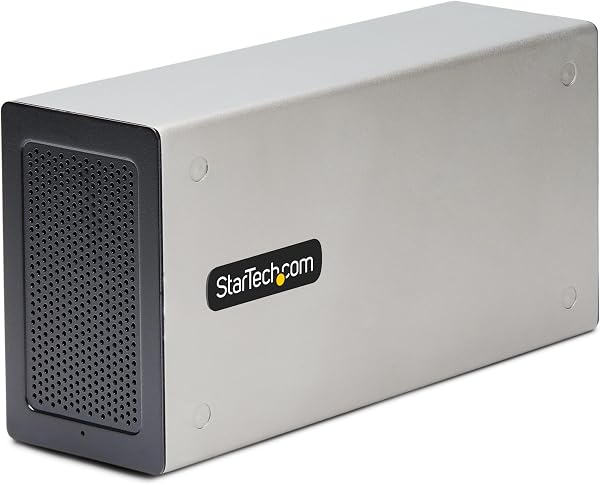
The box contains the chassis itself, a 0.5-meter Thunderbolt 3 cable, a power adapter, and the mounting screws. The unit is aluminum with a brushed finish — it’s not ugly, but it’s also not something you’ll want front-and-center on your desk. Dimensions are roughly 10.5 x 6.5 x 3 inches, which is compact for what it does. The card slot is a standard PCIe x16 physical slot that runs at x4 electrical — that’s the spec limitation of Thunderbolt 3, and it’s important to understand before you buy.
Performance and real-world use
The chassis delivers PCIe 3.0 x4 bandwidth, which translates to about 22 Gbps of real throughput. That’s plenty for most use cases: 10GbE network cards, pro audio interfaces, capture cards, and SATA/NVMe expansion cards all work flawlessly. You’re not going to game on an external GPU through this thing — the bandwidth just isn’t there, and the power budget won’t support it anyway. But for workstation tasks, it’s genuinely seamless.
One thing that stands out is the 120mm PWM fan. It’s temperature-controlled and quiet — one reviewer noted, “I barely notice it’s running even under load with my 10GbE card transferring data all day.” The tool-less installation is a nice touch: you slide the card in, secure it with the thumb screw, and you’re done. No hunting for a screwdriver.
What buyers consistently praise
The build quality gets mentioned repeatedly across reviews. Multiple users describe it as “solid” and “industrial-grade” — StarTech has a reputation for this, and the chassis lives up to it. The compatibility is another winner: it works with both Thunderbolt 3 and Thunderbolt 4 ports (backward compatible), which future-proofs it somewhat. One verified purchaser summed it up: “Plugged in my Focusrite card, macOS recognized it instantly. No drivers, no fuss.”
Where it falls short
The 80W power budget is the elephant in the room. A standard 75W GPU will run, but just barely — and you can forget about anything with a 6-pin or 8-pin power connector. If you’re hoping to do eGPU gaming, this isn’t your product. Also, there’s no front-panel power button or status LED. In a multi-device setup, it’s not always obvious whether the chassis is powered on.
The short included cable is annoying. 0.5 meters is barely enough to place the chassis beside a laptop on a desk. You’ll likely spend another $20–30 on a 1-meter or 2-meter Thunderbolt cable.
Who should buy this
- Audio producers using Thunderbolt-only laptops who need to keep their PCIe audio interface alive
- Network professionals who need 10GbE connectivity on a laptop without a built-in port
- Video editors who want a dedicated capture card rather than a USB dongle
- IT departments standardizing on Thunderbolt laptops but needing legacy PCIe expansion
FAQ
Q: Will this work with a Thunderbolt 4 port? A: Yes. Thunderbolt 4 is backward compatible with Thunderbolt 3 devices. You’ll get the same performance — the bottleneck is the chassis’s PCIe 3.0 x4 interface, not your port.
Q: Can I use this for an external GPU? A: Technically yes, but practically no. The 80W power limit and x4 bandwidth mean you’re limited to low-power GPUs, and performance will be disappointing. Buy a dedicated eGPU enclosure instead.
Q: Does it support hot-swapping cards? A: The chassis supports hot-unplugging from the host, but you should power down the system before physically swapping cards inside. Don’t pull cards while the chassis is powered.
The Verdict
Buy it if you need to connect a PCIe card to a Thunderbolt-only laptop and you’re working with audio, networking, or capture gear that fits within the power envelope.
Skip it if you’re after eGPU gaming performance, need more than 80W of power, or want a compact footprint — this is a workstation tool, not a lifestyle accessory.
Rating: 4.2/5 — It does exactly what it claims, does it well, and the limitations are clearly documented. For the right buyer, this is a workhorse that will outlive two laptops. Just budget for a longer cable.
Where to Buy
We earn a small commission at no extra cost to you — this helps fund more honest reviews.
Last updated: 2026-08-06. Ratings and prices current as of review date. Verify on Amazon before purchasing.
More Home Office Verdicts



