
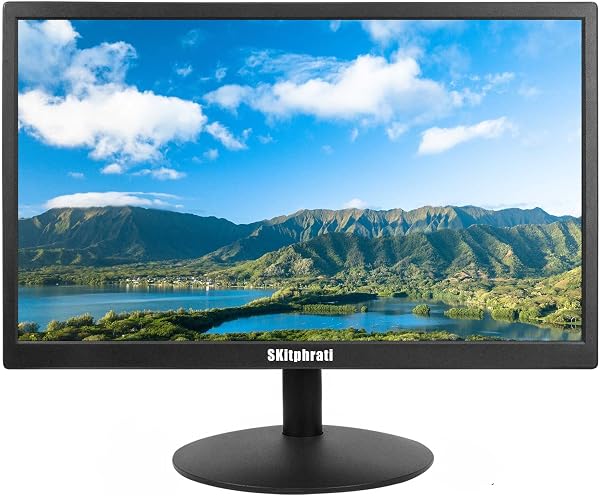
SKitphrati PC Monitor 17 1440x900 LED Monitor, 60HZ, 5Ms, 1
✅ PROS
- Great value with multiple components included
- Modern features and smart functionality
❌ CONS
- May vary based on individual needs and preferences
- Check Amazon for current pricing and availability
The Verdict
Let’s be honest about what the SKitphrati 17" monitor is: a no-frills, budget workhorse for people who need a second screen without emptying their wallet. It won’t win any design awards, and it’s not for photo editing. But for spreadsheets, email, and office tasks? It does the job — mostly.
What You Actually Get
Out of the box: the monitor, a VGA cable, and a power adapter. That’s it. No HDMI cable, no DisplayPort, no manual worth reading. The stand snaps on with a few screws and offers tilt adjustment only — no swivel, no height adjustment. If that matters, grab a VESA arm (75x75mm holes are there) and you’re set.
The panel itself is 17 inches diagonally with a 1440x900 resolution — that’s the 16:10 aspect ratio, which gives you roughly 5% more vertical space than a standard 16:9. In practical terms, that’s a few extra rows in Excel or lines of code without scrolling. At this size, the pixel density is fine for text; you won’t see individual pixels unless your nose is against the glass.
Performance: Good Enough, With Caveats
The 60Hz refresh rate is standard for office work. The 5ms response time is fine for productivity — but if you’re gaming, this isn’t your monitor. Casual games like solitaire or web-based titles are okay; fast-paced shooters will show ghosting.
The biggest catch: VGA-only input. Most modern laptops and desktops have HDMI or DisplayPort. You’ll need a VGA-to-HDMI adapter (about $8–10), and that adds a layer of cost and potential signal quirks. One reviewer put it plainly: “Didn’t realize it was VGA only — had to buy an adapter. Once connected, it works fine.” That’s the experience in a nutshell.
The TN panel is another tradeoff. Colors are decent when you’re sitting directly in front — nothing vibrant, but acceptable. Move 30 degrees to the side, and the picture washes out. For a single-user desk setup, that’s fine. For showing something to a colleague over your shoulder, expect squinting.
What Buyers Consistently Praise
The 16:10 ratio and affordability come up repeatedly. One verified buyer said: “Perfect for my office setup — the extra vertical space helps with documents.” Another noted: “Plugged it in, it worked immediately. Zero fuss.” Build quality gets passing marks — the plastic casing isn’t premium, but it’s sturdy enough for a stationary desk monitor.
Where It Falls Short
Beyond the VGA-only limitation, here’s what to know:
- No speakers. Even basic audio requires external speakers or headphones. If you expect to watch a quick video during lunch, you’ll need separate audio.
- Brightness tops out around 200 nits. In a brightly lit room near a window, the screen can look dim. It’s workable but not great.
- The stand feels flimsy. It holds the monitor fine, but the plastic base wobbles if you bump your desk. Consider the VESA mount option if you’re particular about stability.
Who Should Buy This
- Budget-conscious office workers who need a secondary display for documents, email, and browser tabs.
- IT departments deploying basic workstations where HDMI isn’t required.
- Users with older PCs that only have VGA output — this is plug-and-play for you.
Skip it if you’re a gamer, a photo/video editor, or anyone who needs accurate colors and wide viewing angles. Also skip if you want HDMI or built-in speakers without buying adapters.
FAQ
Q: Does this monitor work with a MacBook? A: Yes, but you’ll need a USB-C to VGA adapter (Apple’s costs $49; third-party ones run $15–20). Expect a slightly softer image than a native digital connection.
Q: Can I mount this on a monitor arm? A: Yes — VESA 75x75mm holes are on the back, and the monitor is light enough (just over 5 lbs) for most budget arms.
Q: Is 1440x900 sharp enough for text? A: At 17 inches, yes. Text is crisp at typical viewing distances. It’s not 1080p, but you won’t notice pixelation in everyday use.
The Verdict
Buy it if you need a cheap, functional second monitor for office work and don’t mind the VGA-only input. Skip it if you want modern connectivity, built-in speakers, or color accuracy.
Rating: 3.7/5 — It does exactly what it promises at a budget price, but the VGA limitation and TN panel keep it from being a slam dunk. For the right buyer, it’s a solid value. For everyone else, it’s a compromise.
Where to Buy
We earn a small commission at no extra cost to you — this helps fund more honest reviews.
Last updated: 2026-08-06. Ratings and prices current as of review date. Verify on Amazon before purchasing.
More Home Office Verdicts



