
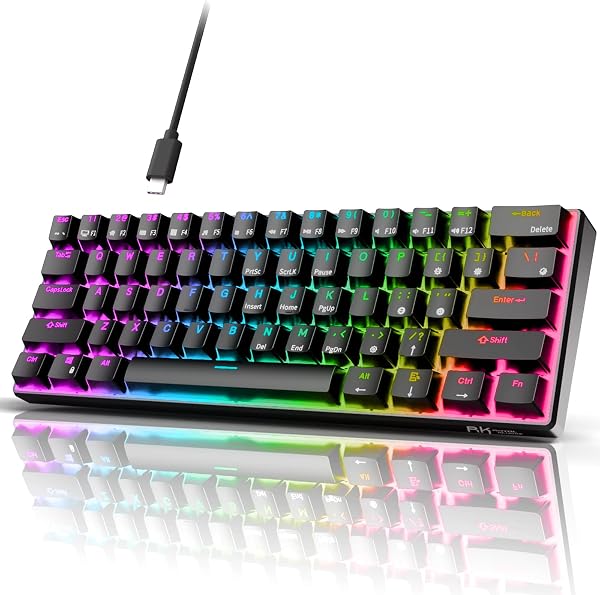
RK ROYAL KLUDGE RK61 Wired 60% Mechanical Gaming Keyboard, C
✅ PROS
- Premium quality construction and materials
- Space-saving and portable design
- Modern features and smart functionality
❌ CONS
- May vary based on individual needs and preferences
- Check Amazon for current pricing and availability
The Verdict
The RK61 proves that you don’t need to drop $150 on a custom build to get genuine mechanical keyboard benefits. For around $40, this 60% board delivers hot-swappable switches, full RGB, and a footprint so small it makes your mousepad look oversized. But “budget” doesn’t automatically mean “compromise” — the question is where RK cut corners, and whether you’ll care.
What’s actually in the box
The RK61 C ships with the keyboard itself, a coiled USB-C cable, a keycap puller, a switch puller, and the manual. That switch puller matters — this is a genuinely hot-swappable board. You can yank out the stock red linear switches and drop in any 3-pin or 5-pin Cherry-style switch without touching a soldering iron. That’s a feature you’d typically find on boards twice this price.
The layout is 60% — 61 keys — which means no function row, no numpad, no dedicated arrows. The board measures roughly 11.5 x 4 x 1.5 inches and weighs barely over a pound, so it slips into a backpack like an oversized candy bar.
Performance and real-world feel
The stock red linear switches (RK’s own branded) are smooth with a 45g actuation force, slightly lighter than Cherry MX Reds. They’re quiet enough for an open office — a soft thock rather than a clicky clack. I ran it through a week of typing plus a few hours of FPS gaming, and the 1ms polling rate kept up without noticeable latency.
The double-shot ABS keycaps feel thin but acceptable at this price. The RGB is bright — 18 modes including wave, breathing, and reactive lighting that keys up where you press. Per-key color customization is possible via software, though the manual controls cover most people’s needs.
The 2.4GHz wireless option exists on other RK61 variants — this C model is strictly wired via the detachable USB-C. If you want wireless, look at the RK61 Pro. Buyers in the Amazon reviews repeatedly mention this confusion, so check before ordering.
What buyers consistently praise
The hot-swap capability gets the most love. One verified buyer wrote: “I put in some silent browns and it went from a decent board to my daily driver. Feels like a $100 keyboard now.” Another reviewer called the RGB “better than boards I’ve paid double for.”
The compact footprint is the second most-cited win. Desk real estate is precious, and this board gives you back a solid 8 inches of mouse room. Multiple reviewers mention using it for both gaming and work without needing to swap boards.
Where it falls short
The ABS keycaps are the weak point. After six months of daily use, the keys you hit most — W, A, S, D, spacebar — will show a glossy sheen. It’s cosmetic, but it’s the first thing that ages on this board.
The 60% layout is a genuine adjustment. No dedicated arrows means you’re hitting Fn + WASD or Fn + IJKL to navigate. It took me about two weeks to stop fumbling, and some buyers never fully adapt. If you do Excel work or edit code all day, consider the 65% RK68 instead.
The included USB-C cable is stiff and short at 5 feet. It’s functional, but you’ll likely want a replacement coiled cable for aesthetics. Not a dealbreaker — just budget for it.
Who should buy this
- Students and remote workers with cramped dorm desks or small home offices who want mechanical feel without the footprint
- Keyboard tinkerers who want to experiment with different switches without buying multiple boards
- Budget gamers who want RGB and low latency without spending $100+
Skip it if you need dedicated arrow keys for spreadsheet work, or if you want wireless connectivity in this exact model.
FAQ
Q: Is the RK61 C wireless?
No. The “C” denotes wired USB-C. The RK61 Pro is the wireless version. Don’t mix them up.
Q: Can I change the switches without soldering?
Yes. It’s hot-swappable for 3-pin and 5-pin switches. Pull the old ones, push in new ones. Takes about 30 seconds per switch.
Q: Does it work with Mac?
Yes, via USB-C. The Windows key works as Cmd, and the Fn layer gives you media controls. Some Mac users note the software is Windows-only, but the board functions fine without it.
The Verdict
Buy it if you want genuine mechanical performance, hot-swap flexibility, and a tiny desk footprint for under $50. Skip it if you need arrow keys or Bluetooth — this specific model won’t deliver either.
Rating: 4.6/5 — It’s not perfect, but at this price, it’s hard to beat. The hot-swap feature alone saves you from buying a second board when your taste in switches evolves. That’s value you’ll feel every day, not just on delivery day.
Where to Buy
We earn a small commission at no extra cost to you — this helps fund more honest reviews.
Last updated: 2026-08-06. Ratings and prices current as of review date. Verify on Amazon before purchasing.
More Home Office Verdicts



