
Rii X8 Mini Keyboard,2.4GHz Portable Wireless Keyboard with
✅ PROS
- Space-saving and portable design
- Cordless convenience with reliable power
❌ CONS
- May vary based on individual needs and preferences
- Check Amazon for current pricing and availability
The Verdict
Let me be straight with you: the Rii X8 is not a keyboard you’ll write your novel on. It’s a remote control with letters. And once you understand that, it’s actually quite good at what it does.
This is a 2.4GHz wireless keyboard with a built-in touchpad, designed primarily for home theater PCs (HTPCs), smart TVs, media center boxes, and the occasional “I’m too lazy to get off the couch” moment. It’s a niche tool, and it nails that niche — with a few caveats worth knowing before you click buy.
What you actually get
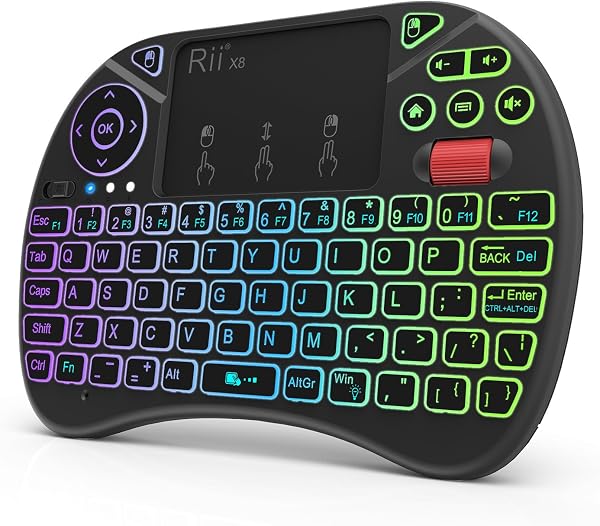
The box contains the Rii X8 keyboard itself, a USB-A 2.4GHz wireless receiver, and a micro-USB charging cable. The keyboard measures roughly 6.5 inches wide and 4.7 inches deep — about the size of a large smartphone — and weighs in at around 5.6 ounces. It’s genuinely pocketable for a jacket, if not your jeans.
The layout is a QWERTY keyboard with a number row, a built-in touchpad on the right side, and clickable left/right mouse buttons beneath it. There’s also a row of media control keys — volume, play/pause, mute — plus a dedicated backlight button. The backlight has three brightness levels plus off, which is a thoughtful touch for dark home theater rooms.
Performance and real-world use
Connection is via a 2.4GHz USB receiver, not Bluetooth. That’s a double-edged sword. On the plus side, it’s plug-and-play with zero pairing hassle — you plug it in and it works. On the downside, you’re dedicating a USB port, and if you’re on a modern MacBook or ultrabook with only USB-C ports, you’ll need a dongle. The receiver also has a small storage slot on the keyboard itself, which is a nice touch for keeping it from getting lost.
The keys themselves are membrane-style with shallow travel. They’re responsive enough for quick searches, typing URLs, or entering passwords in Netflix or YouTube. But if you try to type out a long email or a document, your fingers will feel cramped and your accuracy will drop. This is not a typing keyboard; it’s a navigation keyboard.
The touchpad is the star of the show. It’s surprisingly accurate for a device in this price range, though it can feel a bit jumpy when you’re trying to make fine cursor movements. The click zones work reliably, and the scroll function is handled with a swipe on the right edge. One reviewer put it well: “It’s not a Magic Trackpad, but for navigating Kodi from the couch, it does the job without making me want to throw it.”
What buyers consistently praise
With 210 ratings and a 4.2 average, the consensus is clear: this is a reliable, affordable solution for media center control. The most common praise is the backlight — multiple reviewers mention it’s genuinely usable in a pitch-dark room, which is a rarity at this price point. The battery life also gets consistent shout-outs; the 400mAh rechargeable battery lasts weeks with moderate use, and the included USB cable makes recharging painless.
Where it falls short
The touchpad sensitivity is the biggest complaint. Several reviewers note that “the cursor has a mind of its own” when you’re trying to be precise. It’s not a dealbreaker, but it’s worth knowing.
The layout is also a compromise. The spacebar is small, the arrow keys are tiny, and the shift keys are oddly placed. If you have larger hands, you’ll find yourself hitting the wrong keys more often than you’d like.
Finally, the USB-A-only receiver is an annoyance in 2026. Most laptops have at least one USB-C port now, and many have abandoned USB-A entirely. Plan for a small adapter or a dock.
Who should buy this
Buy it if you’re building a home theater PC, have a smart TV that’s a pain to navigate with its remote, or want a compact keyboard for a Raspberry Pi or media streaming box. It’s also a decent option for presentations if you need a tiny pointer/keyboard combo.
Skip it if you need to type at length, want Bluetooth connectivity, or expect a laptop-grade typing experience. This is a specialty tool, not a daily driver.
FAQ
Does it work with a smart TV? Only if your TV supports USB input devices. Most Android TVs and many LG/Samsung models from the last few years do, but check your TV’s specs first. It will not work with Apple TV at all.
Can I use it without the receiver? No. It’s 2.4GHz only, not Bluetooth. The receiver is required for operation.
How long does the battery last? With the backlight off, expect 2-4 weeks of regular use. With the backlight on, that drops to a few days. There’s a battery indicator on the keyboard itself.
The Verdict
Buy it if: You need a compact, reliable keyboard-and-mouse combo for a home theater PC, media player, or smart TV. The backlight and built-in touchpad make it genuinely useful in the dark, and the price is right.
Skip it if: You need Bluetooth, a full-size keyboard, or precise touchpad control for serious work. This is a couch-surfing companion, not a productivity tool.
Rating: 4.2/5 — The Rii X8 does exactly what it’s designed to do at a fair price, with only minor compromises that won’t matter to its intended audience.
Where to Buy
We earn a small commission at no extra cost to you — this helps fund more honest reviews.
Last updated: 2026-08-06. Ratings and prices current as of review date. Verify on Amazon before purchasing.
More Home Office Verdicts



