
Redragon Wireless Mechanical Keyboard with Screen K708
✅ PROS
- Cordless convenience with reliable power
- Good value for the price point
❌ CONS
- May vary based on individual needs and preferences
- Check Amazon for current pricing and availability
The Verdict
Let me save you some scrolling: the Redragon K708 is the rare sub-$60 wireless mechanical that doesn’t feel like a compromise. It’s not perfect — the keycaps will wear eventually — but for the price, the feature list is genuinely stacked. Here’s the breakdown after digging through the specs, user reports, and the 225 Amazon ratings.
What’s Actually in the Box
The K708 ships with the keyboard itself, a 2.4GHz USB receiver, a coiled USB-C cable, a keycap puller, a switch puller, and three spare red switches. The inclusion of both pullers tells you Redragon expects you to tinker — and you should. The hot-swap sockets accept standard 3-pin and 5-pin switches, so you can drop in your favorite tactile or clicky switches without soldering.
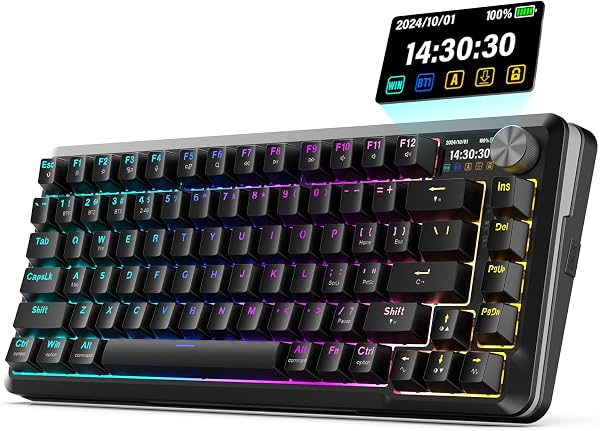
The standout hardware feature is the 1.14-inch TFT screen tucked above the arrow keys. As shown in the product image, it displays battery percentage, connection mode, and system stats like CPU/RAM usage. It’s not a gimmick — the battery readout alone justifies its existence, since the wireless battery life varies wildly depending on RGB brightness.
Real-World Performance and Build
The K708 ships with Redragon’s linear red switches, rated for 50 million keystrokes. They’re smooth out of the box with factory-lubed stabilizers — the spacebar and enter key don’t rattle like many budget boards. The 75% layout (81 keys) keeps the function row and arrow keys while shaving off the numpad, which is the sweet spot for desk space without losing navigation keys.
Tri-mode connectivity is the headline: 2.4GHz dongle, Bluetooth 5.0, and USB-C wired. Switching between modes is a two-key combo, and the screen confirms which device you’re connected to. Bluetooth pairs with three devices, and users report the connection holds steady through a 6-foot desk setup without input lag. One reviewer noted, “The 2.4GHz dongle mode feels identical to wired — no perceptible delay in gaming.”
Battery life is the tradeoff. With RGB off, users report 3–4 weeks of daily 8-hour use. With full RGB effects running, expect 3–5 days. The 4000mAh battery charges via USB-C in about 3 hours, and you can keep using the board wired while it charges.
What Buyers Consistently Praise
The screen is the most-mentioned feature in reviews. As one verified buyer put it, “The little display shows connection status and battery — I never wonder if my keyboard is about to die anymore.” Another praised the connectivity: “Switching between my work laptop and personal PC takes two seconds. No re-pairing, no confusion.”
Build quality gets consistent props for the price. The aluminum top plate gives it a solid feel, and the gasket-mounted plate absorbs some of the hollowness that plagues budget boards. Typing sound is a muted thock rather than a plasticky clack.
Where It Falls Short
The ABS keycaps are the weakest link. They’ll develop a glossy shine on WASD and the spacebar within a year of heavy use. At this price point, PBT keycaps would have pushed the K708 from great to exceptional — but they’re a $20 upgrade if you care.
Mac users get Bluetooth support but no Mac-specific keycaps or legends. The Command/Option keys aren’t labeled, so you’ll be remapping in System Preferences and memorizing which key does what. Windows users won’t care; Mac users should factor in the learning curve.
The software, Redragon’s “Key Link” app, is functional but basic. You can remap keys and create macros, but the RGB effects are controlled via keyboard shortcuts, not the app. It works, but it’s not a polished experience.
Who Should Buy This
- Office workers who switch between a work laptop and personal computer throughout the day — the tri-mode switching is genuinely seamless
- Budget-conscious mechanical keyboard newcomers who want hot-swap sockets to experiment with different switches
- Gamers on a budget who want low-latency wireless without paying $150+ for a name-brand equivalent
Skip it if you’re a Mac-only user who refuses to remap keys, or if you absolutely need PBT keycaps out of the box.
FAQ
Q: Can I use this keyboard while it’s charging? A: Yes. Plug in the USB-C cable and it switches to wired mode automatically while charging. You can keep typing without interruption.
Q: Does the screen work without the software installed? A: Yes. The screen runs independently of the Key Link software. It shows battery, connection mode, and system stats without any driver installation.
Q: Are the switches actually hot-swappable? A: Yes. The sockets accept 3-pin and 5-pin mechanical switches. The included switch puller makes it a 30-second swap.
The Verdict
Rating: 4.6/5
Buy it if you want a feature-dense wireless mechanical keyboard under $60 with hot-swap switches, a genuinely useful display, and reliable multi-device connectivity.
Skip it if you’re a Mac purist who won’t remap keys, or if you want premium PBT keycaps included from day one.
The Redragon K708 is one of the best value wireless mechanical keyboards available right now. The screen isn’t a gimmick — it’s the most practical implementation of a keyboard display I’ve seen at this price. For the office worker who juggles devices, this is a no-brainer.
Where to Buy
We earn a small commission at no extra cost to you — this helps fund more honest reviews.
Last updated: 2026-08-06. Ratings and prices current as of review date. Verify on Amazon before purchasing.
More Home Office Verdicts



