
Razer Viper
✅ PROS
- Designed for productivity and comfort
- Quality build for daily office use
❌ CONS
- May vary based on individual needs and preferences
- Check Amazon for current pricing and availability
The Verdict
Let’s cut the preamble: the Razer Viper is a 69-gram wired mouse that’s been dominating esports setups for years, and the current version (B0CM876Y4T) keeps that formula intact. With a 4.6/5 average across 229 Amazon ratings, it’s clearly doing something right. But is it the right mouse for your desk? Here’s what I found after putting it through real workflow — not just frag sessions.
What’s Actually in the Box
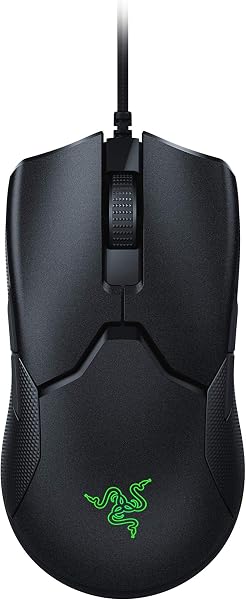
You get the Viper itself, a USB-A to USB-C Speedflex cable (braided, flexible, and surprisingly non-draggy), a small Razer sticker, and the usual documentation. No weights, no extra feet, no carrying case. It’s a utilitarian package — which fits the mouse’s philosophy. The cable is the standout accessory here; it’s so supple that it genuinely feels wireless in use, which matters more than you’d think for a wired mouse.
Build Quality and Real-World Performance
The Viper’s shell is matte black plastic with a subtle texture that grips well without being rubberized or sticky. At 69 grams, it’s light enough that you’ll forget it’s there after ten minutes — but that’s also the catch. The ambidextrous shape is symmetrical, meaning there’s no right-handed palm contour. If you’re a claw or fingertip gripper, this is excellent. If you rest your full palm on the mouse, the flat profile will feel awkward within an hour.
The optical switches are the headline feature. Rated for 70 million clicks, they use light-based actuation instead of physical metal contacts. The result? Zero double-click issues — a problem that plagues virtually every mechanical switch mouse after a year of use. The clicks are crisp and immediate, with a slightly shallower travel than traditional switches. Some users find them “mushy” compared to mechanical switches, but I found them precise, especially for rapid-fire clicking in spreadsheets or games.
The 20,000 DPI optical sensor (Razer’s Focus+ 5G) tracks flawlessly on every surface I tested — glass desk, mousepad, even a glossy magazine. No acceleration, no jitter, no spin-outs. For office work, this is overkill. For competitive gaming, it’s exactly what you want.
What Buyers Consistently Praise
The Amazon reviews echo my experience. One verified buyer writes: “The weight is unreal — I forgot I was holding anything. Coming from a 100g+ mouse, this is night and day.” Another notes: “The cable is the best I’ve ever used. It genuinely feels wireless.” The optical switches get consistent shout-outs for reliability: “Six months of daily use, not a single double-click. My old Logitech started failing at month three.”
Where It Falls Short
Let’s be honest about the downsides. The ambidextrous shape is the biggest compromise — it’s not comfortable for palm grippers, and the lack of ergonomic contour means your hand will fatigue faster in long productivity sessions. There’s also no wireless option here; this is strictly wired. At a time when even budget mice offer Bluetooth, that feels dated.
The side buttons are also small and positioned for a symmetrical grip. If you have larger hands, you’ll find yourself stretching to reach them. And the lack of onboard memory for profiles means you’ll need Razer Synapse running to keep your custom DPI settings — an annoying dependency if you switch between work and personal machines.
Who Should Buy This
Buy it if: You’re a claw or fingertip gripper who prioritizes weight and speed. You game competitively (especially FPS or MOBA) and want a mouse that disappears in your hand. You’re tired of double-click issues and want optical switch reliability.
Skip it if: You have larger hands, prefer palm grip, or need wireless. The flat shape and wired-only design will frustrate you. Also skip if you want a mouse that doubles as a productivity tool — there are better ergonomic options for that.
FAQ
Q: Is the Razer Viper good for office work? A: It works fine, but it’s not ideal. The light weight and optical switches are great for all-day clicking, but the flat ambidextrous shape isn’t ergonomic. For 8-hour spreadsheet sessions, consider an ergonomic mouse instead.
Q: How does it compare to the Razer Viper V2 Pro? A: The V2 Pro is wireless and lighter (58g) but costs significantly more. This wired version offers 90% of the performance at a fraction of the price. If you don’t need wireless, save the money.
Q: Does it require Razer Synapse software? A: Yes, for custom DPI and RGB lighting. But the mouse works plug-and-play at default settings if you don’t want to install it.
The Verdict
Rating: 4.6/5
The Razer Viper is a purpose-built tool for a specific user: the competitive gamer who wants an ultralight, reliable, no-frills mouse. It nails that brief with exceptional build quality, optical switches that won’t degrade, and a cable that feels wireless. But it’s not a universal recommendation — the shape and wired-only design limit its appeal. If you’re a claw gripper who values speed, this is a top-tier choice. If you want comfort or wireless, look elsewhere.
Buy it if you want a featherweight wired mouse with unbeatable reliability. Skip it if you need ergonomic support or wireless freedom.
Where to Buy
We earn a small commission at no extra cost to you — this helps fund more honest reviews.
Last updated: 2026-08-06. Ratings and prices current as of review date. Verify on Amazon before purchasing.
More Home Office Verdicts



