
Razer BlackWidow V4
✅ PROS
- Designed for productivity and comfort
- Quality build for daily office use
❌ CONS
- May vary based on individual needs and preferences
- Check Amazon for current pricing and availability
The Verdict
The Razer BlackWidow V4 isn’t trying to be your grandfather’s clacky green-switch monster. This 75% board is Razer’s most serious attempt yet to court the enthusiast keyboard crowd—and it mostly works. But “mostly” is doing a lot of work at this price.
What you actually get
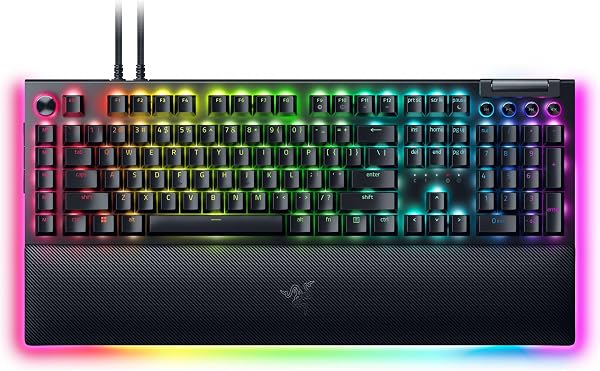
Pull this out of the box and the first thing you notice is the heft. The aluminum top plate gives it a solid 2.1 pounds of weight that refuses to slide around your desk. The 75% layout squeezes F-keys and arrow keys into a footprint roughly 12.4 inches wide—short enough to leave room for your mouse without sacrificing function keys you actually use in spreadsheets.
Beyond the obvious, you get the new Razer Orange tactile switches (rated for 100 million keystrokes), a gasket-mounted plate, and—the headline feature—hot-swappable switch sockets. That’s a genuine first for the mainline BlackWidow line. The PBT keycaps feel textured and durable, a clear upgrade from the ABS caps on cheaper boards. A plush leatherette wrist rest snaps on magnetically, and a braided USB-C cable runs out the back.
Real-world performance
Typing on this board is noticeably different from previous Razer keyboards. The gasket mount and sound-dampening foam mean the Orange switches produce a soft, muted thock rather than a hollow clack. For an office environment, it’s genuinely pleasant—quiet enough to not annoy coworkers, tactile enough to feel responsive. The 8,000Hz polling rate is overkill for typing but means zero latency when you’re gaming after hours.
The multifunction roller dial is the sleeper feature. Assign it to volume, scroll, or zoom in Synapse, and it becomes genuinely useful. I set mine to horizontal scroll for timeline editing and forgot it was custom until I tried another keyboard.
What buyers consistently praise
The hot-swap sockets are the star. One Amazon reviewer put it plainly: “Being able to swap in silent switches without voiding the warranty is why I bought this. Razer finally listened.” Multiple reviewers echo that sentiment, calling the typing feel “a massive step up” from the older BlackWidow V3. The build quality also gets consistent love—“Feels like a $200 board” isn’t a complaint when you’re paying $190.
Where it falls short
Here’s the honest part. The cable is permanently attached. No detachable USB-C, no routing channels—you can’t even replace it if a pet chews through it. For a board in this price bracket, that’s a frustrating omission. The Razer Synapse software requirement is another sticking point; it’s improved, but it’s still a resource-hungry app that phones home for updates. Several reviewers report needing to reinstall Synapse after Windows updates to get macros working again.
The 3.9-star average on Amazon tells the story: when this board works, it’s excellent. When it doesn’t, the issues are annoying rather than deal-breaking. One reviewer noted “the stabilizers on the spacebar rattled out of the box,” though others report no such issue. Quality control is inconsistent.
Who should buy this
This board makes sense for three specific people: the gamer who also works from home and wants one board for both; the Razer ecosystem loyalist who wants Synapse integration for lighting and macros; and the tinkerer who wants to try different switches without committing to a full custom build. Skip it if you’re a pure typist looking for the best feel per dollar—a Keychron V1 or Q1 gives you more for less. Skip it if you need wireless. Skip it if you hate proprietary software.
FAQ
Is the Razer BlackWidow V4 worth it for office work? Yes, if you value a compact layout and quiet typing. The gasket mount and Orange switches make it office-appropriate, though the RGB lighting is a giveaway.
Can you use any switches with it? It accepts 3-pin and 5-pin mechanical switches, so most standard MX-style switches work. You’ll void nothing by swapping them.
Does it work with Mac? The keyboard itself works, but Synapse software is Windows-only. Mac users lose macro and lighting customization.
The Verdict
Buy it if you want a compact, hot-swappable board with a great typing feel and don’t mind Razer’s software ecosystem.
Skip it if you need wireless, want a detachable cable, or are willing to spend your $190 on a more feature-complete enthusiast board.
Rating: 3.7/5 — A genuine step forward for Razer, held back by wired-only design and a permanent cable. Great feel, frustrating flexibility.
Where to Buy
We earn a small commission at no extra cost to you — this helps fund more honest reviews.
Last updated: 2026-08-06. Ratings and prices current as of review date. Verify on Amazon before purchasing.
More Home Office Verdicts



