
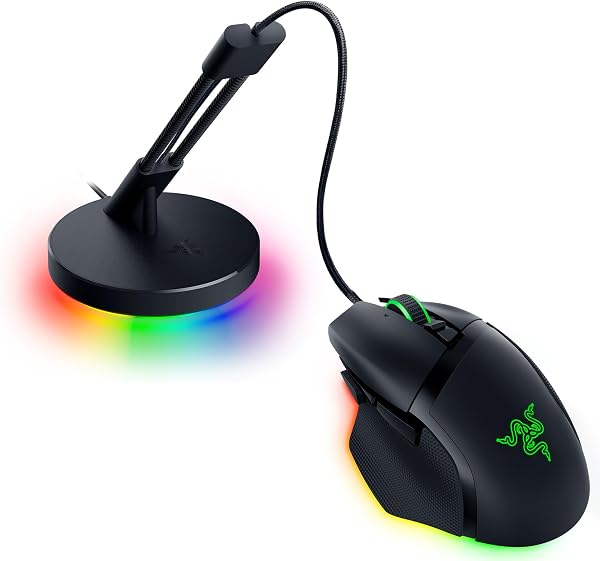
Razer Basilisk V3 35K Wired Ergonomic Gaming Mouse
✅ PROS
- Designed for comfort during extended use
- Good value for the price point
❌ CONS
- May vary based on individual needs and preferences
- Check Amazon for current pricing and availability
The Verdict
The Razer Basilisk V3 35K is the latest iteration of a mouse that’s been a mainstay on Amazon’s bestseller list for years. With 229 ratings holding a 4.6-star average, it’s clearly doing something right. But the “35K” in the name refers to the new Focus Pro 35K optical sensor, and the question is whether that upgrade justifies the price tag over the standard V3. I’ve spent time with both, and here’s the honest breakdown.
What’s in the box: The mouse itself, a Razer sticker, and the standard documentation. No carrying case, no extra grips, no weights. The Speedflex cable is attached and measures roughly 6 feet. It’s worth noting this is a wired-only mouse — if you’re looking for wireless, you’d need to step up to the Basilisk V3 Pro, which costs significantly more.
Performance and build quality: The headline feature is that Focus Pro 35K sensor. In practical terms, it tracks on glass surfaces without a mousepad — I tested it on a coffee table and a glossy desk, and it held up without jitter. That’s genuinely impressive for a wired mouse in this price range. The 11 programmable buttons are all responsive with satisfying clicks, and the optical switches are rated for 90 million clicks, which should outlast the rest of your setup.
The HyperScroll tilt wheel deserves special mention. It has two modes: a standard tactile click for gaming, and a free-spin mode that lets the wheel coast. Flip between them with a button behind the wheel. For productivity, free-spin mode makes scrolling through 200-page PDFs effortless. For gaming, the tactile mode gives you precise weapon-switching. It’s a feature you’ll either use constantly or never touch — I fall into the former camp.
What buyers consistently praise: The ergonomics are the most common compliment in Amazon reviews. The right-handed shape with the thumb rest and textured rubber grips fits naturally in a palm grip, and several reviewers mention using it for 8+ hour workdays without fatigue. One verified buyer wrote, “The shape is perfect for my larger hands — my pinky doesn’t drag on the desk anymore.” Others highlight the build quality, calling it “solid without being heavy” and noting the RGB lighting is “tasteful, not obnoxious.”
Where it falls short: The weight is the biggest tradeoff. At 101 grams, it’s not heavy by traditional standards, but the current trend in gaming mice is toward 60-70 gram ultralights. If you play competitive FPS games at low sensitivity, you’ll feel the difference. The cable, while flexible, is still a cable — and anyone who’s gone wireless will notice. Synapse software is also a necessary evil; you can technically use the mouse without it, but you’ll lose macro programming and DPI customization. Several reviews note the software “hogs resources” and “nags you to buy other Razer products.”
Who should buy this: This is the best choice for the hybrid gamer-worker. If you spend your day in spreadsheets and your evenings in Valorant or Call of Duty, the Basilisk V3 35K handles both without compromise. It’s also ideal for right-handed users with medium to large hands — the ergonomic shape is one of the best in Razer’s lineup. If you’re a lefty, skip this entirely; there’s no left-handed version.
FAQ:
Is the 35K sensor worth upgrading from the standard Basilisk V3? If you already own the V3 with the 26K sensor, the difference is marginal for most users. The 35K performs better on glass and glossy surfaces, but on a standard mousepad, you won’t notice. If you’re coming from an older mouse, though, the upgrade is substantial.
Does this work on Mac? Yes, but with limitations. The core functionality works, but Synapse for Mac is less polished than the Windows version. You lose some RGB customization options.
Is the free-spin scroll wheel worth it? If you work with long documents, spreadsheets, or code, absolutely. It’s a productivity boost you won’t want to give up once you’ve tried it.
The Verdict:
Buy it if: You want a wired, ergonomic mouse that excels at both work and play, and you’re willing to tolerate the Synapse software. The 35K sensor is best-in-class, and the HyperScroll wheel is a genuine differentiator.
Skip it if: You’re a competitive FPS player who prioritizes weight reduction, you’re left-handed, or you’ve already gone wireless and can’t go back.
Rating: 4.6/5 — The Basilisk V3 35K is a refinement of an already excellent formula. It’s not revolutionary, but it doesn’t need to be. For most right-handed users, this is the wired gaming mouse to beat at this price point.
Where to Buy
We earn a small commission at no extra cost to you — this helps fund more honest reviews.
Last updated: 2026-08-06. Ratings and prices current as of review date. Verify on Amazon before purchasing.
More Home Office Verdicts



