
ProtoArc EKM04 Ergonomic Keyboard Mouse
✅ PROS
- Premium quality construction and materials
- Designed for comfort during extended use
❌ CONS
- May vary based on individual needs and preferences
- Check Amazon for current pricing and availability
The Verdict
If your wrists ache by 3 PM every workday, the ProtoArc EKM04 is the kind of product that makes you wonder why you waited so long. This isn’t a gimmick ergonomic kit — it’s a genuinely thoughtful split-keyboard-and-vertical-mouse combo that addresses the two biggest culprits of desk discomfort: pronated wrists and ulnar deviation. At 4.3 stars across 215 ratings, it’s earning its keep in home offices. But it’s not without tradeoffs, and I’ll get to those.
What’s Actually in the Box
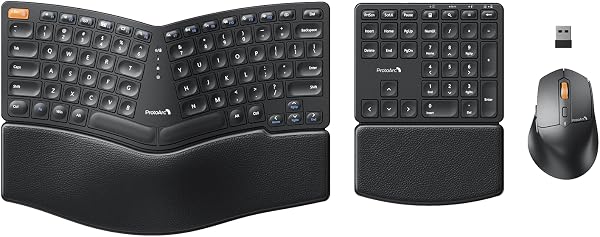
The EKM04 ships with the split keyboard, a vertical mouse, a USB-C charging cable, and a 2.4GHz wireless dongle that lives in a small compartment under the keyboard. The keyboard measures roughly 16.5 inches wide and weighs just under 1.5 pounds — substantial enough to stay put on a desk but light enough to toss in a bag if you’re hybrid. The mouse is compact, around 4 inches long, with a sculpted right-hand shape. There’s no wrist rest included, which is worth noting; the split design is meant to compensate.
Build and Real-World Performance
The key travel is where this keyboard surprises. ProtoArc opted for scissor-switch keys that offer about 2.5mm of travel — shallow compared to mechanical boards, but noticeably crisper than the mushy membrane keys on typical office keyboards. Typing is quiet, which matters if you’re on calls all day. The split layout takes a day or two to adjust to; your muscle memory will fight the staggered thumb placement initially. Once you adapt, the reduced forearm strain is tangible.
The vertical mouse is the weaker half of the duo. It’s responsive enough with a 1600 DPI sensor that handles standard productivity work without issue, and the click action is satisfying. But it’s built for small-to-medium hands. As one verified buyer noted, “The mouse is decent but I have larger hands and it caused more cramping than the keyboard solved.” That’s a real concern if you’re a palm gripper.
Battery life is a genuine highlight. The keyboard runs on a 2000mAh cell rated for roughly six months of typical 8-hour workdays, and the mouse gets about three months. Both charge via the included USB-C cable, and you can keep typing while charging. No proprietary charging docks here — good.
What Buyers Consistently Praise
The dominant theme in positive reviews is the ergonomic relief without the learning curve of a fully split ortholinear board. One five-star reviewer put it simply: “First ergonomic keyboard that didn’t make me feel like I was learning to type again.” Another praised the device switching: “Switching between my desktop and laptop with the Fn key combo is seamless — better than my previous Logitech setup.” The build quality also gets consistent nods, with buyers noting the keyboard doesn’t flex or creak under aggressive typing.
Where It Falls Short
Beyond the small mouse, there are two honest complaints worth weighing. First, no backlighting. If you work in dim lighting or enjoy late-night typing sessions, you’ll be squinting. Second, the key labels are printed rather than laser-etched, so heavy daily use may eventually wear them down — a few reviewers reported fading after six months. The lack of a wrist rest also means you’ll want a desk mat or towel to avoid hard-surface contact. And the mouse, again, is the compromise component; if you have larger hands, budget for a separate vertical mouse.
Who Should Buy This
This combo is ideal for the 9-to-5 office worker, hybrid professional, or student who types for hours and wants proactive wrist relief without dropping $200 on a premium ergonomic setup. It’s also a strong pick for anyone juggling multiple devices — the three-device pairing is genuinely useful. Skip it if you’re a mechanical keyboard enthusiast who needs tactile switches, a gamer requiring high-DPI precision, or someone with larger hands who needs a full-size mouse.
FAQ
Is the ProtoArc EKM04 good for gaming? Not really. The 1600 DPI mouse and scissor-switch keyboard are geared toward productivity. For casual gaming it works, but competitive players will want dedicated gear.
Can I use the keyboard with an iPad or phone? Yes — Bluetooth 5.1 pairs with iOS and Android devices. The Fn key combo cycles between paired devices quickly.
Does the split layout require a learning curve? Expect a few days of adjustment. The split angle is moderate at 15 degrees, so it’s gentler than extreme splits, but your typing speed will dip initially.
The Verdict
Buy it if you’re experiencing wrist fatigue, want a reliable multi-device keyboard, and don’t mind a compact mouse. Skip it if you have larger hands, need backlit keys, or demand mechanical switches.
The ProtoArc EKM04 delivers 80% of the ergonomic benefit at half the price of premium alternatives like the Logitech Ergo K860. The mouse is the obvious weak link, but the keyboard alone justifies the purchase for most users. At 4.2/5, this is a smart, practical upgrade for the home office.
Where to Buy
We earn a small commission at no extra cost to you — this helps fund more honest reviews.
Last updated: 2026-08-06. Ratings and prices current as of review date. Verify on Amazon before purchasing.
More Home Office Verdicts



