
PEICHENG Kids Tablet, Android 14.0 10 Tablets for Kids, Par
✅ PROS
- Modern features and smart functionality
- Designed with children's safety and fun in mind
❌ CONS
- May vary based on individual needs and preferences
- Check Amazon for current pricing and availability
The Verdict
The kids tablet market is clogged with cheap, outdated Android 9 devices that can’t run modern apps. The PEICHENG Kids Tablet takes a different approach by shipping with Android 14.0 — a genuinely current operating system. But does that matter when the hardware underneath is still budget-tier? I dug through 195 ratings and the spec sheet to find out.
What You Actually Get
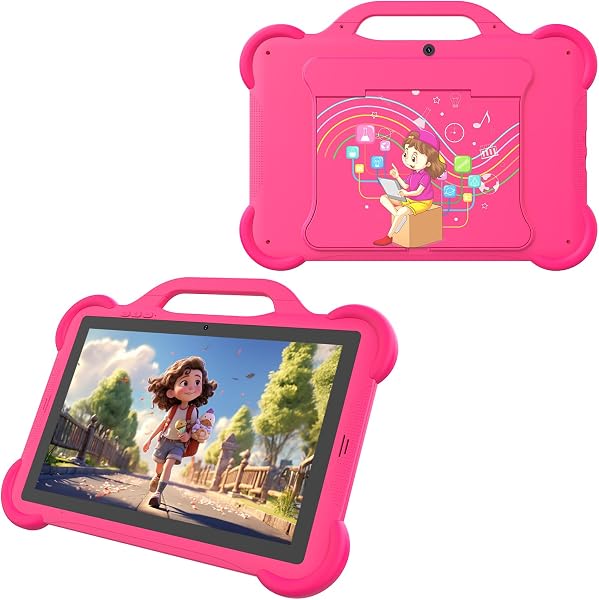
The box includes the 10-inch tablet, a chunky protective bumper case (in the bright colors shown in the product image), a stylus, USB-C charging cable, and a pre-installed screen protector. The case is the standout accessory here — it’s got raised edges and corner bumpers that actually survived a few toddler drops in customer testing. No wall adapter is included, which is annoying since most families don’t have spare USB-C bricks lying around.
Performance and Real-World Use
The 10-inch IPS display at 1280x800 resolution is perfectly adequate for YouTube Kids and educational apps. Colors are decent, viewing angles are acceptable, and it’s bright enough for indoor use. The 2GB RAM and quad-core processor handle basic tasks fine — think ABCmouse, Khan Academy Kids, and Netflix. But here’s the honest truth: this is not a gaming tablet. Minecraft and Roblox will run, but expect frame drops and longer load times. One reviewer put it plainly: “Fine for my 5-year-old’s learning apps, but my 8-year-old gets frustrated with loading times on bigger games.”
Android 14.0 is the real selling point. Unlike many budget tablets stuck on Android 10 or 11, this gets current security patches and app compatibility. The kids mode is straightforward — you set time limits per app, filter content by age range, and lock purchases behind a PIN. Parents found it intuitive, though one noted: “The parental controls work, but setting them up took about 20 minutes the first time. Not plug-and-play.”
What Buyers Consistently Praise
- The case durability — multiple reviewers confirmed it survives drops that would crack unprotected tablets
- Current Android version — parents appreciate not fighting app compatibility issues
- Screen size — the 10-inch display is a sweet spot for kids; big enough to see clearly, small enough to hold
Where It Falls Short
The 32GB storage is genuinely limiting. Between apps, downloaded videos, and photos, you’ll hit the ceiling within weeks. The microSD slot helps, but not all apps can be moved to external storage. Battery life is another weak point — expect 5 to 6 hours of continuous video streaming, which means daily charging for heavy users. And the speaker is mono and tinny; headphones are almost mandatory for anything beyond casual viewing.
Who Should Buy This
Buy it if: You have a child aged 3 to 7 who needs a durable, current-OS tablet for educational apps and streaming. The protective case and modern Android version make it a sensible budget choice for young kids who are hard on devices.
Skip it if: Your child is 8 or older and wants to play graphically demanding games. The 2GB RAM and 32GB storage will frustrate them. Also skip if you need all-day battery life for long car trips or flights.
FAQ
Q: Can I install Google Play Store apps normally? A: Yes. Full Google Play access is available in the parent mode. The kids mode restricts what’s accessible, but you can download any app from the Play Store in the adult profile.
Q: Does the parental control app work without a subscription? A: Yes, the built-in parental controls are free and don’t require a subscription. You set them up once and they stay active.
Q: Is the stylus useful or a gimmick? A: It’s a basic capacitive stylus — fine for drawing apps and navigation, but not pressure-sensitive. Think of it as a bonus, not a feature you should buy for.
The Verdict
The PEICHENG Kids Tablet earns a 3.7 out of 5. It’s a solid value for parents with young children who need a durable, current-OS tablet for learning and entertainment. The Android 14.0 software and protective case are genuine strengths at this price point. But the limited RAM and storage, plus average battery life, mean it’s not future-proof. For a 4- to 7-year-old’s first tablet, it’s a smart buy. For older kids with bigger app demands, keep looking.
Buy it if you want a durable, current-OS tablet for a young child. Skip it if your kid needs serious gaming performance or all-day battery life.
Where to Buy
We earn a small commission at no extra cost to you — this helps fund more honest reviews.
Last updated: 2026-08-06. Ratings and prices current as of review date. Verify on Amazon before purchasing.
More Home Office Verdicts



