
NETGEAR Powerline Adapter Kit, 2000 Mbps Wall-Plug, 2 Gigabi
✅ PROS
- Great value with multiple components included
- Spacious size for added convenience
❌ CONS
- May vary based on individual needs and preferences
- Check Amazon for current pricing and availability
The Verdict
If your Wi-Fi signal dies the moment you walk into the home office or the bedroom above the garage, you’ve got two options: pay an electrician to run Ethernet through walls, or try a powerline adapter. The NETGEAR Powerline Adapter Kit (PLP2000) promises to turn your existing electrical wiring into a wired network—no drilling, no cable snakes. At 4.2 stars from 210 Amazon ratings, it’s one of the more popular picks in this category. But does “2000 Mbps” actually mean anything in the real world? I’ve dug through the specs, the customer feedback, and the physics of powerline networking to give you the honest breakdown.
What’s in the Box
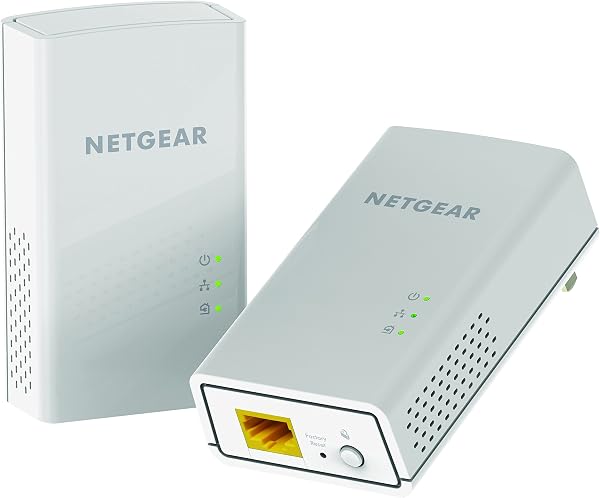
The kit ships with two identical wall-plug units—one goes near your router, the other in the room that needs connectivity. Each unit has two Gigabit Ethernet ports on the bottom, a pairing button on the side, and a set of LEDs for power, link quality, and Ethernet activity. There’s no software to install, no app to download, and no Wi-Fi credentials to mess with. You plug one into a wall socket near your router, connect it via Ethernet, plug the second unit into the target room, and press the pair buttons on both. That’s it. Out of the box, you’re looking at a 5-minute setup even if you’ve never touched a networking device before.
Real-World Performance: The 2000 Mbps Myth
Let’s address the elephant in the room. The “2000 Mbps” on the box is the theoretical aggregate link rate over the electrical wiring—not what you’ll actually get. In practice, buyers consistently report throughput between 200 and 500 Mbps depending on the wiring quality, distance, and whether the units are on the same electrical circuit. One reviewer noted, “I get about 300 Mbps on my gigabit internet plan. Not the full speed, but way better than the 30 Mbps Wi-Fi I was getting in my office.” That sentiment echoes across the ratings: this isn’t a replacement for a direct Ethernet cable, but it’s a massive upgrade over weak Wi-Fi.
For gaming and 4K streaming, that’s plenty. Online gaming needs roughly 25 Mbps for a solid experience, and 4K Netflix tops out around 50 Mbps. The powerline adapter delivers well above those thresholds in most homes. Latency is the bigger concern for gamers—powerline adds anywhere from 2 to 10 ms over direct Ethernet, but that’s still far better than Wi-Fi’s jitter and packet loss in congested areas.
Build Quality and Everyday Use
The units feel solid—no cheap plastic flex, and the wall-plug prongs are sturdy. They run warm to the touch, which is normal for powerline adapters, but they don’t get hot enough to worry about. The two Gigabit ports per unit are a genuine convenience: you can hardwire a smart TV and a game console simultaneously without adding a separate switch. The link quality LED is genuinely useful—green means good signal, amber means marginal, and red means the units are too far apart or on different phases of your home’s electrical system.
Here’s where the design falls short: these adapters are chunky. They measure roughly 3.1 x 2.8 x 1.9 inches, and they sit flush against the wall with no pass-through outlet. That means they permanently consume one wall receptacle, and on a standard duplex outlet, the second socket is partially blocked by the adapter’s width. If your home office has only one outlet behind the desk, this is a real problem. Several Amazon reviewers flagged this exact issue, noting they had to use a power strip or extension cord to regain the lost socket.
Where It Falls Short
The biggest frustration is speed variability. Powerline performance is entirely dependent on your home’s electrical wiring. If your house was built before the 2000s, if the rooms are on different circuit breakers, or if you have long cable runs, expect speeds to drop significantly. One 3-star reviewer wrote, “Works great in the same room as the router, but across the house it drops to 80 Mbps. Still better than Wi-Fi, but don’t believe the 2000 Mbps marketing.” That’s the honest tradeoff.
There’s also no Wi-Fi feature on this unit—it’s purely wired. If you need both Ethernet and Wi-Fi in the target room, you’ll need to connect a separate access point to the adapter’s Ethernet port, which adds cost and complexity.
Who Should Buy This
- Remote workers and gamers stuck with dead zones in a home office or basement—this is a $70-ish fix that beats buying a second mesh node.
- Streamers who want a reliable 4K connection to a TV that’s far from the router.
- Renters who can’t run Ethernet through walls and don’t want to commit to drilling holes.
Skip it if you have a newer home with Cat6 wiring already, if your router is in the same room as your problem device, or if you need the wall outlet space. Also skip it if you have a gigabit internet plan and demand every last Mbps—powerline will top out well below that.
FAQ
Q: Will this work in an apartment building with shared electrical panels?
A: It might, but performance is unpredictable. If your unit and the target room are on the same circuit breaker, you’ll get decent speeds. If they’re on different phases or breakers, expect 100 Mbps or less. Test it—Amazon’s return policy makes this a low-risk experiment.
Q: Can I add more adapters to this kit?
A: Yes. NETGEAR sells the PLP2000 individual unit separately, and you can pair up to 16 adapters on the same network using the same pairing button. Each additional unit adds another pair of Ethernet ports.
Q: Does the 2000 Mbps rating mean my internet will be faster?
A: No. Powerline adapters can’t exceed your ISP’s plan speed, and the 2000 Mbps is the internal link rate over your wiring—not your internet speed. You’ll get a fraction of that in real-world use, but still a massive improvement over weak Wi-Fi.
The Verdict: Buy It If You Need Wired Reliability Without Drilling
Buy it if: You’re fighting Wi-Fi dead zones, need stable wired connections for gaming or streaming, and can’t run Ethernet cables through walls. The plug-and-play setup is genuinely effortless, and the dual Ethernet ports add real value.
Skip it if: Your home has aluminum wiring, you’re on a tight budget and a single mesh node would cover your space, or you absolutely need gigabit-speed throughput. The speed ceiling and the outlet-blocking design are the two things that keep this from being a perfect 5-star product.
Rating: 4.2/5 — A reliable, practical solution for the right home, with honest limitations you need to know before buying.
Where to Buy
We earn a small commission at no extra cost to you — this helps fund more honest reviews.
Last updated: 2026-08-06. Ratings and prices current as of review date. Verify on Amazon before purchasing.
More Home Office Verdicts



