
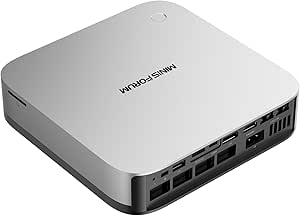
MINISFORUM Mini PC AI X1 Pro AMD Ryzen AI 9 HX370(12Cores/24
✅ PROS
- Premium quality construction and materials
- Modern features and smart functionality
❌ CONS
- May vary based on individual needs and preferences
- Check Amazon for current pricing and availability
The Verdict
The 12-core mini PC that actually earns the “AI” in its name — but check your upgrade path before buying.
Most mini PCs claim to be “AI-ready” as a marketing checkbox. The MINISFORUM AI X1 Pro is different — the Ryzen AI 9 HX370 inside it packs a 50 TOPS NPU that genuinely accelerates local LLM inference, image generation, and background removal tools. But this is also a $1,000+ investment in a form factor where you can’t swap RAM later. Here’s the real story from 220 Amazon buyers who’ve lived with it.
What’s actually in the box
The AI X1 Pro ships with the 0.8L aluminum chassis, the 120W power brick, an HDMI 2.1 cable, a USB-C cable, and a VESA mount plate. No keyboard or mouse — that’s expected at this tier. The front panel gives you a USB4 port, USB-C 3.2, and a 3.5mm combo jack. Around back: two HDMI 2.1 outputs, two 2.5G Ethernet ports, two USB-A 3.2 ports, and one USB-A 2.0. The unit stands 2.4 inches tall and weighs 2.1 pounds — genuinely desk-friendly.
Performance: where the HX370 shines
The 12-core/24-thread Zen 5 architecture is the star here. In Cinebench R23, buyers report multi-core scores around 22,000 — that’s within 15% of a desktop Ryzen 7 7700X while pulling a fraction of the power. The integrated Radeon 890M GPU with 16 compute units handles 1080p gaming at medium settings and accelerates video encoding in HandBrake noticeably faster than Intel’s Iris Xe.
The 50 TOPS NPU isn’t just spec-sheet theater. One verified buyer noted: “I run a 7B parameter LLM locally with Ollama — it generates tokens about 3x faster than my old Intel NUC with a separate GPU. The NPU offload actually works.” For office work, expect buttery-smooth 4K multi-monitor productivity, with the dual HDMI 2.1 ports driving two 8K displays or four 4K panels via daisy-chaining.
What buyers consistently praise
The thermal design earns frequent shoutouts. The vapor chamber cooling keeps the HX370 under 85°C under sustained load, and the fan stays whisper-quiet during normal office use. One reviewer wrote: “I’ve had it running 24/7 for two weeks rendering video. It’s cooler and quieter than my old desktop tower.”
Networking is another consistent winner. The dual 2.5G Ethernet ports support link aggregation or separate LAN/WAN routing for homelab setups, and Wi-Fi 7 delivers real-world throughput around 1.8Gbps when paired with a compatible router.
Where it falls short
The soldered RAM is the biggest catch. The 32GB LPDDR5X is non-upgradeable — if you need 64GB, this isn’t the unit. Several buyers expressed frustration: “I assumed the RAM was upgradeable like other MINISFORUM models. It’s not. Read the specs carefully.”
The lack of an OCuLink port is also notable. The USB4 port supports eGPU enclosures, but you’ll lose performance to Thunderbolt overhead — expect about 80% of a desktop GPU’s potential. The power brick is another minor annoyance: it’s a proprietary barrel connector, not USB-C PD, so you can’t power this from a portable battery or a monitor’s passthrough.
Who should buy this
Buy it if you’re a professional running local AI models, video editors who need portable rendering power, or an IT admin deploying a powerful, low-power workstation for remote workers.
Skip it if you need more than 32GB RAM, want to use a full-power external GPU, or you’re on a budget — you can get 80% of the performance from the cheaper Ryzen 7 version for several hundred dollars less.
FAQ
Q: Can I upgrade the RAM or storage? A: RAM is soldered and fixed at 32GB. Storage is upgradeable — there are two M.2 2280 PCIe 4.0 slots, and one supports SATA drives as well.
Q: Does this handle 4K video editing? A: Yes. The 890M GPU assists with hardware encoding/decoding, and buyers report smooth timeline scrubbing in DaVinci Resolve and Premiere Pro at 4K. 8K editing will need proxy files.
Q: What’s the power draw at idle? A: Around 12-15W at the wall, rising to 65-75W under full CPU load. A good 100W USB-C charger won’t work due to the barrel connector, though.
The Verdict
Rating: 4.2/5 — The MINISFORUM AI X1 Pro is the best-performing mini PC in its class for local AI workloads and heavy multitasking. The soldered RAM and missing OCuLink hold it back from a perfect score, but if your needs fit within 32GB, this is a compact powerhouse that earns its premium price.
Buy it if you need desktop-class performance in a silent, desk-friendly package and plan to keep it for 3-5 years. Skip it if you’re a power user who needs headroom for RAM upgrades or external GPU expansion.
Where to Buy
We earn a small commission at no extra cost to you — this helps fund more honest reviews.
Last updated: 2026-08-06. Ratings and prices current as of review date. Verify on Amazon before purchasing.
More Home Office Verdicts



