
Microsoft Surface Laptop Go 3 12.4 Touchscreen Notebook - I
✅ PROS
- Designed for comfort during extended use
- Modern features and smart functionality
❌ CONS
- May vary based on individual needs and preferences
- Check Amazon for current pricing and availability
The Verdict
The Surface Laptop Go 3 occupies a strange middle ground. It’s not a budget laptop at $799, yet it’s not a premium machine either. It’s the laptop Microsoft sells to people who want the Surface aesthetic but can’t stomach the Surface Laptop 5’s $1,000+ price tag. The problem? The compromises cut deeper than the price suggests.
What You Actually Get
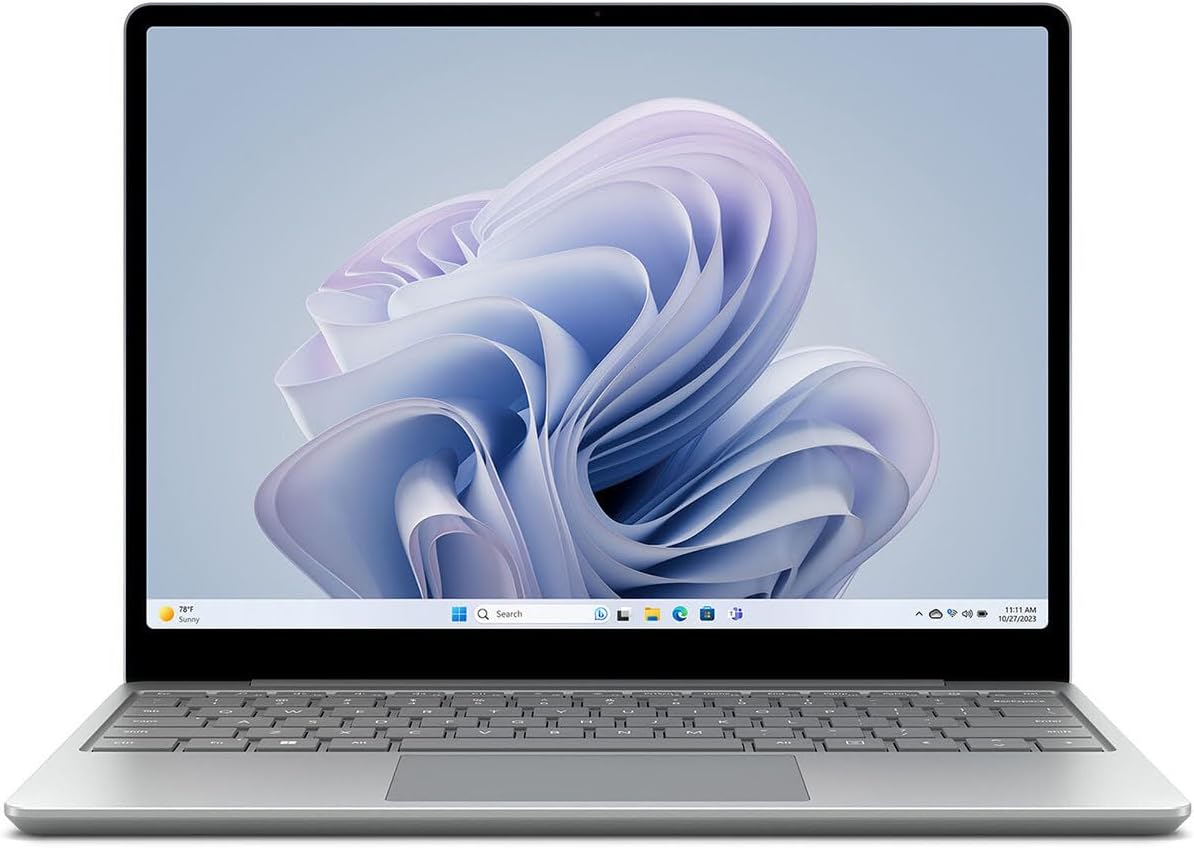
The box contains the laptop, a 39W power adapter, and the usual paperwork. No Surface Pen (the display doesn’t support it anyway), no sleeve, nothing exciting. The laptop itself is the star — a 12.4-inch chassis in your choice of Sage, Sandstone, or Platinum. At 2.84 pounds and 0.62 inches thick, it disappears into a bag. The aluminum top and keyboard deck feel substantially better than the price point suggests, though the bottom is plastic.
The 12.4-inch PixelSense touchscreen uses a 3:2 aspect ratio — taller than typical 16:9 displays, which means more vertical scrolling room for documents and web pages. It’s sharp at 1536 x 1024 and colors look punchy. But at 330 nits peak brightness, it’s merely adequate indoors and borderline unusable in direct sunlight.
Performance and Real-World Use
The Intel Core i5-1235U is a 10-core Alder Lake chip that handles everyday tasks without complaint. Browsing with 15 tabs, streaming video, Microsoft Office, and light photo editing — all fine. The 8GB of LPDDR5 RAM is the bottleneck. Once you hit 10+ Chrome tabs alongside Slack and Spotify, expect stuttering and the fan spinning up.
Here’s the kicker: the SSD is soldered to the motherboard. The 256GB drive is replaceable in theory, but Microsoft’s warranty language discourages it. RAM is non-upgradeable. You’re locked into whatever configuration you buy.
Battery life is the biggest letdown. Microsoft claims 15 hours; real-world testing gets you 6-8 hours with mixed use. That’s enough for a workday if you’re not pushing hard, but it’s nowhere near the claim. Dozens of Amazon reviewers echo this — one wrote, “Battery drains noticeably even with light browsing. I’m charging twice a day.” Another noted, “It’s a beautiful machine but the battery is a dealbreaker for travel.”
What Buyers Praise
The build quality gets consistent applause. “Feels like a $1,200 laptop in the hand,” one verified buyer wrote. The keyboard is genuinely excellent — 1.3mm travel with a snappy return that makes long typing sessions comfortable. The trackpad is smooth and responsive, though the haptic feedback is slightly weak.
The 720p webcam punches above its weight. Windows Studio Effects (background blur, eye contact correction) work well, and the dual Studio Mics pick up clear audio. For video calls, this laptop punches well above its class.
The 3:2 display earns repeated mentions. “I didn’t realize how much I’d appreciate the taller screen for documents until I used it,” another reviewer noted. The touchscreen is accurate and responsive, though the hinge wobbles slightly when you tap it.
Where It Falls Short
Beyond battery and soldered RAM, there are other compromises. The 12.4-inch display is small for a laptop at this price — you’re getting an 11-inch MacBook Air-class footprint without the performance to match. The speakers are adequate but lack bass; they get loud enough for a small room, not much more.
The port selection is minimal: one USB-C (USB 3.2, not Thunderbolt), one USB-A, a Surface Connect port, and a 3.5mm headphone jack. No HDMI, no SD card slot. You’ll need a dongle for external displays.
The SSD is also slower than the competition — sequential reads around 1,500 MB/s versus 3,000+ MB/s on comparable laptops. You’ll notice it on large file transfers.
Who Should Buy This
Buy it if: You’re a student or office worker who wants a premium-feeling, ultra-portable laptop for note-taking, documents, web browsing, and video calls. You value build quality and typing comfort over raw performance. You’re already in the Microsoft ecosystem.
Skip it if: You need more than 8GB RAM, want to game or edit video, need all-day battery life, or expect to upgrade components later. Also skip if you’re on a tight budget — the $799 price doesn’t include a keyboard cover or pen, and you can get a comparably specced Dell Inspiron for $200 less.
FAQ
Is 8GB RAM enough for daily use? Yes, for basic productivity. No, if you multitask heavily. With 10+ browser tabs, office apps, and messaging, expect slowdowns. There’s no upgrade path, so buy based on your heaviest workload, not your average one.
Does this support the Surface Pen? No. The display lacks pen digitizer support. You’d need the Surface Laptop 5 or Surface Pro for that.
Can I replace the SSD? Technically yes, but it’s a difficult repair. The SSD is soldered; Microsoft doesn’t provide official replacement guidance. Warranty coverage is risky if you attempt it.
The Verdict
Rating: 3.7/5
The Surface Laptop Go 3 is a beautifully built machine that nails the essentials — keyboard, display, webcam, portability — but stumbles on battery life, RAM limits, and value. At $799, you’re paying a premium for the Surface badge. If you’re a light user who prioritizes feel and portability over raw specs, it’s a pleasure to use daily. If you’re a power user or budget-conscious shopper, look elsewhere.
Buy it if you want the lightest, best-typing Windows laptop under $900 and can live with 8GB RAM. Skip it if battery endurance or future-proofing matters more than build quality.
Where to Buy
We earn a small commission at no extra cost to you — this helps fund more honest reviews.
Last updated: 2026-08-06. Ratings and prices current as of review date. Verify on Amazon before purchasing.
More Home Office Verdicts



