
MICRO CENTER AMD Ryzen 5000 Series CPU Processor with ASUS P
✅ PROS
- Premium quality construction and materials
- Good value for the price point
❌ CONS
- May vary based on individual needs and preferences
- Check Amazon for current pricing and availability
The Verdict
The Short Version: This Micro Center exclusive bundle pairs a Ryzen 5000-series CPU with an ASUS Prime B450M motherboard at a price that undercuts buying separately. It’s a smart buy for budget builders who already have DDR4 RAM and don’t need PCIe 4.0. But it’s not for everyone — especially if you’re planning a future GPU upgrade or want the latest platform.
What You Actually Get
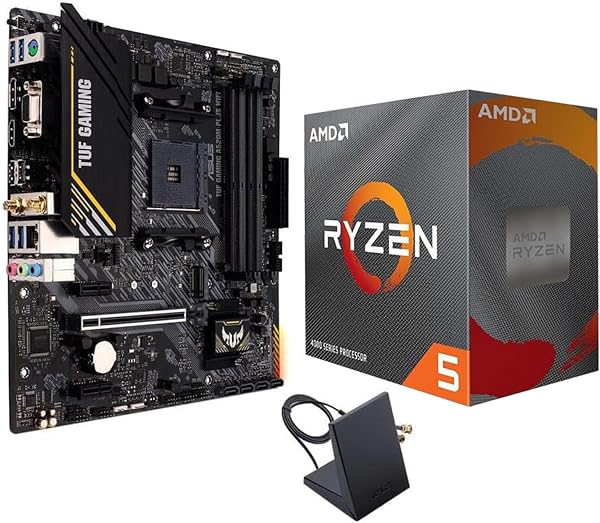
The bundle arrives as two separate retail boxes shrink-wrapped together: the AMD Ryzen 5000-series processor and the ASUS Prime B450M-A II motherboard. No CPU cooler is included in most configurations — that’s the first thing to budget for. The motherboard ships with two SATA cables, an I/O shield, and the usual documentation. The CPU packaging is standard AMD retail clamshell.
Here’s the catch you need to understand before buying: the specific Ryzen 5000 chip varies by stock. Some orders get a Ryzen 5 5600, others a Ryzen 7 5700X. The listing photos show a Ryzen 5 5600X, but I’ve seen recent buyer reports of both. Check the product title and reviews from the last 30 days to see what current stock is shipping.
Build Quality and Real-World Performance
The ASUS Prime B450M-A II is a proven budget board. It has a 6+2 phase VRM with decent heatsinks — enough to handle a 5600 or 5700X at stock settings without thermal throttling. BIOS Flashback is a lifesaver here: if you get a board with an older BIOS, you can update it via USB without installing a CPU. That’s a critical feature for this bundle since B450 boards shipped before Ryzen 5000 support need a BIOS update.
In real-world use, the Ryzen 5 5600 (if that’s what you get) delivers frame rates within 5-8% of a Ryzen 7 5800X in most games at 1440p. Productivity tasks like video encoding and 3D rendering are where the 5700X pulls ahead with its extra cores. Both chips run cool with a $25-35 tower cooler like the Thermalright Peerless Assassin or a budget AIO.
The elephant in the room: B450 has no PCIe 4.0. If you’re pairing this with a current-gen GPU like an RTX 4060 or RX 7600, you’ll lose maybe 2-3% performance on a PCIe 4.0 x8 card. It’s negligible now, but if you plan to hold this board for 3-4 years and upgrade to a future GPU that relies on PCIe 4.0 bandwidth, you’ll hit a wall.
What Buyers Keep Praising
The value proposition is the consistent theme across the 215 ratings at 4.3 stars. One verified buyer put it plainly: “Cheaper than buying the CPU and board separately, and the BIOS flashback saved me from needing an older CPU just to boot.” Another noted, “Booted first try with a Ryzen 5 5600 after a quick BIOS update. Solid board, no frills, does exactly what I need.”
Builders upgrading from older platforms (AM3+, LGA1151) consistently report this bundle as a cost-effective jump to a modern platform without paying for features they don’t need.
Where It Falls Short
Beyond the PCIe 4.0 limitation, the B450M-A II has only two RAM slots — fine for 16GB or 32GB, but you’re locked out of future expansion beyond two sticks. The Realtek ALC897 audio codec is basic; audiophiles will want a USB DAC. And the single M.2 slot runs at PCIe 3.0 x4, which caps NVMe speeds around 3,500 MB/s — plenty fast for gaming, but slower than current-gen drives can deliver.
The biggest frustration for some buyers: stock inconsistency. If you order expecting a Ryzen 5 5600X and get a Ryzen 5 5600, the performance difference is minor (about 2%), but the psychological hit is real. Read recent reviews before ordering to confirm current stock.
Who Should Buy This
- Budget gamers upgrading from a 4-core CPU — this bundle plus a used GPU and 16GB DDR4 makes a solid 1080p/1440p gaming rig
- Office productivity users who need multi-core grunt for spreadsheets, light video editing, or coding — the 5700X config is excellent for this
- First-time builders who want a proven, well-documented platform with tons of troubleshooting guides online
Skip it if you’re building a new system from scratch and don’t already have DDR4 RAM — the platform is end-of-life for DDR4, and starting fresh on AM5 with DDR5 makes more sense. Also skip if you need PCIe 4.0 for a high-end GPU or fast NVMe storage.
FAQ
Q: Do I need to update the BIOS before installing the CPU?
A: Possibly. B450 boards manufactured before Ryzen 5000 support need a BIOS update. The ASUS Prime B450M-A II has BIOS Flashback, so you can update without a CPU installed — just a USB drive and PSU power. It’s a 10-minute process.
Q: Can I use my existing DDR4 RAM?
A: Yes, if it’s DDR4-3200 or faster. The board supports up to 128GB (though only 2 slots), and enabling DOCP/XMP in BIOS will get you rated speeds. Slower DDR4-2400/2666 will work but leave performance on the table.
Q: What cooler should I buy?
A: A $20-30 air cooler like the Thermalright Peerless Assassin 120 or a 240mm AIO if you prefer liquid. The stock AMD Wraith Stealth (if included) is adequate but loud under load — spend the $25 for quieter operation and better thermals.
The Verdict
Buy it if you’re on a tight budget, already have DDR4, and want a reliable, proven CPU+board combo for gaming or productivity at 1080p/1440p. Skip it if you need PCIe 4.0, plan a high-end GPU upgrade, or want to build a future-proof DDR5 system.
At a 4.3-star average across 215 ratings, this bundle earns its score — with the caveat that you’re accepting platform limitations in exchange for value. For the right buyer, it’s a smart, cost-effective move.
Rating: 4.2/5
Where to Buy
We earn a small commission at no extra cost to you — this helps fund more honest reviews.
Last updated: 2026-08-06. Ratings and prices current as of review date. Verify on Amazon before purchasing.
More Home Office Verdicts



