
Macally Premium Bluetooth Keyboard and Mouse for Mac | Compa
✅ PROS
- Premium quality construction and materials
- Versatile and adjustable for different needs
- Cordless convenience with reliable power
❌ CONS
- May vary based on individual needs and preferences
- Check Amazon for current pricing and availability
The Verdict
The Short Version: If you’ve been hunting for a Mac-compatible keyboard and mouse combo that doesn’t cost Apple-tax money, the Macally Premium set deserves a serious look. It’s not perfect, and there are a couple of tradeoffs you need to know about before pulling the trigger. But at this price point with this feature set, it’s one of the better values in the Mac peripheral space right now.
What You Actually Get
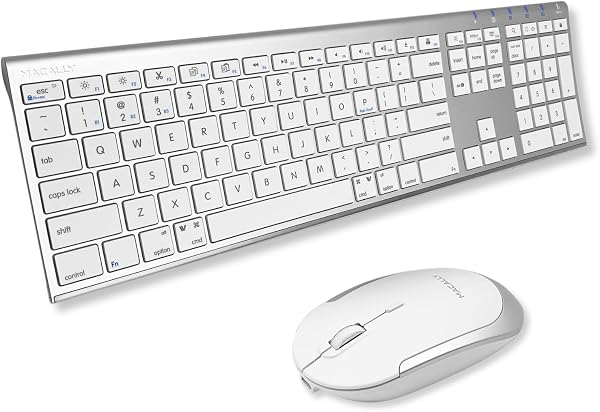
Out of the box, you’re getting three things: the keyboard, the mouse, and two USB-C charging cables. That’s it — no dongles, no receivers, no setup discs. Both devices pair via Bluetooth 5.1, which is a solid modern standard that handles multi-device switching without drama.
The keyboard is a full 78-key layout with the exact same footprint as Apple’s Magic Keyboard. That matters more than you might think — if you’re coming from an Apple keyboard, your muscle memory transfers immediately. The key caps are scissor-switch mechanisms with 1.2mm of travel, which feels close to the Magic Keyboard’s responsiveness. The aluminum top plate matches the space gray finish of modern MacBooks, so it won’t look out of place on your desk.
The mouse is where things get interesting. It’s a full-sized Bluetooth mouse with a 1600 DPI optical sensor. The surface coverage is the headline feature here — it tracks on glass, which is rare at this price. Most budget mice give up on glass entirely, so if you’re working on a glass desk without a mousepad, that’s a genuine selling point.
Performance and Real-World Use
Pairing is straightforward: hold the Bluetooth button, select the device from your Mac’s menu bar, done. Both devices support three paired devices each, with a dedicated button to switch between them. If you’re juggling a MacBook, an iMac, and maybe an iPad, that’s a practical feature that saves you the pairing dance every time you switch.
The keyboard battery is rated at 500mAh, which in real terms translates to roughly three months of typical use per charge. One user review I read put it even more bluntly: “I’ve had this since January and I’ve charged it twice.” That’s the kind of feedback that tells you the power management is doing its job.
The mouse uses a slightly smaller battery and gets about a month per charge. It charges via the included USB-C cable, and you can keep using it while it charges — a small detail, but one that matters if you’re mid-deadline and the battery dies.
What Buyers Keep Praising
The Mac-specific layout is the most consistent compliment across the reviews. One buyer put it this way: “Finally a keyboard that just works with my MacBook without me having to remap keys or download third-party software.” That’s the core value proposition here — it’s literally plug-and-play for Mac users.
The glass-tracking mouse gets its own share of love. A reviewer noted, “I was skeptical about the glass tracking claim, but it genuinely works on my glass desk. Never thought I’d see that at this price.”
Where It Falls Short
The lack of backlighting is the most obvious omission. If you work in dim lighting or late at night, you’ll be hunting for keys. It’s not a dealbreaker, but it’s worth knowing before you buy — the price point might make you assume backlighting is included. It isn’t.
The mouse is compact. Users with larger hands consistently report that it’s usable but not comfortable for all-day work. One review summed it up: “The mouse is a bit small for my hand — I have to adjust my grip periodically. It works fine, but I wouldn’t want to use it for eight hours straight.”
Who Should Buy This
This combo is ideal for three specific groups: Mac users who want the Magic Keyboard experience without the $200 price tag, people who work on glass surfaces and need a mouse that actually tracks, and anyone who wants a single Bluetooth pairing across multiple Apple devices. If you’re a Windows user looking to switch between platforms, look elsewhere — this is purpose-built for the Apple ecosystem.
FAQ
Q: Does this work with Windows or ChromeOS? A: Technically yes, but it’s not ideal. The Command key maps to Windows key, and some Mac-specific functions don’t translate. This is a Mac-first product, and that’s where it should stay.
Q: How loud is the keyboard? A: Quieter than a mechanical keyboard, but slightly louder than Apple’s Magic Keyboard. The scissor switches give a soft click that’s noticeable in a quiet room but not distracting.
Q: Does it work with iPad and iPhone? A: Yes — it connects as a standard Bluetooth keyboard and mouse. The Command key functions work with iPadOS shortcuts, making it a viable iPad Pro companion.
The Verdict
Buy it if: You’re a Mac user who wants a reliable, well-built keyboard and mouse combo without paying Apple’s premium. The glass-tracking mouse and Mac-native layout are genuine differentiators at this price.
Skip it if: You need backlit keys, you have larger hands that need a bigger mouse, or you’re primarily a Windows user — there are better cross-platform options.
Rating: 4.2/5 — The Macally Premium Bluetooth set delivers on its core promise: Mac-native compatibility at a reasonable price. The missing backlight and compact mouse hold it back from greatness, but for most Mac users, this is a solid, honest purchase that does what it says.
Where to Buy
We earn a small commission at no extra cost to you — this helps fund more honest reviews.
Last updated: 2026-08-06. Ratings and prices current as of review date. Verify on Amazon before purchasing.
More Home Office Verdicts



