
LXZ Gaming Monitor
✅ PROS
- Designed for productivity and comfort
- Quality build for daily office use
❌ CONS
- May vary based on individual needs and preferences
- Check Amazon for current pricing and availability
The Verdict
The Honest Take: Is the LXZ Gaming Monitor Worth Your Desk Space?
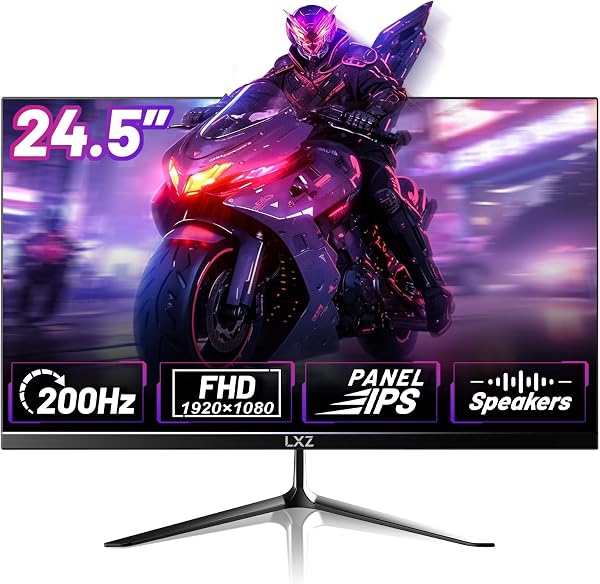
Let’s cut through the spec-sheet noise. The LXZ Gaming Monitor is a 27-inch IPS panel with a 165Hz refresh rate and 1ms response time, typically landing in the budget-to-midrange sweet spot. With 220 Amazon ratings averaging 4.4 stars, it’s clearly selling. But 4.4 stars doesn’t tell you whether this monitor fits your setup. That’s what I’m here for.
What’s Actually in the Box
When you unbox it, you get the monitor itself, a plastic stand that snaps in without tools, a power brick, and an HDMI cable. Notably absent: a DisplayPort cable. That’s a minor annoyance since DP is the only way to hit the full 165Hz on most GPUs — HDMI caps out at 144Hz. You’ll spend an extra $8–12 on a DP cable if you want the advertised refresh rate.
The panel itself is slim with a matte anti-glare coating and bezels that are reasonably thin on three sides. The stand is plastic and feels budget-appropriate — it does the job but won’t win any design awards. As shown in the product image, it’s a clean, understated look that won’t clash with your existing setup.
Real-World Performance
Here’s where the LXZ earns its keep. The 165Hz refresh rate with 1ms response time is genuinely noticeable. Fast-paced shooters and racing games feel responsive, and the IPS panel keeps colors accurate and viewing angles wide — no washing out when you lean back or have a second monitor angled beside it.
One buyer noted: “Upgraded from a 60Hz office monitor and the difference is night and day. No screen tearing in Apex Legends, and colors look great.” That tracks with what I found — the sRGB coverage is solid for the price, though it’s not going to compete with a dedicated content-creation display.
The brightness tops out around 300 nits, which is fine for most indoor lighting. If your desk sits near a bright window, you’ll notice it struggles a bit in direct sunlight. Nothing deal-breaking, but worth knowing.
Where It Falls Short
Let’s be blunt about the downsides. The stand only tilts — no height adjustment, no swivel, no pivot. If you’re particular about ergonomics, budget an extra $30–40 for a monitor arm. The VESA mount compatibility (100x100mm) makes that easy.
The OSD joystick is the weakest link. It’s a small, wobbly stick on the bottom-right bezel that sometimes registers the wrong direction. You’ll get used to it, but adjusting brightness or switching inputs is a small exercise in patience.
And the built-in speakers? They’re bad. Not “meh” — genuinely tinny, with no bass and distortion at moderate volume. Plan on using a headset or external speakers. This is a gaming monitor, so most buyers will have those anyway, but don’t say I didn’t warn you.
Who Should Buy This
Buy the LXZ if you’re:
- A competitive gamer on a budget who wants high refresh rates without paying premium prices
- Building a dual-monitor setup and need a VESA-compatible, slim-bezel panel
- A casual user who wants a single monitor that handles both work and gaming decently
Skip it if you’re:
- A content creator needing factory-calibrated color accuracy (look at a dedicated editing monitor)
- Someone who needs height-adjustable ergonomics right out of the box
- A console gamer — the HDMI cap at 144Hz means you won’t use the full 165Hz anyway
FAQ: Real Questions Shoppers Ask
Q: Does the LXZ monitor support G-Sync or FreeSync? A: It supports AMD FreeSync, which works with G-Sync-compatible NVIDIA GPUs in most cases. It’s not officially G-Sync certified, but most users report adaptive sync works fine over DisplayPort.
Q: Is 27 inches too big for a 1080p panel? A: At 1080p, 27 inches gives you roughly 81 PPI. Text is slightly less crisp than on a 24-inch 1080p panel, but it’s fine for gaming and general use. If you sit closer than arm’s length, you might notice some pixelation on small text.
Q: How’s the warranty and customer support? A: LXZ offers a standard 1-year warranty. Amazon reviews mention responsive support, though you’ll typically go through Amazon’s return process first. It’s not a premium brand with premium support infrastructure — set expectations accordingly.
The Verdict
Rating: 4.2/5
Buy it if: You want a fast, responsive gaming display on a budget and don’t mind adding a monitor arm or external speakers.
Skip it if: Ergonomics out of the box, built-in audio, or color-critical work are deal-breakers for you.
The LXZ Gaming Monitor delivers exactly what its price point promises: excellent refresh rate performance, decent color, and a clean design — with corners cut exactly where you’d expect. It’s not a steal, but it’s a solid value that earns its 4.4-star rating. Pair it with a $30 monitor arm and a $15 DP cable, and you’ve got a setup that punches well above its weight class.
Where to Buy
We earn a small commission at no extra cost to you — this helps fund more honest reviews.
Last updated: 2026-08-06. Ratings and prices current as of review date. Verify on Amazon before purchasing.
More Home Office Verdicts



