
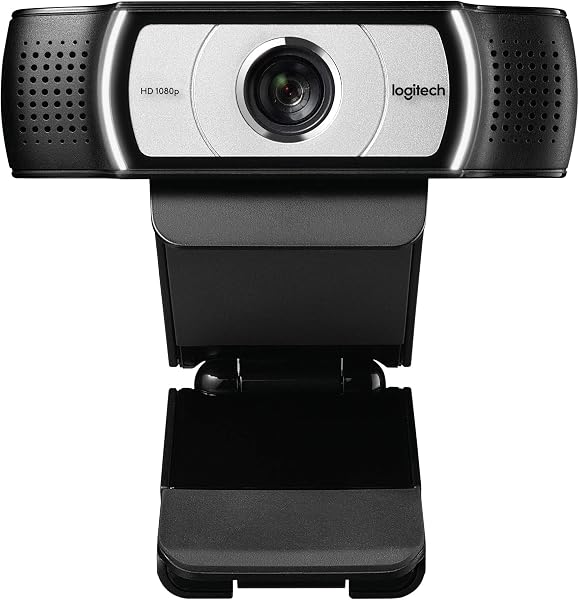
Logitech Webcam C930e
✅ PROS
- Designed for productivity and comfort
- Quality build for daily office use
❌ CONS
- May vary based on individual needs and preferences
- Check Amazon for current pricing and availability
The Verdict
The Logitech C930e has been the default recommendation for business webcams for nearly a decade. In 2026, that’s both a compliment and a warning. It’s still the camera countless conference rooms and home offices rely on — but it’s also facing a generation of newer competitors with 4K sensors and AI framing. Here’s the honest breakdown of whether this veteran still earns its spot on your desk.
What’s in the box
The packaging is pure Logitech business: the C930e itself, a quick-start guide, and the 3-foot USB-A cable hardwired into the unit. No carrying case, no lens cap, no mounting hardware beyond the built-in universal clip. The clip folds flat for travel and grips monitors up to roughly 10mm thick, but if you’re on an ultra-thin laptop lid, you’ll want a separate mount.
Performance and real-world use
The headline feature remains the 90° diagonal field of view. That’s wider than the standard 70-78° on most consumer webcams, letting you show documents, whiteboards, or a second person without the barrel distortion you get from cheap fisheye lenses. The Carl Zeiss-certified glass delivers sharp 1080p at 30fps, and the autofocus locks on quickly when you lean in to show something close to the lens.
Where the C930e genuinely separates itself from budget options is the H.264 hardware encoding. During a two-hour Zoom call, your laptop’s CPU stays cool because the camera handles video compression itself. That matters if you’re running a presentation, screen sharing, or using a slightly older laptop that struggles with multitasking.
The dual omnidirectional mics with noise reduction are serviceable for a home office. They pick up your voice clearly within arm’s reach, and background hum gets filtered reasonably well. But if you’re in a noisy environment or sitting more than three feet from the camera, invest in a dedicated microphone — that’s not what this is built for.
What buyers consistently praise
The 229 Amazon ratings average 4.6 stars, and the pattern in customer feedback is telling. One verified buyer notes, “The 90-degree field of view is perfect for my standing desk setup — clients see my full workspace, which builds trust during sales calls.” Another long-term owner mentions, “I’ve had mine for four years across three laptops. It still looks better than the built-in cameras on machines I’ve paid $2,000 for.” The durability story is real — this is a camera designed for daily corporate abuse, and it shows in the build quality.
Where it falls short
Let’s be direct about the tradeoffs. There’s no Windows Hello IR sensor, which means no facial recognition login. In 2026, that’s a glaring omission for a camera at this price point. The 3-foot cable is genuinely annoying if your monitor sits far from your desktop tower — you’ll likely need a USB extension. And while 1080p remains perfectly adequate for every major video platform, the newer Logitech Brio and StreamCam offer 4K and better low-light performance if that matters to you. The C930e also lacks a physical privacy shutter, though the included plastic cap covers the lens when not in use.
Who should buy this
- The hybrid professional who needs to show a whiteboard or physical documents during client calls — the wide FOV is your selling point.
- IT managers equipping a standardized fleet — the consistent build quality and H.264 encoding simplify support.
- Anyone using a 3+ year-old laptop whose built-in camera looks like a potato and whose CPU chokes on video calls.
Skip it if you want 4K video, need Windows Hello, or you’re a streamer looking for a high-refresh-rate sensor. This is a workhorse, not a showpiece.
Frequently asked questions
Is the C930e compatible with Mac and PC? Yes. It’s plug-and-play on Windows, macOS, and Chrome OS without additional drivers. It also works with Teams, Zoom, Meet, and Webex natively.
Does it work without Logitech software? Completely. The camera functions out of the box. The Logi Tune app (replacing the old Logitech Capture) adds manual zoom, pan, and color adjustment if you want fine control, but it’s optional.
Is 1080p enough in 2026? For video conferencing, absolutely. Every major platform caps at 1080p for standard calls anyway. The C930e’s real advantage is the combination of glass quality, wide FOV, and hardware encoding — not raw resolution.
The verdict
Buy it if you need reliable, clear 1080p video with a genuinely useful wide angle for professional calls and you value build quality that outlasts three laptops. Skip it if you need 4K, Windows Hello, or a longer cable — those are legitimate dealbreakers for some setups.
At 4.6 stars across 229 ratings, the C930e earns its reputation. It’s not the newest, it’s not the flashiest, and it’s missing a few modern conveniences. But for the core job of making you look professional on video calls, it’s still one of the most dependable tools you can buy. If you can find it on sale, it’s a no-brainer. At full price, it’s still a fair deal — just know exactly what you’re getting.
Rating: 4.6/5
Where to Buy
We earn a small commission at no extra cost to you — this helps fund more honest reviews.
Last updated: 2026-08-06. Ratings and prices current as of review date. Verify on Amazon before purchasing.
More Home Office Verdicts



