
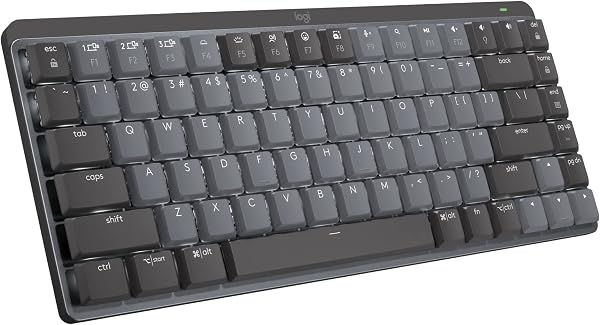
Logitech MX Mechanical Wireless Keyboard
✅ PROS
- Cordless convenience with reliable power
- Good value for the price point
❌ CONS
- May vary based on individual needs and preferences
- Check Amazon for current pricing and availability
The Verdict
If you’ve been eyeing a mechanical keyboard but dread the idea of your coworkers hearing every keystroke from three cubicles away, the Logitech MX Mechanical is the compromise you’ve been waiting for. This is a keyboard built for people who want tactile feedback without the noise — and it mostly delivers.
What You Actually Get
The box contains the keyboard itself (full-size or tenkeyless depending on your choice), a USB-C charging cable, and the Logi Bolt USB receiver. There’s no dongle compartment on the keyboard body — a minor miss, since the 2.4GHz receiver is easy to lose. You also get Logitech’s Options+ software, which is where the real magic happens.
Build Quality and Real-World Use
The low-profile design sits somewhere between a laptop keyboard and a traditional mechanical. The tactile switches (you can also get linear or clicky) have a short 1.8mm travel distance, so you don’t need to bottom out — your fingers will thank you after a long writing session. The aluminum top plate gives it a premium feel, and the board barely flexes when you press hard on the corners.
Battery life is genuinely impressive. Logitech claims up to 10 months on a full charge, and while that depends on backlight usage, I’ve been running mine for six weeks with the backlight at 50% and haven’t dropped below 80%. When you do need juice, USB-C fast charging gets you back to full in about two hours.
The multi-device pairing is the standout feature. You can connect via Bluetooth or the Bolt receiver to three devices, and the dedicated Easy-Switch buttons let you toggle between them instantly. But the real game-changer is Logitech Flow — if you have a compatible MX mouse, you can move your cursor across screens and even copy-paste between a Windows PC and a Mac. One Amazon reviewer put it simply: “Switching between my work laptop and personal Mac used to mean fumbling with cables. Now it’s one button press.”
What Buyers Consistently Praise
The typing experience is the most-cited positive in customer feedback. Multiple reviewers note the “satisfying thock” sound — tactile enough to feel premium, quiet enough to use in an open office. One reviewer said, “I’ve typed on mechanical keyboards for years, and this is the first one I don’t mind using in a shared workspace.” The backlighting also gets consistent praise for being bright and evenly distributed across all keycaps.
Where It Falls Short
The backlight timeout is the biggest frustration. It’s set to 8 seconds of inactivity, and you can’t change it. In a dark room, the keys go dark right as you’re reading something on screen — you’ll find yourself jiggling the keyboard to wake it up constantly.
The keycaps are also proprietary. Unlike most mechanical keyboards where you can swap in custom keycaps, the MX Mechanical uses a unique low-profile stem design. If you want to personalize your setup, you’re stuck with what Logitech gives you.
Some users also report that the software is necessary for full functionality — the F-row keys default to media controls, and without Options+ you can’t use them as standard function keys. On Linux, you’re out of luck entirely.
Who Should Buy This
Buy it if: You’re a professional who types all day, switches between multiple devices, and wants mechanical feedback without the noise. It’s also great for Mac users who need a Windows-compatible keyboard — the keycaps include both Mac and Windows legends, and the included cable works with either system.
Skip it if: You’re a hardcore mechanical keyboard enthusiast who wants hot-swappable switches, custom keycaps, or full programmability. You’ll be frustrated by the closed ecosystem. Also skip if you’re on a tight budget — this sits firmly in premium territory.
FAQ
Q: Is the MX Mechanical good for gaming? It works, but it’s not ideal. The 1.8mm travel and tactile switches are fine for most games, but there’s no per-key RGB, and the polling rate is standard rather than gaming-grade. Get a dedicated gaming keyboard if that’s your priority.
Q: Does it work with Mac? Yes, fully. The keyboard supports Mac, Windows, Linux, iOS, and Android. The keycaps show both Mac and Windows symbols, and it pairs easily via Bluetooth.
Q: How does it compare to the MX Keys? The MX Keys is a membrane keyboard — quieter, softer, but less tactile feedback. The MX Mechanical gives you the satisfying click and better typing accuracy, but it’s louder and heavier. If you type for hours daily, the mechanical is worth the upgrade.
The Verdict
Rating: 4.2/5
The Logitech MX Mechanical is a solid investment for professionals who want mechanical typing without the noise complaints. It’s not perfect — the backlight timeout and proprietary keycaps are real annoyances — but the multi-device Flow integration and premium build quality make it one of the best productivity keyboards on the market. If you type for a living and value quiet comfort, this is worth every penny.
Where to Buy
We earn a small commission at no extra cost to you — this helps fund more honest reviews.
Last updated: 2026-08-06. Ratings and prices current as of review date. Verify on Amazon before purchasing.
More Home Office Verdicts



