
Logitech MX Anywhere 3 for Mac
✅ PROS
- Designed for productivity and comfort
- Quality build for daily office use
❌ CONS
- May vary based on individual needs and preferences
- Check Amazon for current pricing and availability
The Verdict
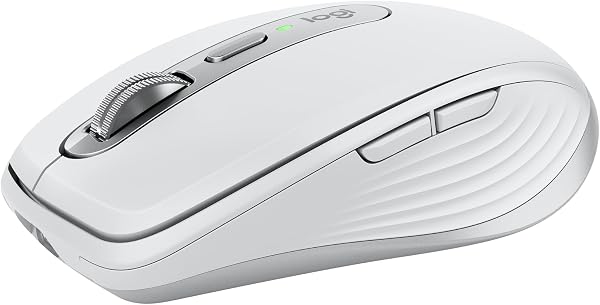
The Logitech MX Anywhere 3 for Mac is the rare mouse that actually understands the difference between “portable” and “compromised.” At 99 grams and roughly the size of a deck of cards, it’s the kind of peripheral you forget is in your bag — until you need it. And when you do, it delivers the kind of polish that makes you wonder why your desk mouse feels so primitive.
What’s actually in the box: The mouse, a Logitech Bolt USB receiver (the newer, more secure standard that replaces the old Unifying receiver), and a USB-C to USB-C charging cable. That’s it. No dongle case, no travel pouch. For the price, you’d think Logitech could toss in a $2 sleeve, but the mouse itself survives the omission.
The headline feature is the MagSpeed scroll wheel. This isn’t marketing fluff — it’s a machined steel wheel with an electromagnetic ratchet. You can feel the difference in the first second. Flick it and it free-spins for up to 7 seconds of inertia, letting you fly through 1,000-line spreadsheets or 50-page PDFs. Click it again and it locks into a tactile, notched mode for line-by-line precision. It’s quiet, too — no rattly plastic wheel here. One Amazon reviewer summed it up: “I didn’t think a scroll wheel could change my workflow, but the free-spin mode is genuinely addictive. I can’t go back to a normal mouse.”
Build quality punches above the weight class. The top plate is machined aluminum — a pale gray “Space Gray” finish that matches Apple’s aesthetic without being a cheap knockoff. The rubber side grips are textured enough to hold onto during a sweaty afternoon of clicking through email, but not so aggressive that they collect lint. The switches underneath are rated for 50 million clicks and feel crisp, with a satisfyingly shallow travel distance that suits macOS’s trackpad-like scrolling.
Multi-device pairing is where this mouse earns its keep. You can pair it with up to three devices — your Mac, an iPad, a Windows work machine — and switch with a button on the bottom. The Logi Options+ software (required for full customization) lets you assign app-specific button functions. Set the side buttons to Mission Control on your Mac, then switch to a Windows laptop and have them trigger Alt-Tab instead. It remembers per-app and per-device. That’s the kind of detail that makes you feel like Logitech actually tested this thing in real life.
Where it falls short — and I won’t sugarcoat it. First, it’s right-handed only. Lefties, look elsewhere. At this price point, that’s a real exclusion. Second, the Darkfield sensor — which Logitech claims works on “any surface including glass” — does work on glass, but only if the glass is at least 4mm thick and not fully transparent. On a bare glass desk, you’ll still need a mousepad. Third, the battery is rated for 70 days, and it charges via USB-C in about an hour for a full three months of use — but the included cable is short, so you’ll likely charge it overnight rather than topping up during a workday.
Who should buy this: The road warrior with a MacBook Pro and a tablet who wants one mouse for everything. The spreadsheet jockey who spends hours scrolling through data and wants the MagSpeed wheel. The person who’s tired of dongle clutter and wants Bluetooth that just works. If you’re a lefty, a gamer needing high polling rates, or someone who prefers a full-size palm grip, this isn’t for you.
FAQ — real questions shoppers ask:
Q: Does it work with Apple Silicon Macs out of the box?
A: Yes. Bluetooth pairing works instantly on M1/M2/M3/M4 Macs without any software. You only need Logi Options+ for button customization and the smart scrolling features.
Q: Is it worth upgrading from the MX Master 3?
A: If you’re desk-bound, no — the MX Master 3 has a bigger, more ergonomic shape and an extra horizontal scroll wheel. The Anywhere 3 is for travel. If you already own the Master 3, keep it at your desk and grab this for the road.
Q: How does it compare to Apple’s Magic Mouse?
A: The Magic Mouse has the touch surface but charges from the bottom (a design flaw). This charges from the front, has a real scroll wheel, and works on Windows too. It’s the better all-around tool.
The Verdict:
Buy it if you need a premium, travel-ready mouse that works flawlessly across Mac, iPad, and Windows with a genuinely innovative scroll wheel.
Skip it if you’re left-handed, want a palm-filling ergonomic shape, or need a dedicated horizontal scroll.
Rating: 4.6/5 — a near-perfect portable mouse held back only by the right-handed design and a few minor oversights.
Where to Buy
We earn a small commission at no extra cost to you — this helps fund more honest reviews.
Last updated: 2026-08-06. Ratings and prices current as of review date. Verify on Amazon before purchasing.
More Home Office Verdicts



