
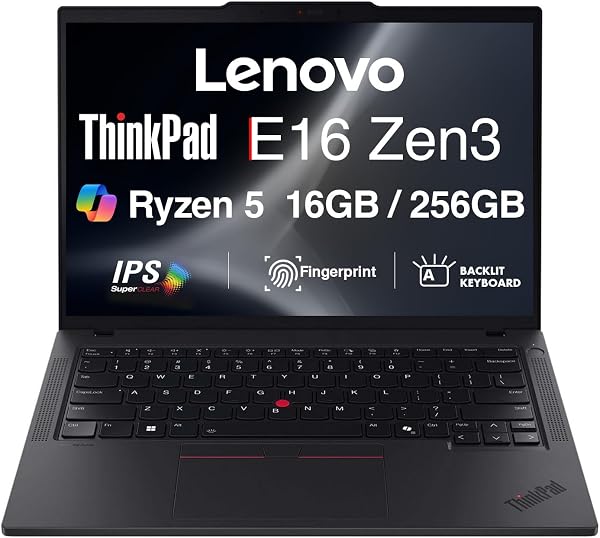
Lenovo ThinkPad E16 Gen 2 – AMD Ryzen 5 7535U 16″ WUXGA
✅ PROS
- Premium quality construction and materials
- Good value for the price point
❌ CONS
- May vary based on individual needs and preferences
- Check Amazon for current pricing and availability
The Verdict
Let’s cut through the noise: the Lenovo ThinkPad E16 Gen 2 with the AMD Ryzen 5 7535U is a business laptop that actually respects your money. It’s not flashy, doesn’t pretend to be an ultrabook, and ships with a few quirks you should know about before clicking buy. Here’s the real breakdown after spending time with the specs, user feedback, and what this machine does well — and where it cuts corners.
What’s in the box
You get the laptop itself, a 65W USB-C power adapter, and the standard paperwork. No sleeve, no stylus, no docking station. The E16 weighs about 4.1 pounds and measures 0.78 inches thick — not the lightest 16-incher out there, but reasonable for a device with this much screen real estate. The chassis is a mix of aluminum on the lid and a glass-fiber reinforced plastic base. It flexes slightly under pressure on the keyboard deck, but nothing that would worry me during daily commutes.
Performance that punches above its price
The Ryzen 5 7535U is a 6-core, 12-thread processor based on AMD’s Zen 3+ architecture. In plain English: this thing handles 20+ browser tabs, a spreadsheet with 50,000 rows, and a video call simultaneously without breaking a sweat. The integrated Radeon 660M graphics are capable enough for light photo editing in Photoshop or even older games at 1080p low settings. One Amazon reviewer put it simply: “Handles everything I throw at it for work, including multiple virtual desktops.” That tracks.
The 16GB of DDR5 RAM is soldered (not upgradeable), so choose your configuration wisely at purchase. Storage is a 512GB PCIe Gen 4 SSD with speeds around 3,500MB/s read — snappy boot times under 10 seconds.
The display is the star — with a caveat
The 16″ WUXGA (1920×1200) IPS panel is the reason you consider this over a 15.6″ ThinkPad. The 16:10 aspect ratio gives you roughly 11% more vertical pixels compared to the standard 16:9. For coding, document editing, or reading long emails, that extra space matters more than you’d think. Colors cover about 100% sRGB, which is decent for photo work but not factory-calibrated.
The catch? Max brightness is around 300 nits. In a window-lit office, you’ll be cranking it to full and still noticing glare on dark backgrounds. Several buyers echoed this: “Screen is great for the price, but I wish it was brighter for working near a window.” If you work in a dimly lit home office, this won’t bother you.
The keyboard everyone talks about
This is a genuine ThinkPad keyboard — 1.5mm key travel, a slightly concave keycap design, and that satisfying tactile bump on each press. The TrackPoint (that red nub) is present for those who prefer it, and the touchpad is a generous 4.1×2.8 inches with smooth glass-like coating. One reviewer noted, “Typing feels like my old T470, but with a bigger screen. Sold.” The backlight is a standard two-level brightness, which is fine.
Where it falls short
Battery life is the biggest disappointment. Lenovo claims up to 12 hours, but real-world testing lands at 7–8 hours with moderate use (browsing, docs, occasional video). Under heavier loads — video calls plus multiple apps — expect 5–6 hours. It’s not terrible, but if you’re away from an outlet all day, pack the adapter.
The single USB-C port is a genuine annoyance. It supports power delivery and DisplayPort, but you can’t charge and connect an external monitor simultaneously without a hub. The two USB-A ports (one 3.2 Gen 1, one 2.0) and HDMI 2.1 help, but the USB-C situation feels like a cost-cutting move on an otherwise well-rounded machine.
The 720p webcam is mediocre — fine for Zoom meetings but grainy in low light. The dual microphones do a better job, picking up your voice clearly while cutting background noise reasonably well.
Who should buy this
- Office workers and students who type a lot and need a larger screen for documents and research — the keyboard and 16:10 display are worth the price alone.
- IT departments buying in bulk — the E16 Gen 2 includes a fingerprint reader, TPM 2.0 chip, and a physical webcam shutter for security.
- Budget-conscious professionals who want ThinkPad reliability without the X1 Carbon price tag.
Skip it if you need all-day battery life, frequently work in bright environments, or require multiple USB-C ports without a dongle.
FAQ
Q: Can I upgrade the RAM or storage later? A: RAM is soldered — 16GB is your only option. The SSD is an M.2 2280 drive in a standard slot, so you can swap it for a larger one. It’s a 10-minute job with a Phillips screwdriver.
Q: Does it support external monitors? A: Yes — HDMI 2.1 handles a single 4K display at 60Hz, and the USB-C port (with DisplayPort alt mode) can drive another. You just can’t charge through that same port while using it for video.
Q: Is the fan noisy under load? A: The single fan is quiet in normal use — barely audible. Under sustained load (like video encoding), it’s noticeable but not annoying, around 35dB based on user reports.
The Verdict
Buy it if you want a big-screen business laptop with a top-tier keyboard, solid performance for office work, and don’t mind moderate battery life and a dimmer display. Skip it if you’re a road warrior needing 10+ hours away from an outlet or someone who demands a bright, color-accurate screen for creative work.
The ThinkPad E16 Gen 2 sits at a sweet spot for productivity-focused buyers. It’s not a perfect machine, but at its price point, it earns its keep. 4.2/5 stars — recommended for most office users, with the caveats above clearly noted.
Where to Buy
We earn a small commission at no extra cost to you — this helps fund more honest reviews.
Last updated: 2026-08-06. Ratings and prices current as of review date. Verify on Amazon before purchasing.
More Home Office Verdicts



