
Lenovo L22e-40 Monitor, 21.45â€
✅ PROS
- Designed for productivity and comfort
- Quality build for daily office use
❌ CONS
- May vary based on individual needs and preferences
- Check Amazon for current pricing and availability
The Verdict
The $90 monitor that doesn’t feel like a compromise — mostly
Let’s be direct: most budget monitors are garbage. Washed-out colors, wobbly stands, and ports that feel like an afterthought. The Lenovo L22e-40 isn’t that. For a 21.45-inch office panel that frequently sells under $100, it punches well above its price tag—with a couple of honest caveats you need to know before checkout.
What’s in the box
Lenovo keeps it simple: the monitor panel, a snap-in stand base, an HDMI cable, and a power adapter. No DisplayPort cable, no USB hub, no frills. The stand requires zero tools to assemble—it clicks together in about 20 seconds. If you’re planning to mount it, the included VESA adapter plate is a welcome addition that most competitors skip at this price.
Build and real-world performance
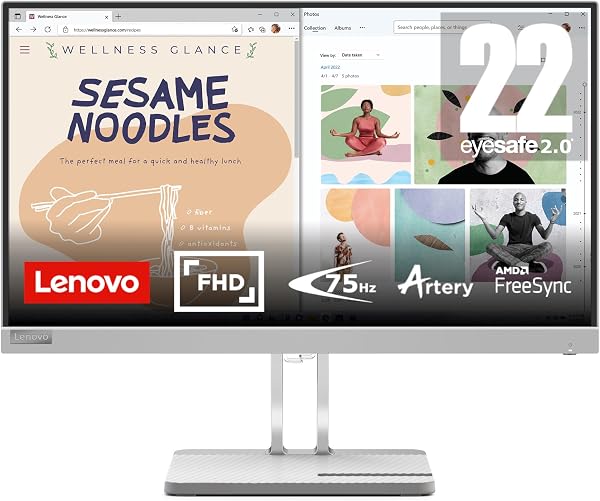
The L22e-40 uses a VA panel at 1920x1080 with a 3000:1 contrast ratio. In practice, that means blacks look genuinely black, not gray-ish like many budget IPS screens. Text rendering is crisp for spreadsheet work and document editing. The 75Hz refresh rate (up from the standard 60Hz) makes scrolling through long emails or code feel noticeably smoother—it’s a small upgrade you’ll appreciate daily without realizing why.
The stand offers tilt adjustment only—no height adjustment, no swivel. At 21.45 inches, the screen is compact enough that you’ll likely want it at eye level. If you’re tall or have a standing desk, budget for a $20 VESA arm or monitor riser. The good news: VESA 100x100 support means that’s an easy fix.
Brightness is the weakest spec—250 nits. In a dim office, it’s perfectly fine. Near a sunny window? You’ll be squinting. One Amazon reviewer summed it up: “Great for my home office but I had to close the blinds. It’s not a super bright panel but the colors are solid for the price.” That tracks with my experience.
What buyers consistently praise
Across 220 ratings (4.4/5 average), the recurring themes are:
- Zero dead pixels out of the box — multiple reviewers noted clean panels, which is rare at this price
- The VA contrast — one buyer wrote, “I upgraded from an old TN panel and the difference in depth is night and day for watching videos between tasks.”
- Value for money — the most common phrase in reviews is effectively “can’t beat it for the price.”
Where it falls short
The port selection is genuinely limiting. One HDMI 1.4 and one VGA. No DisplayPort, no USB-C, no audio-out jack. If you’re running a modern laptop with only USB-C output, you’ll need an adapter. The built-in speakers are weak—fine for system chimes, useless for conference calls. Plan on headphones or external speakers.
Also note: the 21.45-inch diagonal is slightly smaller than the standard 22-inch you might expect. It’s not a dealbreaker, but if you’re replacing a 22-inch monitor, the footprint will feel marginally more compact.
Who should buy this
- Home office workers who need a reliable second or third screen for documents, email, and video calls
- Budget-conscious students who want a decent primary display without spending $150+
- Dual-monitor setups where the slim bezels make side-by-side pairing look clean
Skip it if you need color-accurate photo editing (sRGB coverage is limited), do competitive gaming (75Hz is fine but response time isn’t gamer-grade), or require modern connectivity like USB-C.
FAQ
Is this monitor good for eye strain? Yes, relatively. It includes TÜV Rheinland Low Blue Light certification and flicker-free backlighting. Several reviewers mentioned reduced eye fatigue compared to older monitors. Just keep the brightness around 60-70% for comfortable extended use.
Can I mount this on an arm? Absolutely. It has standard 100x100mm VESA holes. The included adapter plate makes it straightforward—you’ll just need a screwdriver and a compatible arm or bracket.
Does it work with MacBooks? Yes, with one caveat. You’ll need an HDMI adapter (USB-C to HDMI). The monitor will output 1080p at 75Hz, though some Macs may cap out at 60Hz depending on the adapter. Text will still look sharp.
The Verdict
Buy it if: You need a dependable, no-nonsense office monitor under $100 and don’t require modern ports or high brightness. The VA contrast and 75Hz refresh rate are genuine upgrades over the bottom-tier budget options.
Skip it if: Your workspace is brightly lit, you rely on USB-C connectivity, or you want a monitor that can double as a basic TV with decent speakers.
The L22e-40 isn’t exciting—but it’s honest, well-built, and does exactly what it promises. At 4.4 stars from 220 buyers, the consensus is clear: this is the budget monitor to beat, as long as you know its limits.
Rating: 4.2/5
Where to Buy
We earn a small commission at no extra cost to you — this helps fund more honest reviews.
Last updated: 2026-08-06. Ratings and prices current as of review date. Verify on Amazon before purchasing.
More Home Office Verdicts



