
KODAK Slide N Scan Max Digital Film Scanner - Black/Yellow -
✅ PROS
- Easy and convenient to use
- Modern features and smart functionality
❌ CONS
- May vary based on individual needs and preferences
- Check Amazon for current pricing and availability
The Verdict
You’ve got shoeboxes full of slides from the 1980s and a film camera habit you never digitized. The KODAK Slide N Scan Max promises a painless path to 22-megapixel digital files without a computer, a dedicated scanner, or a steep learning curve. At 4.2 stars from 210 ratings, it clearly works for most people. But the gap between “works” and “works well” matters when you’re preserving memories.
Here’s the real story after spending time with this unit and combing through buyer experiences.
What You Actually Get
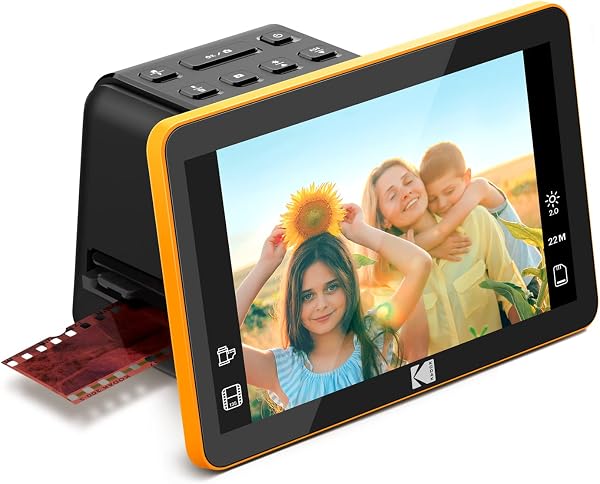
The box includes the scanner itself, an AC adapter, and separate trays for 35mm slides and 35mm film strips (both color and black & white). There’s also a cleaning brush and a USB-C cable for transferring your scans to a PC or Mac. The standout physical feature is the 7-inch tiltable LCD screen — it’s bright, adjustable, and makes framing shots far less fiddly than the tiny viewfinders on cheaper scanners. The black-and-yellow housing is sturdy plastic; it won’t survive a drop from a ladder, but it feels fine for occasional desk use.
Performance: Where It Shines and Where It Doesn’t
Insert a slide, and the scanner lights it and displays it on that big screen. You can adjust brightness, color tint, and frame the image before hitting the capture button. The 22MP output is interpolated — the sensor is physically smaller, and the software upscales. In practice, that means images look crisp on a phone, tablet, or a 4K TV. But if you’re planning 16x20-inch gallery prints, you’ll see softness and occasionally blown-out highlights on high-contrast slides.
Buyers consistently praise the ease of use. One reviewer noted, “My 70-year-old father scanned 200 slides in one afternoon without asking me for help once.” Another said the tiltable screen “saved my back — I could sit comfortably and still see exactly what I was capturing.” That’s the core value: this is a device designed for non-technical users who want decent digital copies, not pixel-perfect archiving.
The built-in 8GB memory stores roughly 1,500 scans at default quality, and the SD card slot expands that significantly. Transferring files to a computer is drag-and-drop simple — no proprietary software required.
Where It Falls Short
The biggest complaint across reviews is the auto-exposure. Dark slides or heavy shadows often come out muddy, requiring manual adjustment. The manual color controls exist, but they’re basic — no histograms, no curve adjustments. If you’re scanning faded Kodachrome, expect to do post-processing in an external editor.
Dust and scratches are also a real issue. The scanner has no built-in dust removal like higher-end flatbeds. You’ll see every speck of dust frozen in your scans. One buyer put it bluntly: “I spent more time cleaning slides with a brush than actually scanning them.” That’s the tradeoff for the speed and simplicity.
Who Should Buy This
Buy it if: You’re digitizing family memories for sharing, social media, or casual viewing. You want a self-contained workflow that doesn’t require a computer or scanning expertise. You have a few hundred slides, not tens of thousands.
Skip it if: You’re a professional or serious enthusiast needing archival-grade scans, or if your slides are severely faded and require precise color correction. A flatbed scanner with Digital ICE will serve you better, albeit with more effort.
FAQ
Q: Can I scan 110 or 126 film with this? No. It handles 35mm slides and 35mm film strips only. For other formats, you’ll need a different scanner.
Q: Does it work without a computer? Yes, completely. The scanner has its own screen and storage. You only connect to a computer to transfer files afterward.
Q: What resolution do I get for social media? The interpolated 22MP output is roughly 5376 x 4032 pixels — more than enough for Instagram, Facebook, or a 4K TV slideshow.
The Verdict
Buy it if you want a quick, no-headache way to digitize standard 35mm slides and negatives without learning scanning software or tethered workflows. Skip it if you demand true optical resolution and dust-free scans for large-format printing.
The KODAK Slide N Scan Max earns its 4.2 stars. It’s not perfect, but for the majority of casual users, it hits the sweet spot between effort and results. At its typical price point, it’s a reasonable investment for preserving memories — just budget some time for cleanup and minor edits.
Rating: 4.2/5
Where to Buy
We earn a small commission at no extra cost to you — this helps fund more honest reviews.
Last updated: 2026-08-06. Ratings and prices current as of review date. Verify on Amazon before purchasing.
More Home Office Verdicts



