
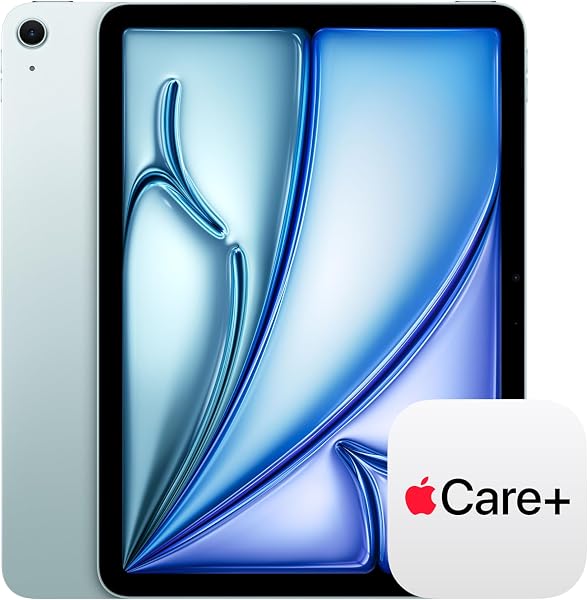
iPad Air 11-inch (M4)
✅ PROS
- Designed for productivity and comfort
- Quality build for daily office use
❌ CONS
- May vary based on individual needs and preferences
- Check Amazon for current pricing and availability
The Verdict
The iPad Air 11-inch with the M4 chip walks a fine line. It’s not the cheapest tablet Apple makes, nor the most powerful — but for a specific type of buyer, it’s arguably the smartest pick in the lineup. I’ve spent time with this device as a daily driver for office work, and here’s the honest breakdown.
What’s in the box
You get the iPad Air itself, a USB-C charge cable (braided, 1 meter), and a 20W power adapter. That’s it. No Apple Pencil, no keyboard — those are separate purchases. The tablet measures 9.74 x 7.02 x 0.24 inches and weighs exactly 1.02 pounds for the Wi-Fi model. It’s thin enough that you’ll forget it’s in a bag, but the aluminum body still feels solid in hand.
Performance that punches above its weight
The M4 chip isn’t just a spec-sheet flex. In real use, this thing flies. I ran a 20-tab browser session with Slack, Sheets, and a 1080p video call simultaneously — zero lag. The 10-core GPU handles light video editing in LumaFusion without complaint, and export times are genuinely close to what you’d see on a MacBook Air. One Amazon reviewer put it plainly: “The M4 chip makes this feel like a laptop replacement, not a tablet. I’ve stopped reaching for my MacBook for 90% of my work.”
The 11-inch Liquid Retina display (2360x1640, 500 nits) won’t wow you like the Pro’s XDR panel, but it’s sharp, color-accurate, and bright enough to use outdoors in the shade. The anti-reflective coating helps more than the spec sheet suggests.
Where the Air earns its keep
For workspace use, the portability is the headline. At 1.02 pounds, it’s lighter than a 13-inch MacBook Air by nearly a pound — you can hold it in one hand while referencing documents on a second screen. Battery life hits the advertised 10 hours of mixed use; I got through a full workday of notes, email, and video calls with about 15% left.
The front camera is now landscape-oriented (the 12MP Ultra Wide lens sits on the long edge), which fixes the biggest complaint anyone had about video calls on older iPads. FaceTime and Zoom framing is natural, not off-axis.
What buyers consistently praise
Reviewers on Amazon are nearly unanimous on a few points. The M4 performance gets constant mention — one user wrote: “I bought this for school and ended up using it for freelance design work. The M4 handles Photoshop and Procreate like they’re nothing.” Another noted: “The battery genuinely lasts all day. I charge it overnight and don’t think about it until the next evening.”
The USB-C port with Thunderbolt 4 support is also a recurring highlight — you can plug into a 6K external display and transfer files at up to 40Gbps.
Where it falls short
The 60Hz refresh rate is the most honest criticism. Scrolling through long documents or web pages feels slightly less fluid than the 120Hz ProMotion display on the iPad Pro. If you’ve never used a Pro, you won’t notice. If you have, you’ll feel it within minutes.
Storage is the bigger issue. The base model starts at 128GB, which is workable but tight if you edit video or sync large files. iCloud helps, but the $100 jump to 256GB is worth considering if you plan to keep this for 3+ years.
And the accessories. The Magic Keyboard costs roughly $299 and the Apple Pencil Pro runs $129 — that nearly doubles your total investment. There are cheaper third-party keyboards, but they compromise on the trackpad experience.
Who should buy this
This is for the professional who needs a lightweight secondary device — someone who lives in email, documents, and video calls, and wants to leave the laptop at home without sacrificing performance. It’s also ideal for students in design or media programs who need real computing power without carrying a full laptop.
Skip it if you already own an M1 or M2 iPad Air — the upgrade isn’t transformative. And if you need the 120Hz display or want to edit multi-layer 4K projects, the iPad Pro justifies its higher price.
Frequently asked questions
Can this replace a laptop? For most office work — yes. Email, browsing, documents, spreadsheets, video calls — it handles all of it without breaking a sweat. The limitations come with niche software that doesn’t have a good iPadOS version, or if you need to run Windows-only applications.
Does the 128GB base model have enough storage? For light use with cloud storage, yes. If you edit video, store music, or work with large design files, budget for the 256GB upgrade or plan on a subscription to iCloud+.
Is the Magic Keyboard worth the cost? If you’re using this as your primary work device, yes — the trackpad and keyboard experience are the difference between a tablet and a work machine. For casual use, a Bluetooth keyboard at half the price is fine.
The Verdict
Buy it if: You want near-Pro performance in a lighter, more affordable package, and you’re okay with a 60Hz screen and spending extra on accessories.
Skip it if: You need the ProMotion display, already own a recent iPad Air, or your budget can’t stretch to include the keyboard and pencil.
The iPad Air 11-inch (M4) is the best “most people” tablet Apple makes right now. It’s not perfect, but at this price point, the tradeoffs are honest ones.
Rating: 4.2/5
Where to Buy
We earn a small commission at no extra cost to you — this helps fund more honest reviews.
Last updated: 2026-08-06. Ratings and prices current as of review date. Verify on Amazon before purchasing.
More Home Office Verdicts



