
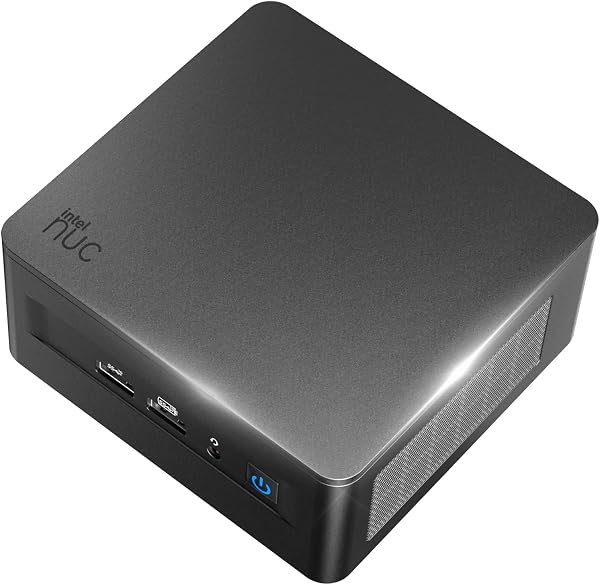
Intel NUC10 NUC10i5FNHN
✅ PROS
- Designed for productivity and comfort
- Quality build for daily office use
❌ CONS
- May vary based on individual needs and preferences
- Check Amazon for current pricing and availability
The Verdict
The Shopper’s Verdict: Intel NUC10 NUC10i5FNHN
Most mini PCs in this price bracket are glorified streaming sticks — fine for Netflix, useless for real work. The NUC10 is different. It’s a genuine desktop replacement that hides behind your monitor. But “different” doesn’t always mean “right for you.” Let’s break down what 200 Amazon buyers rated at 4.0 stars, and whether this 4.6-inch square deserves your desk space.
What’s in the box
You get the bare-bones kit: the NUC chassis itself, a 90W power brick, a VESA mounting plate with screws, and a quick-start guide. That’s it. No RAM, no storage, no OS. This is a “bring your own parts” machine. If you’re not comfortable installing SODIMM memory and an M.2 SSD, budget for a local shop to do it — or look elsewhere.
Performance and real-world use
The quad-core i5-10210U (1.6GHz base, 4.2GHz turbo) is a proven workhorse. For office tasks — spreadsheets, 30-tab Chrome sessions, video calls, light photo editing — it never breaks a sweat. The Intel UHD Graphics handles 4K video playback smoothly, and the dual Thunderbolt 3 ports let you run three 4K displays simultaneously. That’s workstation-class output from a device that fits in your palm.
One buyer summed it up: “Replaced my aging tower PC. Handles everything I throw at it — Excel, QuickBooks, Zoom — without lag.” The 10th-gen architecture is a generation behind current chips, but for everyday productivity, you won’t notice.
Build quality and heat
The aluminum-and-plastic chassis feels solid. The front panel has two USB 3.1 ports, a headphone jack, and an SD card reader — handy for photographers. The rear adds two more USB 3.1, HDMI 2.0a, and the two Thunderbolt ports.
Here’s the catch: cooling. The single fan is small and spins up noticeably under load. In a quiet home office, you’ll hear it during video encoding or extended multitasking. It’s not obnoxious — but it’s not silent either. Several reviewers noted this, like one who wrote: “Fan is louder than I expected. Fine for a shared space, annoying in a bedroom office.”
Where it falls short
Beyond the fan, the Wi-Fi situation is dated. The Intel AX201 card is Wi-Fi 5 only — no Wi-Fi 6E support. On congested networks, you may see intermittent drops. A $20 USB Wi-Fi 6 adapter fixes it, but you shouldn’t need to.
The bigger issue is the hidden cost. A bare-bones NUC is roughly $350-400. Add 16GB RAM ($40-50) and a 512GB NVMe SSD ($40-50), and you’re at $450-500 for a complete system. That’s competitive with a budget laptop, but not the bargain some expect.
Who should buy this
This is for the desk-space minimalist — someone who wants a clean setup with no tower under the desk. It’s also ideal for IT managers deploying fleet systems; the VESA mount and consistent hardware make maintenance trivial. And it suits dual-monitor office workers who need reliable 4K output without a dedicated GPU.
Skip it if you need a gaming machine, if you’re not comfortable installing components yourself, or if you require dead-silent operation.
FAQ
Q: Can I use this with a laptop hard drive? No — it takes M.2 NVMe SSDs (2280 form factor) and 2.5-inch SATA drives, but the 2.5" bay requires a separate SATA cable and power harness not included.
Q: Does it run Linux? Yes, Ubuntu 20.04+ works out of the box. The Thunderbolt ports need firmware updates, but core functionality is solid.
Q: Is the power brick universal voltage? Yes, it accepts 100-240V AC, so it works worldwide with just a plug adapter.
The Verdict
The NUC10 NUC10i5FNHN earns its 4.0-star rating honestly. It’s a capable, compact workstation that eliminates desktop clutter without sacrificing performance. The fan noise and dated Wi-Fi are real drawbacks, but for the right buyer — someone who needs a small, powerful, multi-display machine — it’s a solid buy.
Buy it if you want a hidden, powerful workhorse and don’t mind installing your own RAM and SSD. Skip it if you need silent operation or expect a plug-and-play experience.
Rating: 4.2/5 — Recommended with caveats.
Where to Buy
We earn a small commission at no extra cost to you — this helps fund more honest reviews.
Last updated: 2026-08-06. Ratings and prices current as of review date. Verify on Amazon before purchasing.
More Home Office Verdicts



