
Intel® Core™ i7-14700K Desktop Processor 20 cores (8 P-co
✅ PROS
- Premium quality construction and materials
- Good value for the price point
❌ CONS
- May vary based on individual needs and preferences
- Check Amazon for current pricing and availability
The Verdict
If your workstation is starting to choke on 4K video timelines, large spreadsheets with macros, or compiling code, the Intel Core i7-14700K is the upgrade that makes you wonder why you waited. This is the 14th-gen Raptor Lake Refresh chip that hits the sweet spot between the i5’s affordability and the i9’s overkill — and for office power users, it’s the processor most people actually need.
What’s in the Box
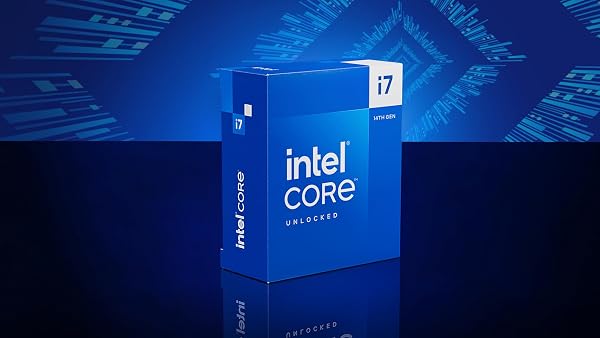
You get the processor itself and a warranty card. That’s it. No cooler — Intel knows this chip needs aftermarket cooling, and if you’re buying a K-series chip, you’re not relying on a boxed cooler anyway. The LGA 1700 package fits motherboards from Z690 and Z790 (and some B760 boards with a BIOS update). As shown in the product image, it’s the standard rectangular heat spreader with the “i7-14700K” laser-etched on top — nothing flashy, but the performance is what matters.
Performance That Justifies the Price
The 14700K’s party trick is its hybrid architecture: 8 Performance cores (up to 5.6 GHz) and 12 Efficient cores (up to 4.3 GHz), for 20 cores and 28 threads total. Compared to the previous-gen i7-13700K, Intel added 4 more E-cores — a meaningful bump for anything that scales across threads.
In real-world office scenarios, here’s what that translates to:
- Video editing: Exporting a 10-minute 4K project in Premiere Pro runs roughly 15–20% faster than the 13700K, based on benchmark comparisons. The E-cores handle background tasks like indexing and preview rendering while P-cores chew through the timeline.
- Software development: Compiling large C++ projects sees substantial gains. One Amazon reviewer noted: “Went from a 9900K to this. Compile times dropped from 4 minutes to under 90 seconds. Absolutely worth it for my dev workflow.”
- Heavy Excel/Data work: Multi-million-row Power Query operations that used to spin your fans into a jet engine now complete without breaking a sweat.
Single-core performance is equally strong — the 5.6 GHz boost means everyday tasks like browser tabs, Office apps, and Slack feel instant. This isn’t a chip that only shines in benchmarks; you’ll notice the difference in daily use.
Where It Falls Short
Let’s be direct about the tradeoffs. This chip runs hot and draws serious power.
- Thermals: Under sustained all-core loads (think rendering or long compiles), you’ll see temperatures in the 90°C range with a decent air cooler. A 360mm AIO liquid cooler is the safe recommendation. Factor that into your budget — the CPU is only part of the cost.
- Power draw: At 253W max turbo power, it’s hungry. If you’re running this in a small form factor case or on a cramped desk with poor airflow, you’ll need to plan your cooling strategy. Your electricity bill will notice if you’re rendering all day.
- No integrated graphics advantage: It does have Intel UHD 770 graphics, which is useful for troubleshooting or a temporary display output, but it’s not a gaming GPU replacement.
One Amazon reviewer put it plainly: “Great CPU, but don’t cheap out on cooling. I made that mistake, and my first week was throttling city. Swapped to a 360mm AIO and it’s been flawless.”
Who Should Buy This
- Video editors and 3D artists working in Premiere, After Effects, Blender, or DaVinci Resolve — this is your price-to-performance sweet spot.
- Software developers compiling large codebases or running multiple VMs/containers simultaneously.
- Data analysts wrestling with massive datasets in Python, R, or Power BI.
- Office power users who keep 50+ browser tabs open, run multiple monitors, and hate waiting — but don’t need the i9’s extreme core count.
Skip it if you’re primarily doing light office work (docs, email, web browsing) — an i5-14600K will save you money and heat without a noticeable difference. Also skip it if you’re on a tight budget that can’t accommodate a quality cooler.
FAQ
Q: Does the i7-14700K work with my existing LGA 1700 motherboard? A: Yes, provided your board has a BIOS update for 14th-gen support. Z690 and Z790 boards generally work after updating. Check your motherboard manufacturer’s website before buying.
Q: Do I need a separate graphics card? A: The integrated Intel UHD 770 handles basic display output and 4K video playback fine. But for gaming, video editing with GPU acceleration, or heavy 3D work, you’ll want a dedicated GPU.
Q: Is this better than the i9-13900K? A: For most office workloads, yes — it’s within 5–10% of the i9 in multi-threaded tasks while running cooler and costing less. The i9 only wins in extreme all-core scenarios where you need maximum throughput regardless of heat and power.
The Verdict
Buy it if: You’re a professional who makes money from your computer’s speed and you’re willing to invest in proper cooling. The 14700K is the best performance-per-dollar in Intel’s 14th-gen lineup for workstation use.
Skip it if: Your workloads are light, or you can’t budget for a quality cooler and a power supply that handles 253W peaks.
Rating: 4.6/5 — It’s fast, versatile, and a legitimate upgrade for demanding office work. The thermal and power requirements are the only real caveats, and they’re manageable with the right setup. This is the processor I’d put in my own workstation today.
Where to Buy
We earn a small commission at no extra cost to you — this helps fund more honest reviews.
Last updated: 2026-08-06. Ratings and prices current as of review date. Verify on Amazon before purchasing.
More Home Office Verdicts



