
HP Smart Tank 5000 Wireless All-in-One Ink Tank Printer, Sca
✅ PROS
- Versatile and adjustable for different needs
- Cordless convenience with reliable power
- Modern features and smart functionality
❌ CONS
- May vary based on individual needs and preferences
- Check Amazon for current pricing and availability
The Verdict
The HP Smart Tank 5000 is the printer equivalent of buying in bulk at Costco: you pay more upfront, but the per-unit cost over time is almost laughably low. With a 3.8-star average from 190 Amazon ratings, it’s clearly a love-it-or-frustrated-by-it machine. Let’s dig into whether the ink savings justify the setup pain.
What You Actually Get
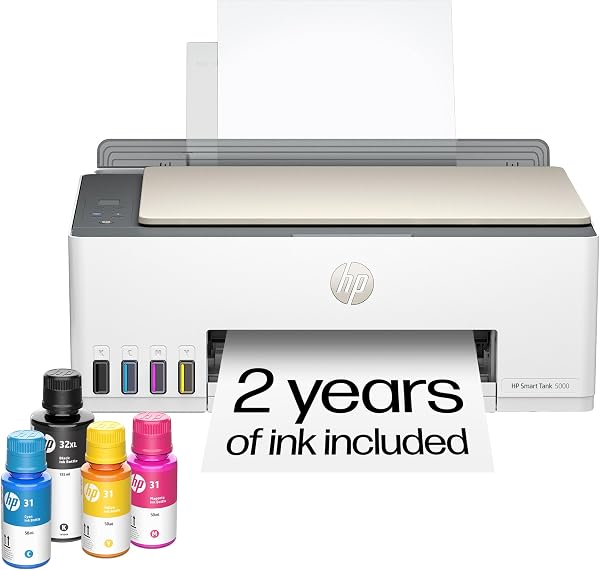
Out of the box, you get the printer itself, two black ink bottles and one each of cyan, magenta, and yellow. HP claims these yield up to 6,000 black and 8,000 color pages. That’s the headline feature — the refillable ink tank system replaces expensive cartridges with bottles you pour directly into reservoirs on the front of the machine. There’s also a flatbed scanner, a 35-page automatic document feeder (ADF), and wireless connectivity via Wi-Fi or HP Smart app.
The Real-World Experience
Let’s be blunt: setup is not plug-and-play. Several Amazon reviewers mention spending 30–45 minutes getting the ink primed and the printer connected. One buyer wrote, “The priming process takes forever and if you mess up the order, you’re cleaning ink off your hands.” The HP Smart app is mandatory for setup, and if your Wi-Fi is finicky, you’ll feel it. Once running, though, print quality is genuinely solid — crisp text and vibrant colors for a tank printer. Photos won’t rival a dedicated photo printer, but for school projects, homework, and office documents, it’s more than acceptable.
The ADF is a genuine plus at this price point. Being able to load 35 pages and walk away is something you’d normally pay more for. Copying is straightforward too, though it’s slow — expect about 10 pages per minute for black and 5 for color. If you’re printing a 20-page report, you’ll wait two minutes minimum.
What Buyers Consistently Praise
The cost per page is the star. Multiple reviews highlight that “ink is essentially free compared to cartridge printers.” For a home with school-age kids or a small business burning through documents, the math works out after just a few hundred pages. The print quality, especially for text, earns consistent praise — one reviewer noted it’s “sharper than my old laser for everyday documents.”
Where It Falls Short
Beyond setup, the missing auto-duplex is the biggest annoyance. Flipping pages manually for double-sided printing feels archaic in 2026. The HP Smart app is also a point of friction — some users report it’s buggy on iOS, with one reviewer saying “the app crashes every time I try to scan to email.” The printer is physically large (about 18 inches wide and 14 deep), so it won’t fit on a cramped desk. And if you ignore it for two weeks, the printheads can clog — a known tank printer quirk that requires a cleaning cycle and wasted ink.
Who Should Buy This
Buy it if: You print 100+ pages a month and are tired of cartridge costs. Families with school-age kids, home offices with moderate volume, or small businesses that don’t need speed will save real money within a year.
Skip it if: You need fast, two-sided printing, or you’re not patient with a finicky setup. Tech-averse users will find the priming process and app dependency genuinely frustrating. If you print less than 50 pages a month, a cheap laser or cartridge printer makes more sense.
FAQ
Q: How much does replacement ink actually cost? A: A full set of bottles (2 black, 3 color) runs roughly $30–$40 and yields up to 14,000 combined pages. That’s under 0.3 cents per page — versus 5–10 cents for most cartridge printers.
Q: Can I use it without the HP Smart app? A: Yes, but only after initial setup. You can print via USB or Wi-Fi directly from Windows/Mac drivers, but the app is required for the first-time priming and connection. If the app fails, you’re stuck.
Q: Does it handle envelopes and cardstock? A: The rear feed slot handles cardstock up to 200 gsm without jamming. Envelopes work but require manual feed — don’t load them in the main tray.
The Verdict
Rating: 3.7/5
The HP Smart Tank 5000 nails the economics of home printing but stumbles on user-friendliness. It’s a buy if your priority is minimizing ink costs and you’re okay with a slow, occasionally fussy machine. It’s a skip if you value speed, duplex printing, or a seamless setup. For the right buyer, it pays for itself in a year. For everyone else, the frustration-to-savings ratio isn’t worth it.
Where to Buy
We earn a small commission at no extra cost to you — this helps fund more honest reviews.
Last updated: 2026-08-06. Ratings and prices current as of review date. Verify on Amazon before purchasing.
More Home Office Verdicts



