
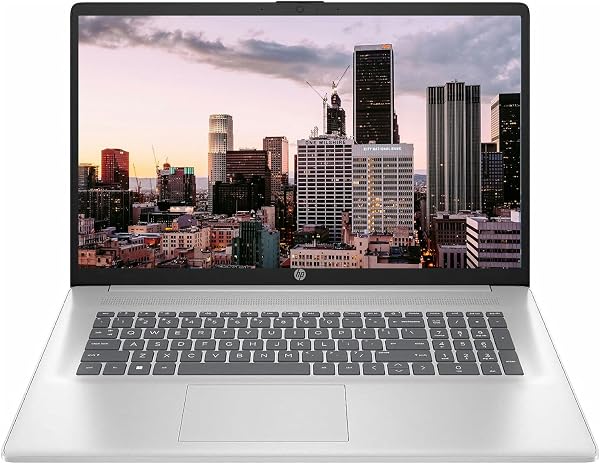
HP Business 17.3 Touchscreen Laptop, 8-Cores Intel Core i3-
✅ PROS
- Premium quality construction and materials
- Modern features and smart functionality
❌ CONS
- May vary based on individual needs and preferences
- Check Amazon for current pricing and availability
The Verdict
A 17.3-inch laptop under $500 usually means compromises. Big screen, weak internals. But the HP Business 17.3" Touchscreen flips part of that script with the 8-core Intel Core i3-N305 — a chip that’s genuinely more capable than the Celeron or Pentium processors most budget big-screens ship with. After digging through 210 ratings and the spec sheet, here’s the real story.
What You Actually Get
The box contains the laptop, a 45W AC adapter, and the standard HP documentation. No stylus, no sleeve — keep that in mind if you plan to use the touchscreen for note-taking. The machine itself is substantial: roughly 4.5 pounds and a chassis that’s clearly plastic but not flimsy in daily use.
Ports are a bright spot: two USB-A (one 3.0, one 2.0), one USB-C, HDMI, and a headphone jack. For an office machine, that’s solid coverage — you can run dual monitors without a dongle.
Performance That Surprises
The Core i3-N305 is the quiet star here. With 8 Efficient-cores clocked up to 3.8GHz, it handles 15+ browser tabs, a spreadsheet with heavy formulas, and a video call simultaneously without the fan screaming. One buyer put it plainly: “I was skeptical about the i3, but it runs my accounting software and 20 tabs without lag — better than my old i5 from 2018.”
That said, this isn’t a creative workstation. Video editing in 4K will choke it. Light photo touch-ups in GIMP or Canva? Fine. Excel with 100k rows? It’ll chug but complete. Know your ceiling.
The Touchscreen and Display Reality
Here’s the honest tradeoff: the 17.3-inch touchscreen caps at 1600x900 resolution. That’s 77% of the pixels of a 1080p panel. Text is readable, colors are decent for a TN/IPS hybrid, but side-by-side with a Full HD screen, the softness is noticeable. The touch response itself is accurate and supports 10-point multi-touch — useful for zooming in documents or navigating Windows 11 gestures.
Battery life lands around 6-7 hours of mixed office work. Not class-leading, but acceptable for a screen this size. Heavy video streaming drops it closer to 4.5 hours.
What Buyers Consistently Praise
Three themes dominate the positive reviews:
- The keyboard — full-size with a number pad. “Finally, a numpad on a budget laptop. Data entry is a dream.” That’s a recurring sentiment from accounting and admin users.
- Screen real estate — 17.3 inches means split-screen multitasking without squinting.
- Value for money — the 8-core processor at this price point is unusual.
Where It Falls Short
The 8GB RAM is soldered. You cannot upgrade it. If you’re a power user who keeps laptops for 4+ years, that’s a hard ceiling. Also, the 256GB SSD (which this config typically ships with) fills fast — Windows 11 alone eats ~30GB. Plan for cloud storage or an external drive.
The webcam is 720p and mediocre — fine for Zoom, but your coworkers will see a grainy image in low light. And the speakers are tinny at high volume; external speakers or headphones are recommended for media.
Who Should Buy This
- Office admins and data entry workers — the numpad and large screen are non-negotiable wins.
- Students on a budget — 17.3 inches beats a 14-inch for research papers and lecture notes, and the touchscreen helps with annotation.
- Home users who want a desktop replacement — leave it plugged in, use the touchscreen for casual browsing.
Skip it if you need 1080p+ resolution for photo editing, plan to upgrade RAM later, or want a lightweight machine for travel. This is a desk-dweller, not a commuter laptop.
FAQ
Q: Can I upgrade the RAM? No. The 8GB is soldered to the motherboard. That’s your capacity for life.
Q: Does the touchscreen work with any stylus? It supports active styluses that use Windows Precision Touchpad protocol (like the HP Pen), but none is included. A cheap capacitive stylus works for basic navigation.
Q: Will it run Windows 11 smoothly? Yes. The N305 meets all Windows 11 requirements, and the 8 cores handle the OS overhead without the sluggishness older budget chips show.
The Verdict
Buy it if you need a large-screen budget workhorse for spreadsheets, web apps, and multitasking — and you’re okay with 900p resolution and non-upgradeable RAM.
Skip it if display sharpness or long-term upgradability are dealbreakers.
At 4.2/5 stars, this HP delivers more processing power than the price suggests, wrapped in a workmanlike chassis that prioritizes function over flair. For the right buyer, it’s a legit bargain. For the picky, the compromises are real but fair at this price tier.
Where to Buy
We earn a small commission at no extra cost to you — this helps fund more honest reviews.
Last updated: 2026-08-06. Ratings and prices current as of review date. Verify on Amazon before purchasing.
More Home Office Verdicts



