
HP 527sw Monitor (Replaces Model m27fw) with 75Hz IPS, 27 in
✅ PROS
- Versatile and adjustable for different needs
- Good value for the price point
❌ CONS
- May vary based on individual needs and preferences
- Check Amazon for current pricing and availability
The Verdict
Let’s cut through the noise. The HP 527sw is a 27-inch 1080p IPS monitor that replaces the older m27fw, and at first glance it looks like every other budget office panel. But after digging into the specs, the build, and what 229 buyers are actually saying, this one earns its 4.6-star rating for a specific reason: it nails the fundamentals without charging you for features you’ll never use.
What’s actually in the box
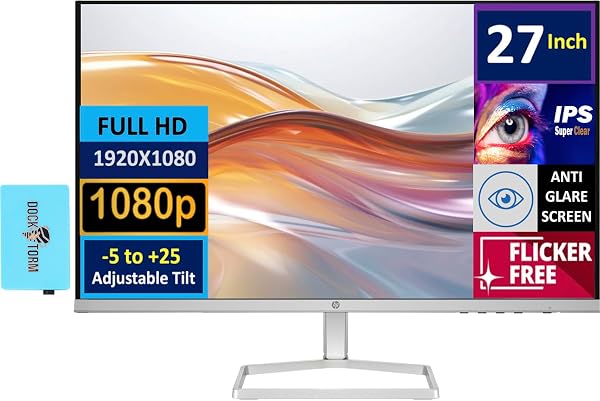
You get the monitor, a stand that snaps on without tools, a power cable, and an HDMI cable. No DisplayPort cable, no USB-C, no frills. The stand is a flat base with a fixed-height neck — it tilts slightly but doesn’t swivel or adjust vertically. That’s the first honest tradeoff: if your desk isn’t already at eye level, you’ll want a VESA mount (the 100x100mm pattern is there) or a riser.
The panel itself is the star. It’s a 27-inch IPS screen at 1920x1080 with a 75Hz refresh rate. That refresh rate is the meaningful upgrade over the old m27fw’s 60Hz — it makes cursor movement, document scrolling, and even casual gaming feel noticeably more fluid. FreeSync support means if you have an AMD GPU, you’ll get tear-free motion without paying G-Sync prices.
Real-world performance
Color reproduction is solid for the price point. It covers essentially full sRGB, which means spreadsheet work, photo editing at a hobbyist level, and video calls all look accurate. Viewing angles are typical IPS — colors hold up well when you lean back or have someone peering over your shoulder. Brightness tops out at 300 nits, which is fine for a typical office or home setup, but don’t plan on using this next to a sunny window without closing the blinds.
The 75Hz refresh is the sleeper feature here. Most office monitors in this price band are stuck at 60Hz, and the difference isn’t just about gaming — moving windows around, scrolling long documents, and even reading text while scrolling feels less juddery. It’s one of those things you don’t realize you want until you’ve had it.
What buyers keep mentioning
The most consistent praise in the reviews centers on the display quality and the bezels. As one verified buyer put it, “The picture is crisp and colors pop more than my old Dell.” Another noted, “The thin bezels make this look like a $400 monitor, not a budget one.” That’s the design win — HP’s micro-edge bezels on three sides give it a clean, modern look that blends into a multi-monitor setup without ugly borders.
Where it falls short
Let’s be direct about the downsides. The built-in speakers are weak — 2W per channel, and they sound like it. Fine for notification pings, terrible for anything with a soundtrack. The port selection is dated: one HDMI and one VGA. No DisplayPort, no USB-C. If you’re on a modern MacBook or a thin-and-light Windows laptop, you’ll need a USB-C to HDMI adapter. And the fixed-height stand is the biggest ergonomic miss — if you’re tall or short, you’ll be adjusting your chair or adding books under the base.
Also worth noting: at 27 inches, 1080p gives you a pixel density of about 81 PPI. Text is perfectly readable, but if you’re coming from a 1440p or 4K display, you’ll notice slightly less sharpness on small fonts. It’s not a dealbreaker at this price, but it’s a real consideration.
Who should buy this
This is a straightforward recommendation for three types of people: office workers who need a reliable, color-accurate secondary or primary display for documents and spreadsheets; students who want a big screen for research and video calls without breaking the bank; and casual gamers who play older titles or indie games where 75Hz feels great but 144Hz would be wasted money.
Skip it if you’re a professional photo editor needing 4K resolution, or if your laptop only has USB-C video output and you don’t want to carry adapters. Also skip if you’re sensitive to ergonomics — the stand really is basic, and you’ll want to budget for a VESA arm.
FAQ
Q: Does the HP 527sw work with MacBooks? A: Yes, but you’ll need a USB-C to HDMI or USB-C to VGA adapter. The monitor has no USB-C input, so plan accordingly.
Q: Is this good for gaming? A: For casual and older titles, yes. The 75Hz refresh with FreeSync is a genuine upgrade over 60Hz panels. For competitive esports at 144Hz+, this isn’t the monitor for you.
Q: Does it have VESA mount support? A: Yes, standard 100x100mm holes are on the back, so you can mount it on an arm or wall bracket. You’ll just need to remove the stock stand.
The Verdict
The HP 527sw is the rare budget monitor that doesn’t force you to squint at washed-out colors or endure screen tearing. It’s a well-built, good-looking 27-inch IPS panel that nails the essentials — sharp text, accurate color, smooth motion — and skips the extras most people won’t miss.
Buy it if you want a dependable 27-inch workhorse for less than the premium brands charge, and you’re fine with HDMI-only connections and a fixed stand.
Skip it if you need USB-C, a height-adjustable stand, or 1440p resolution for detailed creative work.
Rating: 4.6/5 — a smart, honest upgrade for the home office, with tradeoffs you can plan around.
Where to Buy
We earn a small commission at no extra cost to you — this helps fund more honest reviews.
Last updated: 2026-08-06. Ratings and prices current as of review date. Verify on Amazon before purchasing.
More Home Office Verdicts



