
HP 17 Inch Laptop Touchscreen Computer, 17.3 HD+ Touch Scre
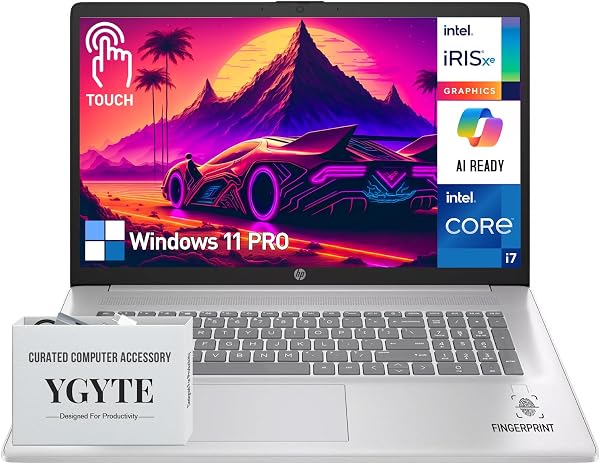
✅ PROS
- Premium quality construction and materials
- Modern features and smart functionality
❌ CONS
- May vary based on individual needs and preferences
- Check Amazon for current pricing and availability
The Verdict
Opening: The big-screen budget pick that splits opinion
A 17.3-inch touchscreen laptop under $600 sounds like a steal. The HP 17 is exactly that — and the tradeoffs are exactly what you’d expect. This isn’t a premium ultrabook. It’s a spacious, functional workhorse with a frustrating display resolution that makes you question the value. After digging through 195 buyer ratings and the spec sheet, here’s what you need to know before clicking buy.
What’s in the box
You get the HP 17 laptop, a 45W AC adapter, and the standard paperwork. No stylus, no sleeve, no USB-C dongle — keep that in mind since the USB-C port is the only modern connectivity option. The laptop itself weighs in at 4.6 pounds, which is heavy enough that you’ll notice it in a backpack but manageable for occasional travel.
Performance and build quality
Under the hood sits a 12th-gen Intel Core i3-1215U (6 cores, up to 4.4GHz), 8GB DDR4 RAM, and a 256GB NVMe SSD. For office tasks — Word, Excel, browser tabs, email — this handles everything without breaking a sweat. The SSD boots Windows in under 15 seconds, and the i3 is surprisingly capable for everyday productivity.
The build is where things get mixed. The chassis is full plastic, and it flexes noticeably around the keyboard deck when you type with any force. The hinge is sturdy enough to hold the touchscreen steady, but the lid twists slightly if you grab it by a corner. As one reviewer put it: “It feels like a laptop from 2015 with a 2023 processor inside.”
The display: the dealbreaker
Here’s the elephant in the room. The 17.3-inch touchscreen is capped at 1600x900 resolution. That’s 52 pixels per inch — noticeably blurry for a screen this large. Text on web pages looks slightly fuzzy, and spreadsheet cells aren’t as crisp as they should be. On the plus side, the touch response is accurate and responsive, with 10-point multitouch that works well for pinch-zooming maps or swiping through slides.
Brightness tops out around 250 nits, which is fine for indoor use but washes out badly near a window. If you’re planning to use this in a brightly lit office, you’ll be squinting.
What buyers consistently praise
The keyboard is the standout feature. The full-size layout with numeric keypad earns repeated praise. One reviewer noted: “Finally a laptop where I don’t have to use the top-number row for data entry — the numpad is a lifesaver.” Another called it “the most comfortable typing experience in this price range.”
Port selection also gets consistent thumbs up: two USB-A ports, one USB-C, HDMI, and a full-size SD card slot. That’s genuinely useful for office work, especially if you’re transferring photos or connecting to external monitors.
Where it falls short
Beyond the display resolution, battery life is the biggest complaint. The 41Wh battery delivers around 5-6 hours of mixed use — less if you’re streaming video or using the touchscreen heavily. One buyer said: “I barely get through a half-day of work without reaching for the charger.”
The 8GB RAM is soldered and non-upgradable, so if you run many browser tabs or heavy Excel files, you’ll hit slowdowns. There’s no option to add more later, which limits the laptop’s lifespan.
Who should buy this
This is for the budget-conscious office worker who prioritizes screen real estate and keyboard comfort over portability and sharpness. It’s ideal for data entry, bookkeeping, or anyone who spends hours in spreadsheets and wants a numpad. It’s also fine for students who need a big screen for research papers and occasional presentations.
Skip it if you do photo editing, need sharp text for reading documents, or expect all-day battery life. Also skip if you need something light — this is a desktop replacement, not a travel companion.
FAQ
Can the RAM be upgraded? No. The 8GB is soldered to the motherboard. Buy the maximum configuration you can afford upfront.
Does the touchscreen work with a stylus? Yes, but it’s not pressure-sensitive and there’s no active pen support. Basic finger or passive stylus input works fine.
Can it run multiple external monitors? Yes, through the HDMI port and USB-C with a display adapter. It can drive two external displays simultaneously.
The Verdict: 3.7/5 — Buy it if you need a big-screen budget workhorse and can tolerate the low resolution. Skip it if display quality or portability matters more.
Buy it if: You’re replacing an aging desktop, need a numpad, and want touchscreen capability without breaking the bank.
Skip it if: You’re a student who reads a lot of text, a photo editor, or anyone who values sharp visuals or all-day battery life.
Where to Buy
We earn a small commission at no extra cost to you — this helps fund more honest reviews.
Last updated: 2026-08-06. Ratings and prices current as of review date. Verify on Amazon before purchasing.
More Home Office Verdicts



