
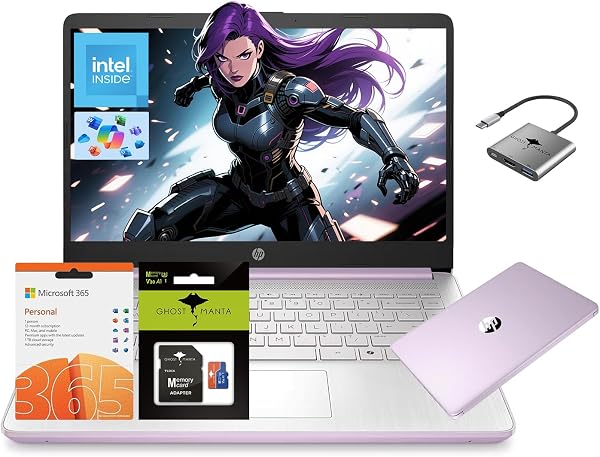
HP 14 Laptop Stream Ultral Light for Students and Business,
✅ PROS
- Modern features and smart functionality
- Good value for the price point
❌ CONS
- May vary based on individual needs and preferences
- Check Amazon for current pricing and availability
The Verdict
The Short Version
The HP Stream 14 is the laptop equivalent of a commuter car: unglamorous, limited, but gets you from point A to point B without breaking the bank. At this price point, you’re not buying power — you’re buying portability and basic functionality for cloud-based work. For the right user, it’s genuinely useful. For anyone expecting a full Windows experience, it will frustrate.
What You Actually Get
The box contains the laptop itself, a 45W AC adapter, and the standard HP paperwork. No stylus, no sleeve, no surprises. The unit weighs roughly 3.2 pounds and measures about 0.7 inches thick — genuinely light and thin enough to toss in a backpack without noticing it’s there. The 14-inch HD display (1366x768) is the spec sheet’s weakest link, but at this price, that’s expected. You’re getting 4GB of RAM and 64GB of eMMC storage, which is the real bottleneck for most users.
Performance: The Honest Truth
The Intel Celeron N4120 processor (the “Ultral Light” in the name refers to the chassis, not the workload) handles basic tasks — web browsing, Google Docs, streaming video — without drama. Boot times hover around 15-20 seconds, and waking from sleep is nearly instant. But open more than a handful of browser tabs, and you’ll feel the slowdown. The 4GB RAM is the limiting factor here; Windows 11 Home in S Mode eats a significant chunk of it just sitting idle.
One buyer put it plainly: “It’s fine for schoolwork and YouTube, but don’t expect to run Photoshop or have 30 tabs open.” That’s accurate. The eMMC storage (64GB) fills up fast — after Windows updates and a few apps, you’re looking at roughly 30GB of usable space. Plan on relying heavily on cloud storage.
What Buyers Consistently Praise
The battery life is the standout feature. Most users report 8-10 hours of real-world use, which means it survives a full school day without a charger. One reviewer noted: “I used it for a full day of classes and still had 30% left.” The keyboard is also surprisingly comfortable for a budget machine — decent travel and no flex. And the port selection (two USB-A, one USB-C, HDMI, microSD) covers the basics well for the price.
Where It Falls Short
The display is the biggest compromise. The 1366x768 resolution is noticeably soft, and the TN panel’s viewing angles are poor — tilt it slightly and colors wash out. It’s also dim, making outdoor use difficult. The speakers are similarly underwhelming: tinny and quiet, fine for a YouTube video, frustrating for anything else.
Windows 11 S Mode adds another layer of friction. You’re restricted to Microsoft Store apps unless you switch out of S Mode (which is free but requires a Microsoft account and a permanent switch). This catches some users off guard. And the 64GB storage means you’ll be managing space constantly — uninstalling, clearing caches, and relying on OneDrive.
Who Should Buy This
This is the right laptop for three specific buyers:
- The budget-conscious student whose workload is browser-based — Google Classroom, Canvas, Docs, email. It handles these flawlessly.
- The second-laptop user who needs something light for travel and already owns a primary machine for heavy lifting.
- The cloud-first user who lives in Google Workspace or Microsoft 365 and doesn’t need local software.
Skip it if you need to run desktop applications, edit video, or do any kind of coding beyond basic web development. Also skip it if you’re not comfortable managing limited storage.
FAQ
Can I upgrade the RAM or storage? No. Both are soldered. The microSD slot is your only expansion option, and it’s not suitable for running applications.
Is it good for Zoom calls? The webcam is 720p and adequate for classes or meetings in good lighting. The microphone is acceptable but picks up background noise. It works, but don’t expect crisp video.
Does it come with Office? Yes, a one-year subscription to Microsoft 365 Personal is included, which adds 1TB of OneDrive storage — partially offsetting the limited local storage.
The Verdict: 3.7/5 Stars
Buy it if you’re a student or light user who needs an ultra-portable, long-battery laptop for cloud-based work and understands its limitations. The price-to-portability ratio is genuinely strong, and the battery life alone justifies the purchase for many.
Skip it if you need real processing power, a quality display, or local storage. This is a tool with a narrow, specific job — and it does that job well. Expecting more will lead to disappointment.
It’s not the laptop I’d recommend to everyone, but for the right buyer, it’s a smart, honest value.
More Home Office Verdicts



