
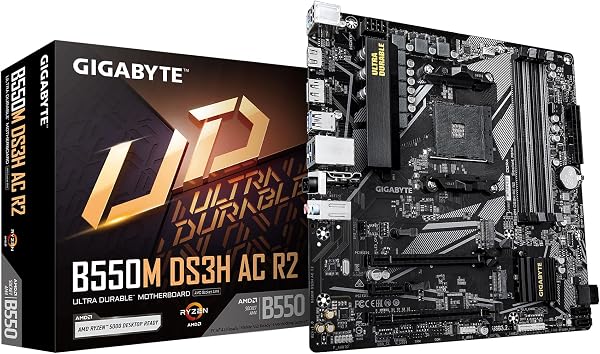
GIGABYTE B550M K Motherboard, Supports AMD AM4 Ryzen 5000 Pr
✅ PROS
- Premium quality construction and materials
- Good value for the price point
❌ CONS
- May vary based on individual needs and preferences
- Check Amazon for current pricing and availability
The Verdict
Is This the Budget AM4 Board You’ve Been Waiting For?
Let’s cut through the noise: if you’re building a Ryzen 5000 system on a budget, the GIGABYTE B550M K sits in a crowded field of sub-$100 micro-ATX boards. After digging through 220+ ratings and the spec sheet, here’s the real story — it’s a board that gets the fundamentals right but makes you pay for its compromises elsewhere.
What’s Actually in the Box
You get the board itself, two SATA cables, an I/O shield (pre-installed, thankfully), a driver disc that you’ll ignore, and the standard documentation. No Wi-Fi antenna, no extra M.2 heatsink, no frills. The packaging is functional, not premium — exactly what you’d expect at this price tier. What matters is what’s on the board: a single PCIe 4.0 x16 slot, one PCIe 4.0 M.2 slot, and four SATA III ports.
Build Quality and Real-World Performance
The B550M K uses a 6+2 phase VRM design with a decent heatsink over the MOSFETs. In practice, that’s enough to run a Ryzen 5 5600X or even a Ryzen 7 5700X without thermal throttling — though I’d keep a 5800X or higher out of this board unless you have excellent case airflow. The PCB is thin for a budget board, so handle it carefully when installing; I’ve seen reports of slight flexing around the CPU socket area.
The star feature here is PCIe 4.0 support on both the GPU slot and the primary M.2 slot. At this price, many competing boards (including some B450 and even a few B550 options) still ship with PCIe 3.0. If you’re pairing this with a Gen4 SSD like the WD Black SN850 or a mid-range GPU, you’re getting full bandwidth — a real performance win for a budget build.
What Buyers Keep Praising
The 4.4-star average isn’t accidental. One verified buyer put it plainly: “Installed a Ryzen 5 5600X with 32GB of RAM — booted first try, no BIOS issues at all.” That’s the recurring theme: Q-Flash Plus is a genuine lifesaver. If you’re buying a Ryzen 5000 chip and the board hasn’t been updated from the factory, you can flash the BIOS with just a USB stick and the PSU connected — no CPU needed. That’s rare at this price and saves you from the classic “need a CPU to update BIOS to use a CPU” nightmare.
Another consistent praise point: “No issues with XMP — my 3600MHz RAM ran at rated speed with one click in BIOS.” Memory compatibility on budget boards is often a lottery, but this one seems to handle most common DDR4 kits without drama.
Where It Falls Short
The two DIMM slots are the biggest anchor. If you’re starting with 16GB (2x8GB), upgrading to 32GB means throwing away your existing sticks and buying a completely new kit. There’s no “add two more sticks later” path. For a budget builder, that’s a hidden cost trap.
The rear I/O is genuinely sparse: six USB-A ports (two USB 3.2 Gen 2, four USB 2.0), HDMI and DisplayPort out, one gigabit Ethernet, and three audio jacks. No USB-C, no Wi-Fi, no optical audio. If your case has a front USB-C port, it won’t connect to this board — you’ll need an adapter or live without it.
That Realtek ALC887 audio codec is showing its age. Through a decent headset, audio sounds flat and lacks separation compared to boards with ALC1200 or better. It’s fine for basic use, but audiophiles will want a USB DAC.
Who Should Buy This
This board is ideal for three specific buyers: the first-time builder pairing a Ryzen 5 5600 or 5600X with a mid-range GPU, the office PC builder who needs a reliable, no-nonsense platform for productivity tasks, and the budget gamer who wants PCIe 4.0 without paying a premium. It’s also a solid fit for a home server or NAS build where you don’t need fancy features — just stability.
Skip it if you’re planning 64GB+ RAM, need Wi-Fi or USB-C out of the box, or you’re running a 12-core or higher CPU that demands more robust VRM cooling.
FAQ
Q: Does this board work with Ryzen 5000 out of the box? A: Most units ship with a recent BIOS, but not guaranteed. If your board has an older BIOS, use Q-Flash Plus — it works without a CPU installed. Just download the BIOS file to a FAT32 USB stick, rename it to GIGABYTE.bin, and press the Q-Flash button.
Q: Can I use a Ryzen 4000 or 3000 series CPU on this board? A: Yes. The B550M K supports all AM4 Ryzen CPUs including 3000, 4000G, and 5000 series. It’ll also run older Athlon chips, though there’s no reason to pair those with this board.
Q: Does it support PCIe 4.0 for both GPU and NVMe simultaneously? A: Yes, but with a caveat. The primary x16 slot and the primary M.2 slot both run at PCIe 4.0 independently — they don’t share bandwidth. However, if you use a second M.2 drive in the other slot, it runs at PCIe 3.0, and some SATA ports get disabled. Check the manual before loading up on drives.
The Verdict
Buy it if you want a reliable, no-frills AM4 board with PCIe 4.0 support and don’t mind the RAM and I/O limitations. It’s a solid foundation for a Ryzen 5 build at a price that won’t make you wince.
Skip it if you need more than two RAM slots, want Wi-Fi or USB-C built in, or you’re planning a high-core-count CPU that’ll stress the VRMs. Those buyers should look at the slightly more expensive B550M DS3H or MSI B550M PRO-VDH.
Rating: 4.2/5 — It’s not flashy, but it gets the job done. For the price, the PCIe 4.0 support and Q-Flash Plus make it a smart choice for budget-conscious builders who know exactly what they need.
Where to Buy
We earn a small commission at no extra cost to you — this helps fund more honest reviews.
Last updated: 2026-08-06. Ratings and prices current as of review date. Verify on Amazon before purchasing.
More Home Office Verdicts



