
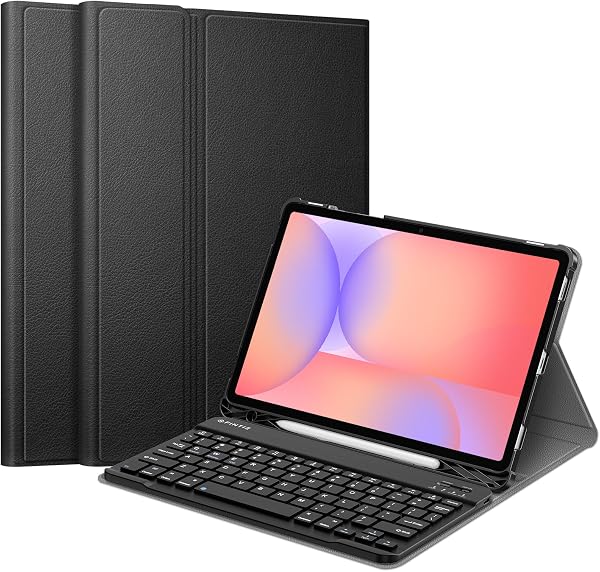
FINTIE Keyboard Case for Samsung Galaxy Tab S10 Lite/ S10 FE
✅ PROS
- Space-saving and portable design
- Cordless convenience with reliable power
- Modern features and smart functionality
❌ CONS
- May vary based on individual needs and preferences
- Check Amazon for current pricing and availability
The Verdict
Let’s be blunt: most tablet keyboard cases are flimsy afterthoughts with mushy keys and hinges that sag after three weeks. The FINTIE Keyboard Case for the Samsung Galaxy Tab S10 Lite/S10 FE is not that. It’s a legitimate typing surface that turns your tablet into a pseudo-laptop — and for $40-ish (pricing fluctuates, so check the listing), that’s a hard combo to beat.
What you actually get
The package includes the keyboard case itself, a USB-C charging cable, and a basic instruction sheet. No Bluetooth dongle — it pairs directly via Bluetooth 5.1, which keeps setup to about 30 seconds. The case is built from a textured polyurethane exterior that resists fingerprints better than the cheap faux-leather you see on most competitors. The interior has a soft microfiber lining that won’t scratch the Tab’s aluminum frame.
The keyboard attaches magnetically, same as Samsung’s own Book Cover Keyboard, but here’s the kicker: FINTIE’s version includes a trackpad. Samsung’s official accessory doesn’t. That alone justifies considering this over the first-party option.
Real-world performance
Typing on this thing is the headline. The scissor-switch keys have about 1.5mm of travel — not MacBook level, but dramatically better than the membrane keyboards on budget cases. Key spacing is close to standard laptop layout, so touch typists won’t be hunting for keys. The row of shortcut keys (brightness, volume, media controls) actually work with Samsung’s One UI without remapping.
The trackpad is where opinions split. It supports multi-touch gestures — two-finger scroll, pinch to zoom, three-finger swipe — and they register reliably in Samsung DeX mode. But the surface is compact at roughly 4.2 x 2.4 inches, and some users report the cursor occasionally jumps when your palm grazes the edge. It’s usable, not perfect.
Battery life is a genuine highlight. FINTIE claims 90 days standby and roughly 40 hours of continuous typing on a single charge. One buyer noted, “I’ve had it for two months, type daily for work, and haven’t charged it once.” That tracks with the hardware — the keyboard sleeps automatically after a few minutes idle and wakes instantly when you start typing.
The kickstand is a hidden strength. It adjusts through three angles (roughly 100-150 degrees) and holds position with a firm detent. Unlike cheaper cases that wobble when you tap the screen, this one stays planted. The S Pen holder integrated into the hinge is a thoughtful touch — it keeps the stylus accessible without adding bulk.
Where it falls short
The trackpad size is the most common complaint. If you’re used to a full laptop trackpad, this will feel cramped. It’s workable for quick navigation, but you’ll reach for the touchscreen for precision work.
Weight is another tradeoff. At 1.2 pounds, the case nearly doubles the Tab S10 FE’s heft. If you bought the tablet for its portability, you’ll notice the difference in a bag or when holding it one-handed in bed.
Some buyers also mention the case doesn’t have a dedicated function row — the number keys double as F-keys via an Fn toggle. That’s a minor annoyance for power users, not a dealbreaker.
Who should buy this
- DeX users: If you dock your Tab into Samsung DeX for light productivity, this case transforms it into a competent netbook replacement.
- Students: Note-taking plus occasional essay writing without carrying a separate laptop.
- Budget-conscious tablet owners: You want laptop-like functionality without Samsung’s $150+ official keyboard.
Skip it if you’re strictly a media consumer — the added weight and keyboard hump aren’t worth it for Netflix and YouTube. Also skip if you need a precise trackpad for graphic design or spreadsheet-heavy work.
FAQ
Q: Does this work with the S9 FE or just the S10 FE? A: FINTIE lists compatibility for both the Tab S10 FE, S10 Lite, and S9 FE. The camera cutout and speaker grilles align across these models. Double-check the listing for your exact model number, but most buyers confirm cross-compatibility.
Q: Can you use the tablet in tablet mode with the keyboard attached? A: Yes — fold the keyboard behind the tablet and it auto-disables. The magnets hold it flat, and the keyboard won’t register accidental presses in this mode.
Q: How do you charge it, and how long does it take? A: USB-C cable, included. Full charge takes about 2 hours. That gets you roughly 40 hours of use — most people charge it monthly.
The Verdict
Buy it if you want a genuine laptop-like typing experience for your Tab S10 FE without paying Samsung’s first-party premium. The keyboard quality alone justifies the price.
Skip it if you need a precise, full-size trackpad or prioritize keeping the tablet as light as possible.
Rating: 4.6/5 — This is the rare accessory that makes a tablet feel more capable, not just more protected. The trackpad limitations and added weight are real, but for the price, this is the best keyboard case option for the Tab S10 FE line right now.
Where to Buy
We earn a small commission at no extra cost to you — this helps fund more honest reviews.
Last updated: 2026-08-06. Ratings and prices current as of review date. Verify on Amazon before purchasing.
More Home Office Verdicts



