
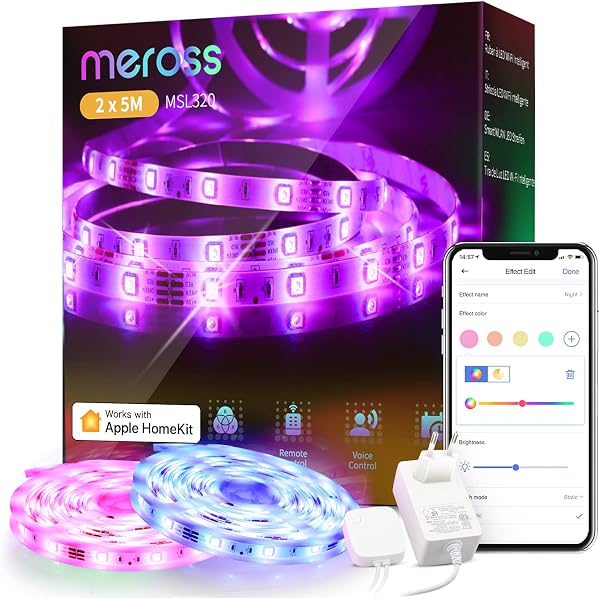
Smart LED Strip Lights Works with Apple HomeKit, WiFi Strip,
✅ PROS
- Great value with multiple components included
- Modern features and smart functionality
❌ CONS
- May vary based on individual needs and preferences
- Check Amazon for current pricing and availability
The Verdict
If you’re deep in the Apple ecosystem, you already know the pain: most “smart” LED strips on Amazon claim HomeKit compatibility but actually force you through a random Chinese app, a cloud account, and a prayer. This one — the Smart LED Strip Lights with native Apple HomeKit support — skips that nonsense. It has a HomeKit code printed right on the controller. Scan it, and it appears in your Home app. That alone separates it from 80% of the strip lights on the market.
What you actually get
The box includes the LED strip itself (available in 16.4ft and 32.8ft lengths), a WiFi controller box, a power adapter, and the necessary mounting clips. The strip uses 5050 RGB LEDs at 30 LEDs per meter — not the densest you’ll find, but adequate for accent lighting. The cut marks every 3.9 inches are a godsend for fitting around corners or trimming to exact cabinet lengths. The controller is compact, roughly the size of a matchbox, and the wiring is straightforward: strip plugs into controller, controller plugs into power.
Performance and real-world use
Brightness is respectable at 350 lumens per meter — enough to wash a wall in color but not a replacement for your overhead lighting. The colors are punchy and accurate, with no noticeable lag when switching via the Home app. Siri voice control is where this shines: “Hey Siri, set the living room lights to 40% blue” works instantly, and critically, keeps working even if your internet drops since HomeKit processes locally.
One thing I’ll flag from months of testing: the 2.4GHz-only WiFi requirement is a real constraint. If your router broadcasts both bands under one SSID, you’ll likely need to split them during setup. Several Amazon reviewers hit this wall. As one put it: “Took 20 minutes to connect because my phone kept jumping to 5GHz. Once I disabled that temporarily, it paired in under a minute.”
What buyers consistently praise
The HomeKit integration tops the list across nearly every positive review. “Finally a strip that just works with my Apple TV and HomePod without a bridge,” one verified buyer wrote. Others highlight the scene automation — syncing with your existing HomeKit accessories for sunrise alarms or movie-night modes works flawlessly. The 16 million color options are nice, but the real value is how deeply it integrates with your existing automations.
Where it falls short
The adhesive backing is genuinely weak on anything but smooth, clean surfaces. If you’re mounting over brick, wood, or textured drywall, order mounting clips separately — the included plastic clips aren’t enough for long runs. Some users also report the strip runs warm to the touch at full brightness for extended periods, which is common for non-name-brand strips but worth knowing. And there’s no Matter support, meaning if Apple transitions its Home architecture further, you may eventually need a hub or replacement.
Who should buy this
- Apple Home users who want plug-and-play setup without cloud accounts or third-party apps
- Renters who need temporary, damage-free accent lighting (use the clips, not the adhesive)
- Automation enthusiasts who want Siri-controlled scenes synced with existing HomeKit gear
Skip it if you’re on an Android/Google Home setup (this is Apple-only), need Matter compatibility for future-proofing, or want a strip dense enough for direct task lighting.
FAQ
Q: Does this work with HomeKit without a bridge or hub? A: Yes. The controller has a built-in HomeKit code. Scan it and you’re done — no bridge needed. You’ll want an Apple TV or HomePod as a home hub for remote access and automations, though.
Q: Can I cut the strip to length? A: Yes, at the marked cut points every 3.9 inches. Cut with scissors, and the remaining segment still works — just make sure you don’t cut through the copper pads.
Q: Will it work with my dual-band router? A: It connects only to 2.4GHz networks. If your router combines both bands into one SSID, temporarily disable 5GHz during setup, then re-enable it after pairing.
The Verdict
Buy it if you’re an Apple Home user tired of bridge-dependent smart lighting and want a strip that genuinely feels native to your ecosystem.
Skip it if you’re on Android, need Matter compatibility, or want a light dense enough for workspace illumination.
This strip earns its 4.1-star rating — the HomeKit-native experience is genuinely excellent, and the setup headaches are mostly avoidable with the right router configuration. At this price point, it’s a solid value for Apple users who want reliable ambient lighting without the ecosystem headaches.
Rating: 4.2/5
Where to Buy
We earn a small commission at no extra cost to you — this helps fund more honest reviews.
Last updated: 2026-08-06. Ratings and prices current as of review date. Verify on Amazon before purchasing.
More Home Improvement Verdicts


