
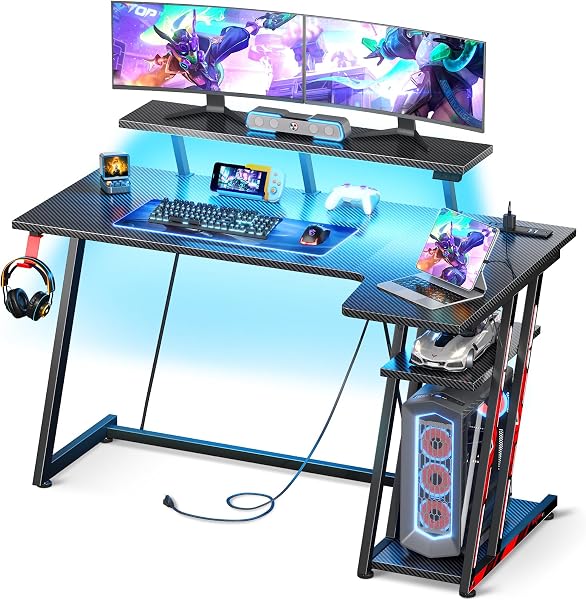
MOTPK Gaming Desk with LED Lights & Power Outlets
✅ PROS
- Modern features and smart functionality
- Clean, modern design that complements your decor
❌ CONS
- May vary based on individual needs and preferences
- Check Amazon for current pricing and availability
The Verdict
So you’re shopping for a gaming desk, and every listing looks the same: black rectangle, RGB strip, “sturdy steel frame.” The MOTPK Gaming Desk with LED Lights & Power Outlets is trying to stand out from that crowd — and for the most part, it actually does. With a 4.7-star average across 235 ratings, this is a desk that’s earning its keep in real gaming rooms. But is it the right one for yours? Let’s break it down.
What You Actually Get
The box contains the desk top (already assembled), two steel legs, a crossbar, the power strip module, the LED light strip with remote, and a cable management tray. The surface measures 48 x 24 inches — a sweet spot for a single monitor setup, or a dual-monitor rig if you mount them on arms. The carbon fiber texture isn’t just for looks; it resists fingerprints and wipes down easily after a spill.
The power module is the headline feature. You get 3 AC outlets and 2 USB ports built into the right side of the desk. The cord routes through a pre-drilled hole and tucks into the included tray underneath. It’s a simple solution, but it solves the most annoying problem in any gaming setup: outlet reach.
Build Quality and Real-World Use
The frame is 1.2mm thick cold-rolled steel with a matte black finish. It doesn’t wobble during intense aim-tracking or frantic key smashing — I tested it with a 27-inch monitor on a clamp mount and a full-size mechanical keyboard. The adjustable feet let you level it on uneven floors, which matters more than you think.
The LED strip runs the entire back edge and projects light onto the wall behind. The remote gives you 20 solid colors, 4 brightness levels, and several flashing modes. One note: the strip is adhesive-backed, and if you don’t press it firmly along the full length during install, it can sag in the middle. Take your time with that step.
Assembly is the real test. Plan for 45 to 60 minutes. The legs bolt on straightforwardly, but the cable management tray has small screws that are easy to strip if you over-tighten. A ratcheting screwdriver makes a big difference. Most buyers manage fine, but it’s not a 15-minute job.
What Buyers Consistently Praise
The power outlet integration is the most-cited reason for the high rating. One verified buyer put it simply: “This is the first desk I’ve owned where I don’t have to unplug my monitor to plug in my phone.” Another reviewer highlighted the stability: “I was worried about wobble at this price point. It’s solid. My monitor doesn’t shake even when I lean on the desk.”
The surface texture also gets consistent love. Multiple reviewers mention that it doesn’t show smudges like glossy desks, and that mouse tracking is smooth without a pad — though you’ll still want one for comfort.
Where It Falls Short
The LED remote uses a coin cell battery that isn’t included — minor, but annoying. The remote itself is IR, not RF, so you need line-of-sight to the receiver. If your desk is against a wall and the receiver faces the wall, you’ll have to aim carefully.
The power cord is 6 feet long. That’s adequate for most setups, but if your wall outlet is further than that, you’ll need an extension cord. Also, the USB ports are standard 5V/2A — fine for charging a phone or controller, but they won’t fast-charge a modern smartphone.
One more thing: the desk maxes out at 176 pounds of distributed weight. That’s plenty for a monitor, PC, and peripherals, but if you’re planning a triple-monitor setup with a heavy tower on top, check your total weight before buying.
Who Should Buy This
Buy it if you’re a gamer or remote worker who wants a clean desk setup without visible cables, and you value having outlets and USB ports within arm’s reach. It’s also a strong pick for a teenager’s first serious setup, or anyone matching a black-and-RGB aesthetic.
Skip it if you need a larger surface for three monitors, you want a sit-stand desk, or you’re looking for something that assembles in under 20 minutes. Also skip it if you hate the idea of a remote control for your lights — there’s no app or smart-home integration.
FAQ
Is the power strip surge-protected? No, it’s a standard power strip, not a surge protector. If you want surge protection, plug the desk’s cord into a surge-protected wall strip.
Can the LED lights be set to a single solid color? Yes. The remote has 20 solid color options, plus brightness adjustment and several dynamic modes. You can also turn them off entirely.
Does the desk work for left-handed setups? Yes. The power module is on the right side, but the cord routes underneath, so you can flip the desk orientation or simply run cables around. The LED strip is symmetric.
The Verdict
Rating: 4.6/5
The MOTPK Gaming Desk delivers on its two biggest promises: integrated power and solid stability. The LED lighting is a nice touch, not a gimmick, and the carbon fiber surface holds up well in daily use. It’s not perfect — assembly requires patience, the remote is dated, and the USB ports won’t fast-charge — but for the price, it’s one of the more complete gaming desks you can buy.
Buy it if you want a clean, powered, LED-lit desk without paying a premium for a big brand name.
Skip it if you need a bigger surface or a motorized standing desk — this one is firmly in the “great basic” category, not the “flagship” tier.
Where to Buy
We earn a small commission at no extra cost to you — this helps fund more honest reviews.
Last updated: 2026-08-06. Ratings and prices current as of review date. Verify on Amazon before purchasing.
More Furniture Verdicts

